Windows 7 Forums Search
Welcome to Windows 7 Forums. Our forum is dedicated to helping you find solutions with any problems, errors or issues you are experiencing with Windows 7. The Windows 7 forum also covers news and updates and has an extensive Windows 7 tutorial section that covers a wide range of tips and tricks.


Windows 7 - Need a high contrast skin for Win7

 
02-04-2012   #1
whs


Vista and Windows7, sometimes Ubuntu and Fedora


Need a high contrast skin for Win7

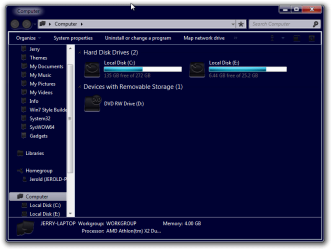
In Ubuntu I have that nifty skin (see pic) which helps a lot with my poor eyesight. Does anybody know how I could finagle something similar for Windows 7.

I know that there is a high contrat option in Ease of Access. But that is not really nice and it is black which I hate.

Attached Thumbnails
Need a high contrast skin for Win7-2012-02-04_1634.png  
My System SpecsSystem Spec
02-04-2012   #2


Windows 7 Ultimate 64bit SP1


Hi Wolfgang

Did you tried this?

Control Panel\Personalization....
Attached Thumbnails
Need a high contrast skin for Win7-panais.png  
My System SpecsSystem Spec
02-04-2012   #3


Windows 7 Ultimate x86/Ubuntu


Press ALT, SHIFT, and PrtScr at the same time. Select Yes to the popup that opens.

The Alt and Shift will only work if you press the Left one.

Or just go to Control Panel/Personalisation look panias said.

If you don't have the High Contrast Themes, download the Attachment I included and extract it into a Empty Folder on your Desktop. Then head over to C:\Windows\Resources\Themes\Ease of Access Themes and place it in there.

If you do not have Ease of Access Themes inside, you can create it.
Attached Files
File Type: zip High Contrast Themes.zip (5.7 KB, 11 views)
My System SpecsSystem Spec
.


02-04-2012   #4
whs


Vista and Windows7, sometimes Ubuntu and Fedora


Thanks guys. This is all good stuff. But how do I get a blue background in lieu of black.
My System SpecsSystem Spec
02-04-2012   #5


Windows 7 Ultimate x86/Ubuntu


You would probably need to use Vista Style Builder to accomplish that or Restorator/Resource Hacker. Alternatively change the settings on your actual Monitor or enter your Graphics Card Settings. Or even modify the display settings from the Control Panel itself.
My System SpecsSystem Spec
02-04-2012   #6
whs


Vista and Windows7, sometimes Ubuntu and Fedora


Quote   Quote: Originally Posted by Infinite View Post
You would probably need to use Vista Style Builder to accomplish that or Restorator/Resource Hacker. Alternatively change the settings on your actual Monitor or enter your Graphics Card Settings. Or even modify the display settings from the Control Panel itself.
Thanks Infinite. I hate to use external programs for stuff like that. They always have some downsides. Playing with the graphics card settings may be difficult. I have already played with it to change the contrast, hue and brightness. But that changes everything - even my videos and desktop pictures.
My System SpecsSystem Spec
02-04-2012   #7
whs


Vista and Windows7, sometimes Ubuntu and Fedora


There is hope. I have played around a bit. Still need to fine tune it and get that blue writing changed to another color.
Attached Thumbnails
Need a high contrast skin for Win7-2012-02-04_1830_001.png   Need a high contrast skin for Win7-2012-02-04_1833.png   Need a high contrast skin for Win7-2012-02-04_1830.png  
My System SpecsSystem Spec
02-04-2012   #8


Windows 7 Ultimate x86/Ubuntu


Quote   Quote: Originally Posted by whs View Post
There is hope. I have played around a bit. Still need to fine tune it and get that blue writing changed to another color.
Did you use Style Builder to do that?
My System SpecsSystem Spec
02-04-2012   #9
whs


Vista and Windows7, sometimes Ubuntu and Fedora


No. I just used what is in desktop properties. But there are so many parameters you can change that I got dizzy.
My System SpecsSystem Spec
02-04-2012   #10


Windows 7 Ultimate 64bit (Build 7600)


Have a word with Bongo (aka. Jerry ... the gentle giant with the big beard ), he's really good at customising this kind of thing
My System SpecsSystem Spec
Reply

 Need a high contrast skin for Win7 problems?


Thread Tools


Similar Threads for: Need a high contrast skin for Win7
Thread Forum
High Contrast #2 problem with fonts Themes and Styles
Old CRT monitor, blurry when contrast is too high. Hardware & Devices
High Contrast Won't Turn OFF Customization
High Contrast Black Theme Themes and Styles
Dark/High Contrast Settings Customization


All times are GMT -5. The time now is 10:50 PM.


Windows 7 Forums is an independent web site and has not been authorized,
sponsored, or otherwise approved by Microsoft Corporation.
"Windows 7" and related materials are trademarks of Microsoft Corp.
© Designer Media Ltd
  

1 2 3 4 5 6 7 8 9 10 11 12 13 14 15 16 17 18 19 20 21 22 23 24 25 26 27 28 29 30