

Sorry I know the title is pretty poopy bad but I just can't sum this all up!
I have followed these instructions and installed the patches: https://www.sevenforums.com/tutorials/28377-theme-how-apply-custom-themes.html
this is the theme I am trying to install: https://mangosango.deviantart.com/journal/AMANA-sup2-is-Released-288599818?#/d4rtdfc
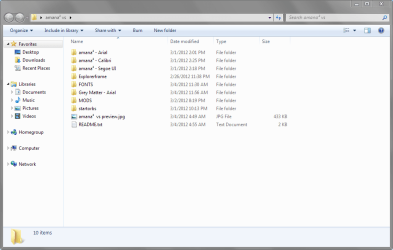
Please see attached image for content of folder. I have intalled thepatches and retstarted and then navigated to the Windows/Recources/Themese folder, but I'm not sure which files to place in it. I do know the theme comes in multiple mods and fonts. I was hoping someone more experienced with this could help me out
update: i have made some progress and was able to partially change things but the start orb wont change and things dont really look as they should. Maybe I am getting some combination wrong? I'm not sure what to do with the MODS, Startorbs,Explorerframe,Grey Matter folders?
second update: okay, i figured out the start orb, there was a program than changes it in the folder. Still not sure about the other stuff.
I have followed these instructions and installed the patches: https://www.sevenforums.com/tutorials/28377-theme-how-apply-custom-themes.html
this is the theme I am trying to install: https://mangosango.deviantart.com/journal/AMANA-sup2-is-Released-288599818?#/d4rtdfc
Please see attached image for content of folder. I have intalled thepatches and retstarted and then navigated to the Windows/Recources/Themese folder, but I'm not sure which files to place in it. I do know the theme comes in multiple mods and fonts. I was hoping someone more experienced with this could help me out
update: i have made some progress and was able to partially change things but the start orb wont change and things dont really look as they should. Maybe I am getting some combination wrong? I'm not sure what to do with the MODS, Startorbs,Explorerframe,Grey Matter folders?
second update: okay, i figured out the start orb, there was a program than changes it in the folder. Still not sure about the other stuff.
Attachments
My Computer
At a glance
7 Ultimate 64 bit Service Pack 1Intel Core 2 Duo P9500 @ 2.53GHz (lower watta...4.0GB Dual-Channel DDR 2 @ 398MHz (5-5-5-18)512MB GeForce 9600M GT
- Computer Manufacturer/Model Number
- Sager NP2096
- OS
- 7 Ultimate 64 bit Service Pack 1
- CPU
- Intel Core 2 Duo P9500 @ 2.53GHz (lower wattage chip)
- Motherboard
- JHL 90 (U2E1)
- Memory
- 4.0GB Dual-Channel DDR 2 @ 398MHz (5-5-5-18)
- Graphics Card(s)
- 512MB GeForce 9600M GT
- Sound Card
- Realtek High Definition Audio
- Monitor(s) Displays
- Generic PnP Monitor
- Screen Resolution
- 1680x1050
- Hard Drives
- Hitachi 244GB @ 7200rpm (IDE)
- Cooling
- nature
- Keyboard
- generic
- Mouse
- Microsoft Wireless Mobile Mouse 3500
- Internet Speed
- 30 megabits down, 5 megabits up
- Other Info
- 1.)Staples 4-Port USB 2.0 Mobile Hub
2.)WNDR3700 - NETGEAR RangeMax Dual Band Wireless-N Gigabit Router
3.)Logitech Webcam C250
4.)Logitech M570


