JavaScript is disabled. For a better experience, please enable JavaScript in your browser before proceeding.
You are using an out of date browser. It may not display this or other websites correctly.
You should upgrade or use an
alternative browser .
Solved I need change something in theme....
Hello everyone!
I need help with this (screenshot below) in " Server OS X " theme. It looks like there is a problem with margin or maybe small icons... I don't know, I can't find it in W7 Style Builder to fix that
Here is a screenshot
Link for theme (Sever OS X - deviantart):
Browsing deviantART
Thanks for your help & sorry for English
I hope you understand what I mean (from screenshot)
Windows 7 Ultimate 32bit
Jerry ☮ 1956-2019 R.I.P.
VIP
SF Team
Welcome to the Seven Forums
Win 7 Pro x64 / Win 10 Pro Intel(R) Core(TM) i7-3630QM CPU @ 2.40GHz 12 GB (1) Intel(R) HD Graphics 4000 (2) NVIDIA GeFo... Laptop Sager NP9170 Win 7 Pro x64 / Win 10 Pro Intel(R) Core(TM) i7-3630QM CPU @ 2.40GHz CLEVO P170EM 12 GB (1) Intel(R) HD Graphics 4000 (2) NVIDIA GeForce GTX 675M (1) Realtek High Definition Audio (2) Intel(R) Display Aud 17.3 1920x1080 (1) Samsung 860 EVO 500GB(OS) (1) Samsung 860 EVO 500GB(Data) Backlite MSE, Malwarebytes Pro Firefox DESKTOP: Custom-built.
New member
Thread Starter
Adobe Photoshop CS6
//And when I try to switch to other themes it looks good, but when I using Seven OS X it always do that .
Windows 7 Ultimate 32bit
Jerry ☮ 1956-2019 R.I.P.
VIP
SF Team
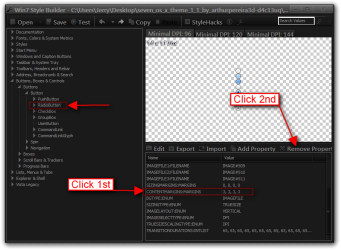
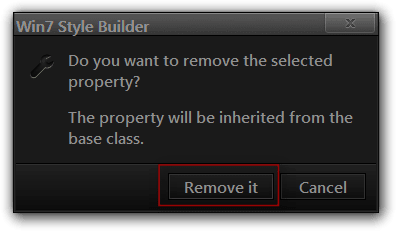
Go to Buttons, Boxes & Controls > Buttons > Button > RadioButton and remove CONTENTMARGINS:MARGINS properties.
Jerry
Win 7 Pro x64 / Win 10 Pro Intel(R) Core(TM) i7-3630QM CPU @ 2.40GHz 12 GB (1) Intel(R) HD Graphics 4000 (2) NVIDIA GeFo... Laptop Sager NP9170 Win 7 Pro x64 / Win 10 Pro Intel(R) Core(TM) i7-3630QM CPU @ 2.40GHz CLEVO P170EM 12 GB (1) Intel(R) HD Graphics 4000 (2) NVIDIA GeForce GTX 675M (1) Realtek High Definition Audio (2) Intel(R) Display Aud 17.3 1920x1080 (1) Samsung 860 EVO 500GB(OS) (1) Samsung 860 EVO 500GB(Data) Backlite MSE, Malwarebytes Pro Firefox DESKTOP: Custom-built.
New member
Thread Starter
Thank you very much! I thought it was margin, but I didnt know where is it
I appreciate your help, thank you again
Windows 7 Ultimate 32bit
Jerry ☮ 1956-2019 R.I.P.
VIP
SF Team
You're welcome
Win 7 Pro x64 / Win 10 Pro Intel(R) Core(TM) i7-3630QM CPU @ 2.40GHz 12 GB (1) Intel(R) HD Graphics 4000 (2) NVIDIA GeFo... Laptop Sager NP9170 Win 7 Pro x64 / Win 10 Pro Intel(R) Core(TM) i7-3630QM CPU @ 2.40GHz CLEVO P170EM 12 GB (1) Intel(R) HD Graphics 4000 (2) NVIDIA GeForce GTX 675M (1) Realtek High Definition Audio (2) Intel(R) Display Aud 17.3 1920x1080 (1) Samsung 860 EVO 500GB(OS) (1) Samsung 860 EVO 500GB(Data) Backlite MSE, Malwarebytes Pro Firefox DESKTOP: Custom-built.