Making a Win7 theme, need help with something

alphamode

New member
Hey everyone, Im currently trying to make a windows 7 theme and I've ran into a slight problem. Is there any way to disable certain parts of Aero without disabling all of it? the idea i have for my them is to make the bar with the close, minimize, and restore (not sure if it has a name) a solid color, but i want the start bar to remain transparent. So basically im wondering if there is a way i can disable transparency on just the one bar or if there is a way i can make the start bar transparent again if i switch to basic.

Thanks for any help anyone can give. -alpha
 

My Computer

OS
Windows 7 Ultimate x64
Welcome to the Seven Forums

You would probably need a custom theme to do what you want, by coloring just the top frame where the buttons are then you would have a solid color by the buttons and still be able to make the task bar transparent.
If you are using the default aero theme I can change that for you, using Windows Style Builder and post it here in a zip folder.
If you are using a custom theme you will need to ask the theme maker. It's not cool to change someone else work.
&
This will be a custom theme and you will need to do 1 of these 2 ways of Enabling custom themes for it to work.
http://www.sevenforums.com/tutorials/34579-enabling-custom-themes-windows-7-a.html
Or
http://www.sevenforums.com/tutorials/28377-theme-how-apply-custom-themes.html?filter
What color would you like the top frame to be? Do you want the active and inactive frames the same color or a different color?
Let me know.
Jerry
 

My Computer

Computer type
Laptop
Computer Manufacturer/Model Number
Sager NP9170
OS
Win 7 Pro x64 / Win 10 Pro
CPU
Intel(R) Core(TM) i7-3630QM CPU @ 2.40GHz
Motherboard
CLEVO P170EM
Memory
12 GB
Graphics Card(s)
(1) Intel(R) HD Graphics 4000 (2) NVIDIA GeForce GTX 675M
Sound Card
(1) Realtek High Definition Audio (2) Intel(R) Display Aud
Monitor(s) Displays
17.3
Screen Resolution
1920x1080
Hard Drives
(1) Samsung 860 EVO 500GB(OS) (1) Samsung 860 EVO 500GB(Data)
Keyboard
Backlite
Antivirus
MSE, Malwarebytes Pro
Browser
Firefox
Other Info
DESKTOP: Custom-built.
OS: Win 10 Pro x64.
CASE: Rosewill R5.
CPU: Intel I5 4670K CPU @ 3.40GHz.
CPU COOLER: Cool Master Hyper 212 EVO.
MOTHERBOARD: Asus Z87-A.
MEMORY: Kingston HyperX 2x4 GB.
GPU: Nvidia Geforce 650 TI.
PSU: Corsair TX750.
DRIVES: (1) Samsung 840 120 GB SSD (2) Western Digital blue 500 GB 7200 RPM.
Ive already patched my system files to allow custom themes, wish i knew about uxstyle beforehand then i wouldnt have needed to modify the system files but too late now. I am actually starting my theme from scratch using the default Windows 7 Aero theme, and the only thing ive actual made so far is the start orb so it would be awesome if you could edit that and post it here for me, the color im going for is a off white/bone white, which seems to be R: 250 G: 250 B:250 on the rgb. not too sure the hex code for it, and if possible i would like the active and inactive windows to be the same color. Is there a tutorial or chart somewhere that lists what each category corresponds to in Windows 7 style builder? Ar first glance i wasnt sure where to go to edit what. Oh and do you know of a way to edit the colors that show up on mouse over of the close, mini, and restore buttons?

Thanks for the help -alpha

PS: sorry for the long post man
 

My Computer

OS
Windows 7 Ultimate x64
Is there a tutorial or chart somewhere that lists what each category corresponds to in Windows 7 style builder?
Yes Complete Guide to Theme Building

Oh and do you know of a way to edit the colors that show up on mouse over of the close, mini, and restore buttons?
Yes what color do you want?
In WSB it's at
Windows and Caption Buttons > Aero > Dwm Window > Glows > CloseButton and
Windows and Caption Buttons > Aero > Dwm Window > Glows > Restore/Maximize Button and
Windows and Caption Buttons > Aero > Dwm Window > Glows > Small CloseButton

Jerry
 

My Computer

Computer type
Laptop
Computer Manufacturer/Model Number
Sager NP9170
OS
Win 7 Pro x64 / Win 10 Pro
CPU
Intel(R) Core(TM) i7-3630QM CPU @ 2.40GHz
Motherboard
CLEVO P170EM
Memory
12 GB
Graphics Card(s)
(1) Intel(R) HD Graphics 4000 (2) NVIDIA GeForce GTX 675M
Sound Card
(1) Realtek High Definition Audio (2) Intel(R) Display Aud
Monitor(s) Displays
17.3
Screen Resolution
1920x1080
Hard Drives
(1) Samsung 860 EVO 500GB(OS) (1) Samsung 860 EVO 500GB(Data)
Keyboard
Backlite
Antivirus
MSE, Malwarebytes Pro
Browser
Firefox
Other Info
DESKTOP: Custom-built.
OS: Win 10 Pro x64.
CASE: Rosewill R5.
CPU: Intel I5 4670K CPU @ 3.40GHz.
CPU COOLER: Cool Master Hyper 212 EVO.
MOTHERBOARD: Asus Z87-A.
MEMORY: Kingston HyperX 2x4 GB.
GPU: Nvidia Geforce 650 TI.
PSU: Corsair TX750.
DRIVES: (1) Samsung 840 120 GB SSD (2) Western Digital blue 500 GB 7200 RPM.
Yes what color do you want?

Do you mean what color i want the top frame? if so its RGB 250, if you mean what color do i want the mouse over color, im not intirely sure yet, possibly no color at all if possible
thanks again -alpha
 

My Computer

OS
Windows 7 Ultimate x64
I meant the mouse over for the closed minimize maximize buttons I went ahead and removed the outer glow for those buttons hopefully that's what it was that you wanted.
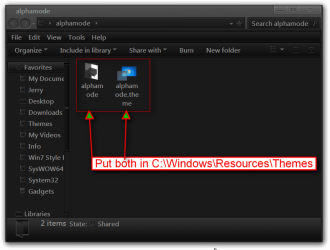
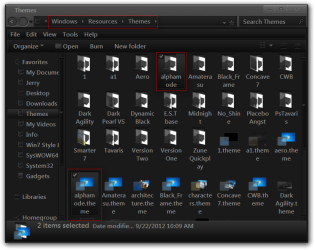
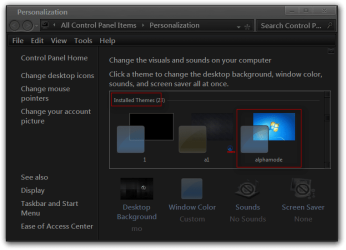
Give this a test and see how it looks to you, download and extract the zip folder to your desktop, then put both 1 alphamode theme folder and 1 alphamode.theme file in C:\Windows\Resources\Themes, it should show up in Personalization as alphamode under Installed Themes.
alphamode.png
Themes.png
Personalization.png

Let me know what you think of it.
Jerry
 

Attachments

My Computer

Computer type
Laptop
Computer Manufacturer/Model Number
Sager NP9170
OS
Win 7 Pro x64 / Win 10 Pro
CPU
Intel(R) Core(TM) i7-3630QM CPU @ 2.40GHz
Motherboard
CLEVO P170EM
Memory
12 GB
Graphics Card(s)
(1) Intel(R) HD Graphics 4000 (2) NVIDIA GeForce GTX 675M
Sound Card
(1) Realtek High Definition Audio (2) Intel(R) Display Aud
Monitor(s) Displays
17.3
Screen Resolution
1920x1080
Hard Drives
(1) Samsung 860 EVO 500GB(OS) (1) Samsung 860 EVO 500GB(Data)
Keyboard
Backlite
Antivirus
MSE, Malwarebytes Pro
Browser
Firefox
Other Info
DESKTOP: Custom-built.
OS: Win 10 Pro x64.
CASE: Rosewill R5.
CPU: Intel I5 4670K CPU @ 3.40GHz.
CPU COOLER: Cool Master Hyper 212 EVO.
MOTHERBOARD: Asus Z87-A.
MEMORY: Kingston HyperX 2x4 GB.
GPU: Nvidia Geforce 650 TI.
PSU: Corsair TX750.
DRIVES: (1) Samsung 840 120 GB SSD (2) Western Digital blue 500 GB 7200 RPM.
yeah this is exactly what I wanted, thanks man. Also do you know how to change the corner of windows to not be rounded off any more? o want them to be pointed and square. -alpha
 

My Computer

OS
Windows 7 Ultimate x64
yeah this is exactly what I wanted, thanks man. Also do you know how to change the corner of windows to not be rounded off any more? o want them to be pointed and square. -alpha
You're Welcome
Do you want just the top or both top and bottom squared?

Jerry
 

My Computer

Computer type
Laptop
Computer Manufacturer/Model Number
Sager NP9170
OS
Win 7 Pro x64 / Win 10 Pro
CPU
Intel(R) Core(TM) i7-3630QM CPU @ 2.40GHz
Motherboard
CLEVO P170EM
Memory
12 GB
Graphics Card(s)
(1) Intel(R) HD Graphics 4000 (2) NVIDIA GeForce GTX 675M
Sound Card
(1) Realtek High Definition Audio (2) Intel(R) Display Aud
Monitor(s) Displays
17.3
Screen Resolution
1920x1080
Hard Drives
(1) Samsung 860 EVO 500GB(OS) (1) Samsung 860 EVO 500GB(Data)
Keyboard
Backlite
Antivirus
MSE, Malwarebytes Pro
Browser
Firefox
Other Info
DESKTOP: Custom-built.
OS: Win 10 Pro x64.
CASE: Rosewill R5.
CPU: Intel I5 4670K CPU @ 3.40GHz.
CPU COOLER: Cool Master Hyper 212 EVO.
MOTHERBOARD: Asus Z87-A.
MEMORY: Kingston HyperX 2x4 GB.
GPU: Nvidia Geforce 650 TI.
PSU: Corsair TX750.
DRIVES: (1) Samsung 840 120 GB SSD (2) Western Digital blue 500 GB 7200 RPM.
Do you want just the top or both top and bottom squared?

Jerry

Both top and bottom, also im running into a problem with Windows Style Builder, occasionally it will say "Error Testing MsStyle File". It says that it means there is a error in the file but it started saying it just after i changed the close button (the X) to black, it had been working a few seconds before with the black version, all i did was tweak it a little so im not sure why it stopped working. -alpha
 

My Computer

OS
Windows 7 Ultimate x64
Switch to the default aero theme then logoff, logon then
Replace the alphamode.msstyle in C:\Windows\Resources\Themes\alphamode folder with the 1 in the zip folder below.

That error in WSB happens from time to time some times you can wait a little and it will work or hit the test button, test it then stop testing and try to save if that does not work you have a corrupt .msstyles and need to start a new 1, save every now and then so you don't lose much.

Jerry
 

Attachments

My Computer

Computer type
Laptop
Computer Manufacturer/Model Number
Sager NP9170
OS
Win 7 Pro x64 / Win 10 Pro
CPU
Intel(R) Core(TM) i7-3630QM CPU @ 2.40GHz
Motherboard
CLEVO P170EM
Memory
12 GB
Graphics Card(s)
(1) Intel(R) HD Graphics 4000 (2) NVIDIA GeForce GTX 675M
Sound Card
(1) Realtek High Definition Audio (2) Intel(R) Display Aud
Monitor(s) Displays
17.3
Screen Resolution
1920x1080
Hard Drives
(1) Samsung 860 EVO 500GB(OS) (1) Samsung 860 EVO 500GB(Data)
Keyboard
Backlite
Antivirus
MSE, Malwarebytes Pro
Browser
Firefox
Other Info
DESKTOP: Custom-built.
OS: Win 10 Pro x64.
CASE: Rosewill R5.
CPU: Intel I5 4670K CPU @ 3.40GHz.
CPU COOLER: Cool Master Hyper 212 EVO.
MOTHERBOARD: Asus Z87-A.
MEMORY: Kingston HyperX 2x4 GB.
GPU: Nvidia Geforce 650 TI.
PSU: Corsair TX750.
DRIVES: (1) Samsung 840 120 GB SSD (2) Western Digital blue 500 GB 7200 RPM.
thanks man, i ended up starting over but i had all the images I had made up to that point saved so i just loaded up the copy you gave me and edited them again. so far so good, i have ran into a bit of a snag with trying to make custom navigation buttons, im using a navigation button customizer I found on a website, but I cant seem to make a transparent disabled back/forward button. My idea is whenever the back/forward are disabled i dont want in indication they are there, just completely invisible, but i dont know how to make a .bmp file transparent and i cant get the bmp to stay the color i set it to. I think its because i have to (to the best of my knowledge) set the file to alpha channel, which seems to always make it solid white. any idea on how i can fix this? - alpha
 

My Computer

OS
Windows 7 Ultimate x64
When I do bmp images I usually use Gimp which for me seems to keep the transparency or I use this site Online Image Converter which seems to save the transparency.

Jerry
 

My Computer

Computer type
Laptop
Computer Manufacturer/Model Number
Sager NP9170
OS
Win 7 Pro x64 / Win 10 Pro
CPU
Intel(R) Core(TM) i7-3630QM CPU @ 2.40GHz
Motherboard
CLEVO P170EM
Memory
12 GB
Graphics Card(s)
(1) Intel(R) HD Graphics 4000 (2) NVIDIA GeForce GTX 675M
Sound Card
(1) Realtek High Definition Audio (2) Intel(R) Display Aud
Monitor(s) Displays
17.3
Screen Resolution
1920x1080
Hard Drives
(1) Samsung 860 EVO 500GB(OS) (1) Samsung 860 EVO 500GB(Data)
Keyboard
Backlite
Antivirus
MSE, Malwarebytes Pro
Browser
Firefox
Other Info
DESKTOP: Custom-built.
OS: Win 10 Pro x64.
CASE: Rosewill R5.
CPU: Intel I5 4670K CPU @ 3.40GHz.
CPU COOLER: Cool Master Hyper 212 EVO.
MOTHERBOARD: Asus Z87-A.
MEMORY: Kingston HyperX 2x4 GB.
GPU: Nvidia Geforce 650 TI.
PSU: Corsair TX750.
DRIVES: (1) Samsung 840 120 GB SSD (2) Western Digital blue 500 GB 7200 RPM.
When I do bmp images I usually use Gimp which for me seems to keep the transparency or I use this site Online Image Converter which seems to save the transparency.

Jerry

Ive tried GIMP and the site you linked and i cant get neither to work, Im trying to make the navigation arrows the same color as the title frame, RGB 249, and every time the arrows end up white (rgb 255). any ideas why? -alpha

Edit-It seems that for some reason it just wasnt updating the bmp. After I restarted my pc it fixed it, so it seems i actually did manage to make it transparent.
 
Last edited:

My Computer

OS
Windows 7 Ultimate x64
Cool, I was doing some testing this morning and got it transparent myself so I knew it could be done. Good to hear you got it.

Jerry
 

My Computer

Computer type
Laptop
Computer Manufacturer/Model Number
Sager NP9170
OS
Win 7 Pro x64 / Win 10 Pro
CPU
Intel(R) Core(TM) i7-3630QM CPU @ 2.40GHz
Motherboard
CLEVO P170EM
Memory
12 GB
Graphics Card(s)
(1) Intel(R) HD Graphics 4000 (2) NVIDIA GeForce GTX 675M
Sound Card
(1) Realtek High Definition Audio (2) Intel(R) Display Aud
Monitor(s) Displays
17.3
Screen Resolution
1920x1080
Hard Drives
(1) Samsung 860 EVO 500GB(OS) (1) Samsung 860 EVO 500GB(Data)
Keyboard
Backlite
Antivirus
MSE, Malwarebytes Pro
Browser
Firefox
Other Info
DESKTOP: Custom-built.
OS: Win 10 Pro x64.
CASE: Rosewill R5.
CPU: Intel I5 4670K CPU @ 3.40GHz.
CPU COOLER: Cool Master Hyper 212 EVO.
MOTHERBOARD: Asus Z87-A.
MEMORY: Kingston HyperX 2x4 GB.
GPU: Nvidia Geforce 650 TI.
PSU: Corsair TX750.
DRIVES: (1) Samsung 840 120 GB SSD (2) Western Digital blue 500 GB 7200 RPM.
Back
Top