Join Forum
|
Login
|
Today's Posts
|
Tutorials
|
Vista Forum
|
Windows 8 Forum
Windows 7 Help Forums
>
Windows 7 help and support
>
Customization
>
Themes and Styles
»
Windows 7: WinXP address bar in win7
05 Nov 2012
#
1
coderw
win7
2 posts
WinXP address bar in win7
Hi,
How can I get the winXP address bar from My Computer in Windows 7?
So when I go to my computer and some folder it will say "c:\program files\folder1" for example. Instead of what it shows normally in Windows 7.
Thanks.
My System Specs
OS
win7
05 Nov 2012
#
2
Bongo
Win 7 Pro x64
9,373 posts
Council Bluffs, Iowa
Welcome to the Seven Forums
I am not sure what XP address bar looks like would you happen to have a screenshot of it?
Use these tutorials for posting screenshots.
Screenshot with Paint
How to Use the Snipping Tool in Vista - Vista Forums
Screenshots and Files - Upload and Post in Seven Forums
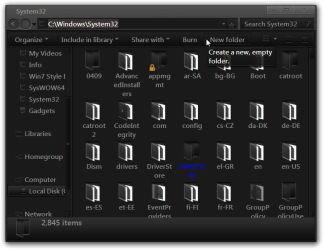
Here is what the address bar looks like after I open up the System32 folder in C
Here is what it looks like after I click in the address field.
Jerry
My System Specs
Computer type
Laptop
System Manufacturer/Model Number
Sager NP9170
OS
Win 7 Pro x64
CPU
Intel(R) Core(TM) i7-3630QM CPU @ 2.40GHz
Motherboard
CLEVO P170EM
Memory
12 GB
Graphics Card
(1) Intel(R) HD Graphics 4000 (2) NVIDIA GeForce GTX 675M
Sound Card
(1) Realtek High Definition Audio (2) Intel(R) Display Aud
Monitor(s) Displays
17.3
Screen Resolution
1920x1080
Keyboard
Backlite
Hard Drives
(1) M4-CT256M4SSD2 ATA Device 256 GB (2) ST9500424AS ATA Device 500 GB
Antivirus
MSE, Malwarebytes Pro
Browser
Firefox
05 Nov 2012
#
3
coderw
win7
2 posts
Yes that is what I meant. But how do I get permanently and only like in the last picture?
Just like winXP.
My System Specs
OS
win7
.
05 Nov 2012
#
4
Bongo
Win 7 Pro x64
9,373 posts
Council Bluffs, Iowa
I don't think you can get it permanently in Windows 7, as far as I know.
Jerry
My System Specs
Computer type
Laptop
System Manufacturer/Model Number
Sager NP9170
OS
Win 7 Pro x64
CPU
Intel(R) Core(TM) i7-3630QM CPU @ 2.40GHz
Motherboard
CLEVO P170EM
Memory
12 GB
Graphics Card
(1) Intel(R) HD Graphics 4000 (2) NVIDIA GeForce GTX 675M
Sound Card
(1) Realtek High Definition Audio (2) Intel(R) Display Aud
Monitor(s) Displays
17.3
Screen Resolution
1920x1080
Keyboard
Backlite
Hard Drives
(1) M4-CT256M4SSD2 ATA Device 256 GB (2) ST9500424AS ATA Device 500 GB
Antivirus
MSE, Malwarebytes Pro
Browser
Firefox
09 Nov 2012
#
5
Hermitt43
Windows 7 Ultimate x86 w/SP1
30 posts
Missouri USA
coderw, read this...
How to replace Windows Explorer breadcrumbs with classic full path textbox? - Super User
Jim
My System Specs
Computer type
PC/Desktop
System Manufacturer/Model Number
Dell Dimension E521
OS
Windows 7 Ultimate x86 w/SP1
Memory
3GB
WinXP address bar in win7 problems?
«
Disable High Contrast
|
Need help with creating a Windows 7 Theme
»
Thread Tools
Printable Version
Email this Page
Similar help and support threads for: WinXP address bar in win7
Thread
Forum
dual boot win7 & winxp separate drives OR upgrade to win7 professional
Software
Win7 & WinXP Hell
Network & Sharing
Share my Win7 HDD with WinXP and Win7
Network & Sharing
winxp and win7
Installation & Setup
All times are GMT -5. The time now is
09:11 AM
.
Contact Us
-
Windows 8 Support
-
Windows Vista Support
-
Legal
-
Privacy and cookies
-
Top
Windows 7 Forums is an independent web site and has not been authorized,
sponsored, or otherwise approved by Microsoft Corporation.
"Windows 7" and related materials are trademarks of Microsoft Corp.
©
Designer Media Ltd
1
2
3
4
5
6
7
8
9
10
11
12
13
14
15
16
17
18
19
20
21
22
23
24
25
26
27
28
29
30
31
32