
You are using an out of date browser. It may not display this or other websites correctly.
You should upgrade or use an alternative browser.
You should upgrade or use an alternative browser.
How do i make my taskbar looked disappear, but only show icon?
- Thread starter andywang
- Start date

Dinesh
Wonder Man
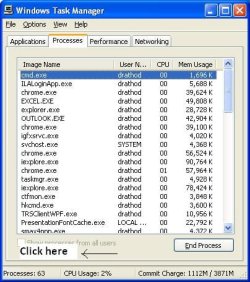
Then it becomes like this:

Is this what you were looking for?
Last edited:
My Computer
- Computer Manufacturer/Model Number
- Samsung NP530U4B-S02IN
- OS
- Windows® 8 Pro (64-bit)
- CPU
- Intel® Core™ i5 Processor 2467M (1.60GHz, 3MB L3 Cache)
- Motherboard
- Samsung Electronics
- Memory
- 6GB DDR3 System Memory at 1,333MHz (on BD 4GB + 2GB x 1)
- Graphics Card(s)
- AMD Radeon™ HD7550M 1GB DDR3 (Ext. Graphic)
- Sound Card
- Realtek High Definition Audio
- Monitor(s) Displays
- 35.56cm (14.0) SuperBright 300nit HD LED Display
- Screen Resolution
- 1366x768
- Hard Drives
- 1TB S-ATA II Hard Drive (5400RPM) with ExpressCache 16GB SSD
- Internet Speed
- sucks
- Antivirus
- Microsoft Security Essentials
- Browser
- Google Chrome (Sync enabled)
what do you want to explain?
I am really confused with your picture without any clear instruction.
what do you want to explain, buddy?
I am really confused with your picture without any clear instruction.
what do you want to explain, buddy?
View attachment 266526
Then it becomes like this:
View attachment 266527
Is this what you were looking for?
My Computer
- OS
- Windows 7 Pro x86 32bit
Dinesh
Wonder Man
On the first pic, you just need to click on an empty space (like the one mentioned in the pic). This will remove the borders from the Task Manager (like in the 2nd pic).
My Computer
- Computer Manufacturer/Model Number
- Samsung NP530U4B-S02IN
- OS
- Windows® 8 Pro (64-bit)
- CPU
- Intel® Core™ i5 Processor 2467M (1.60GHz, 3MB L3 Cache)
- Motherboard
- Samsung Electronics
- Memory
- 6GB DDR3 System Memory at 1,333MHz (on BD 4GB + 2GB x 1)
- Graphics Card(s)
- AMD Radeon™ HD7550M 1GB DDR3 (Ext. Graphic)
- Sound Card
- Realtek High Definition Audio
- Monitor(s) Displays
- 35.56cm (14.0) SuperBright 300nit HD LED Display
- Screen Resolution
- 1366x768
- Hard Drives
- 1TB S-ATA II Hard Drive (5400RPM) with ExpressCache 16GB SSD
- Internet Speed
- sucks
- Antivirus
- Microsoft Security Essentials
- Browser
- Google Chrome (Sync enabled)

Bongo
Jerry ☮ 1956-2019 R.I.P.
By editing the taskbar images you can almost get what you want but not completely transparent it will still have a slight blur have a look at these three screenshots, I edited the taskbar images so they are completely transparent as you can see depending on what kind of background you have the blur they show more or less.
Jerry



Jerry
My Computer
- Computer type
- Laptop
- Computer Manufacturer/Model Number
- Sager NP9170
- OS
- Win 7 Pro x64 / Win 10 Pro
- CPU
- Intel(R) Core(TM) i7-3630QM CPU @ 2.40GHz
- Motherboard
- CLEVO P170EM
- Memory
- 12 GB
- Graphics Card(s)
- (1) Intel(R) HD Graphics 4000 (2) NVIDIA GeForce GTX 675M
- Sound Card
- (1) Realtek High Definition Audio (2) Intel(R) Display Aud
- Monitor(s) Displays
- 17.3
- Screen Resolution
- 1920x1080
- Hard Drives
- (1) Samsung 860 EVO 500GB(OS) (1) Samsung 860 EVO 500GB(Data)
- Keyboard
- Backlite
- Antivirus
- MSE, Malwarebytes Pro
- Browser
- Firefox
- Other Info
- DESKTOP: Custom-built.
OS: Win 10 Pro x64.
CASE: Rosewill R5.
CPU: Intel I5 4670K CPU @ 3.40GHz.
CPU COOLER: Cool Master Hyper 212 EVO.
MOTHERBOARD: Asus Z87-A.
MEMORY: Kingston HyperX 2x4 GB.
GPU: Nvidia Geforce 650 TI.
PSU: Corsair TX750.
DRIVES: (1) Samsung 840 120 GB SSD (2) Western Digital blue 500 GB 7200 RPM.
Dinesh
Wonder Man
Oops! Sorry. I thought you were talking about Task manager. 
My Computer
- Computer Manufacturer/Model Number
- Samsung NP530U4B-S02IN
- OS
- Windows® 8 Pro (64-bit)
- CPU
- Intel® Core™ i5 Processor 2467M (1.60GHz, 3MB L3 Cache)
- Motherboard
- Samsung Electronics
- Memory
- 6GB DDR3 System Memory at 1,333MHz (on BD 4GB + 2GB x 1)
- Graphics Card(s)
- AMD Radeon™ HD7550M 1GB DDR3 (Ext. Graphic)
- Sound Card
- Realtek High Definition Audio
- Monitor(s) Displays
- 35.56cm (14.0) SuperBright 300nit HD LED Display
- Screen Resolution
- 1366x768
- Hard Drives
- 1TB S-ATA II Hard Drive (5400RPM) with ExpressCache 16GB SSD
- Internet Speed
- sucks
- Antivirus
- Microsoft Security Essentials
- Browser
- Google Chrome (Sync enabled)
By editing the taskbar images you can almost get what you want but not completely transparent it will still have a slight blur have a look at these three screenshots, I edited the taskbar images so they are completely transparent as you can see depending on what kind of background you have the blur they show more or less.
Jerry
View attachment 266543
View attachment 266544
View attachment 266545
Yes, that's what i want.

you really know my problem.
but, it's little blur. no problem,
could you give me a tutorial how to make it, buddy?
may be someone in this forum could give the tutor to make it unblur.?
lol.Oops! Sorry. I thought you were talking about Task manager.
no problem.. thank you for your fast response to my problem.
i really appreciate your help :roflmao:.
My Computer
- OS
- Windows 7 Pro x86 32bit
Bongo
Jerry ☮ 1956-2019 R.I.P.
It might be easier to use what I have created, that way you did not corrupt the original aero.msstyles, it becomes a third-party custom theme and either way if I do it for you or you do for yourself you will need to do 1 of these 2 ways of Enabling custom themes for it to work.
http://www.sevenforums.com/tutorials/34579-enabling-custom-themes-windows-7-a.html
Or
http://www.sevenforums.com/tutorials/28377-theme-how-apply-custom-themes.html?filter
If you just use the taskbar at the bottom I could post it here in a couple of minutes because I have that one ready already but if you move your taskbar around it will take me a few extra minutes to do those also.
Let me know
Jerry
http://www.sevenforums.com/tutorials/34579-enabling-custom-themes-windows-7-a.html
Or
http://www.sevenforums.com/tutorials/28377-theme-how-apply-custom-themes.html?filter
If you just use the taskbar at the bottom I could post it here in a couple of minutes because I have that one ready already but if you move your taskbar around it will take me a few extra minutes to do those also.
Let me know
Jerry
My Computer
- Computer type
- Laptop
- Computer Manufacturer/Model Number
- Sager NP9170
- OS
- Win 7 Pro x64 / Win 10 Pro
- CPU
- Intel(R) Core(TM) i7-3630QM CPU @ 2.40GHz
- Motherboard
- CLEVO P170EM
- Memory
- 12 GB
- Graphics Card(s)
- (1) Intel(R) HD Graphics 4000 (2) NVIDIA GeForce GTX 675M
- Sound Card
- (1) Realtek High Definition Audio (2) Intel(R) Display Aud
- Monitor(s) Displays
- 17.3
- Screen Resolution
- 1920x1080
- Hard Drives
- (1) Samsung 860 EVO 500GB(OS) (1) Samsung 860 EVO 500GB(Data)
- Keyboard
- Backlite
- Antivirus
- MSE, Malwarebytes Pro
- Browser
- Firefox
- Other Info
- DESKTOP: Custom-built.
OS: Win 10 Pro x64.
CASE: Rosewill R5.
CPU: Intel I5 4670K CPU @ 3.40GHz.
CPU COOLER: Cool Master Hyper 212 EVO.
MOTHERBOARD: Asus Z87-A.
MEMORY: Kingston HyperX 2x4 GB.
GPU: Nvidia Geforce 650 TI.
PSU: Corsair TX750.
DRIVES: (1) Samsung 840 120 GB SSD (2) Western Digital blue 500 GB 7200 RPM.
It might be easier to use what I have created, that way you did not corrupt the original aero.msstyles, it becomes a third-party custom theme and either way if I do it for you or you do for yourself you will need to do 1 of these 2 ways of Enabling custom themes for it to work.
http://www.sevenforums.com/tutorials/34579-enabling-custom-themes-windows-7-a.html
Or
http://www.sevenforums.com/tutorials/28377-theme-how-apply-custom-themes.html?filter
If you just use the taskbar at the bottom I could post it here in a couple of minutes because I have that one ready already but if you move your taskbar around it will take me a few extra minutes to do those also.
Let me know
Jerry
please post it here, buddy.
i kindly appreciate your help.
My Computer
- OS
- Windows 7 Pro x86 32bit
Bongo
Jerry ☮ 1956-2019 R.I.P.
Here you go.
Download the .zip folder and extract it to your desktop, put both 1 andywang folder and 1 andywang.theme file in C:\Windows\Resources\Themes


It will show up in Personalization under Installed Themes as andywang click on it.
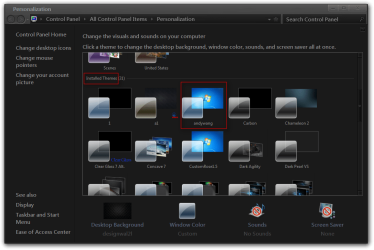
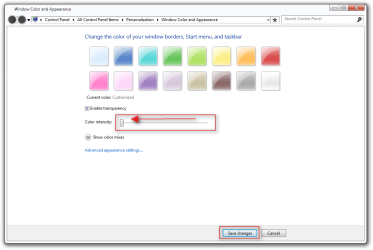
Click on Window Color and move the slider to the left and Save changes.
Jerry
Download the .zip folder and extract it to your desktop, put both 1 andywang folder and 1 andywang.theme file in C:\Windows\Resources\Themes
It will show up in Personalization under Installed Themes as andywang click on it.
Click on Window Color and move the slider to the left and Save changes.
Jerry
Attachments
My Computer
- Computer type
- Laptop
- Computer Manufacturer/Model Number
- Sager NP9170
- OS
- Win 7 Pro x64 / Win 10 Pro
- CPU
- Intel(R) Core(TM) i7-3630QM CPU @ 2.40GHz
- Motherboard
- CLEVO P170EM
- Memory
- 12 GB
- Graphics Card(s)
- (1) Intel(R) HD Graphics 4000 (2) NVIDIA GeForce GTX 675M
- Sound Card
- (1) Realtek High Definition Audio (2) Intel(R) Display Aud
- Monitor(s) Displays
- 17.3
- Screen Resolution
- 1920x1080
- Hard Drives
- (1) Samsung 860 EVO 500GB(OS) (1) Samsung 860 EVO 500GB(Data)
- Keyboard
- Backlite
- Antivirus
- MSE, Malwarebytes Pro
- Browser
- Firefox
- Other Info
- DESKTOP: Custom-built.
OS: Win 10 Pro x64.
CASE: Rosewill R5.
CPU: Intel I5 4670K CPU @ 3.40GHz.
CPU COOLER: Cool Master Hyper 212 EVO.
MOTHERBOARD: Asus Z87-A.
MEMORY: Kingston HyperX 2x4 GB.
GPU: Nvidia Geforce 650 TI.
PSU: Corsair TX750.
DRIVES: (1) Samsung 840 120 GB SSD (2) Western Digital blue 500 GB 7200 RPM.
Bongo
Jerry ☮ 1956-2019 R.I.P.
You're Welcome
My Computer
- Computer type
- Laptop
- Computer Manufacturer/Model Number
- Sager NP9170
- OS
- Win 7 Pro x64 / Win 10 Pro
- CPU
- Intel(R) Core(TM) i7-3630QM CPU @ 2.40GHz
- Motherboard
- CLEVO P170EM
- Memory
- 12 GB
- Graphics Card(s)
- (1) Intel(R) HD Graphics 4000 (2) NVIDIA GeForce GTX 675M
- Sound Card
- (1) Realtek High Definition Audio (2) Intel(R) Display Aud
- Monitor(s) Displays
- 17.3
- Screen Resolution
- 1920x1080
- Hard Drives
- (1) Samsung 860 EVO 500GB(OS) (1) Samsung 860 EVO 500GB(Data)
- Keyboard
- Backlite
- Antivirus
- MSE, Malwarebytes Pro
- Browser
- Firefox
- Other Info
- DESKTOP: Custom-built.
OS: Win 10 Pro x64.
CASE: Rosewill R5.
CPU: Intel I5 4670K CPU @ 3.40GHz.
CPU COOLER: Cool Master Hyper 212 EVO.
MOTHERBOARD: Asus Z87-A.
MEMORY: Kingston HyperX 2x4 GB.
GPU: Nvidia Geforce 650 TI.
PSU: Corsair TX750.
DRIVES: (1) Samsung 840 120 GB SSD (2) Western Digital blue 500 GB 7200 RPM.
Dinesh
Wonder Man
Tip
If you feel your query has been resolved, kindly click on the "Solved" button to mark this thread as Solved.

My Computer
- Computer Manufacturer/Model Number
- Samsung NP530U4B-S02IN
- OS
- Windows® 8 Pro (64-bit)
- CPU
- Intel® Core™ i5 Processor 2467M (1.60GHz, 3MB L3 Cache)
- Motherboard
- Samsung Electronics
- Memory
- 6GB DDR3 System Memory at 1,333MHz (on BD 4GB + 2GB x 1)
- Graphics Card(s)
- AMD Radeon™ HD7550M 1GB DDR3 (Ext. Graphic)
- Sound Card
- Realtek High Definition Audio
- Monitor(s) Displays
- 35.56cm (14.0) SuperBright 300nit HD LED Display
- Screen Resolution
- 1366x768
- Hard Drives
- 1TB S-ATA II Hard Drive (5400RPM) with ExpressCache 16GB SSD
- Internet Speed
- sucks
- Antivirus
- Microsoft Security Essentials
- Browser
- Google Chrome (Sync enabled)

Arc
٩͡[๏̯͡๏]۶

My Computer
- Computer type
- PC/Desktop
- Computer Manufacturer/Model Number
- Self Assembled
- OS
- Microsoft Windows 10 Pro Insider Preview 64-bit
- CPU
- Intel(R) Core(TM) i3-4130 CPU @ 3.40GHz
- Motherboard
- Gigabyte Technology Co., Ltd. B85M-D3H
- Memory
- Corsair Vengence 4GB x2 (8.00GB Dual-Channel DDR3 @ 798MHz)
- Graphics Card(s)
- 2047MB GeForce GTS 450 (ZOTAC International)
- Sound Card
- Onboard (Realtek High Definition Audio)
- Monitor(s) Displays
- LG Flatron E2040T
- Screen Resolution
- 1600x900
- Hard Drives
- Western Digital 1 TB
Seagate 500 GB
- PSU
- Corsair VS550
- Case
- Cooler Master K380
- Cooling
- Cooler Master Seidon 120V Plus
- Keyboard
- Logitech MK260r
- Mouse
- Logitech MK260r
- Internet Speed
- PMPL Broadband
- Antivirus
- Windows Defender + MBAM
- Browser
- Firefox
- Other Info
- Dell Studio 15" Laptop

Sunimar
New member
Arc can you also post the steps to get the above effect on Desktop screen!
My Computer
- Computer type
- Laptop
- OS
- Windows 7 Ultimate
Sunimar
New member
It might be easier to use what I have created, that way you did not corrupt the original aero.msstyles, it becomes a third-party custom theme and either way if I do it for you or you do for yourself you will need to do 1 of these 2 ways of Enabling custom themes for it to work.
http://www.sevenforums.com/tutorials/34579-enabling-custom-themes-windows-7-a.html
Or
http://www.sevenforums.com/tutorials/28377-theme-how-apply-custom-themes.html?filter
If you just use the taskbar at the bottom I could post it here in a couple of minutes because I have that one ready already but if you move your taskbar around it will take me a few extra minutes to do those also.
Let me know
Jerry
I'm damn scared in trying this as my laptop keep crashing BIG time whenever I try something like this. Need something simple & sweet. Any suggestion??
My Computer
- Computer type
- Laptop
- OS
- Windows 7 Ultimate