Windows 7 Forums Search
Welcome to Windows 7 Forums. Our forum is dedicated to helping you find solutions with any problems, errors or issues you are experiencing with Windows 7. The Windows 7 forum also covers news and updates and has an extensive Windows 7 tutorial section that covers a wide range of tips and tricks.


Windows 7 - problem with Windows 7 OEM Theme Packs

 
12-25-2009   #1


Windows 7 Ultimate


problem with Windows 7 OEM Theme Packs - SOLVED

Hi,

I have downloaded the "Windows 7 OEM Theme Packs" and did try 2 of them :

FUJITSU and GIGABYTE

then I went to remove them so I first did select an other them , and then made right click on each one and selected > Delete.

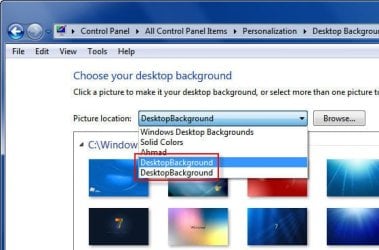
Problem is in the window where you change the desktop wallpaper, there is still a link for them in the drop down menu to select the wallpaper for them

how can i fix this ?

- i went to the location in the error message - hidden folder - and there is nothing in it !

- i made a search in the registry and came out with nothing.


thanks for the help

Attached Thumbnails
problem with Windows 7 OEM Theme Packs-001gb.jpg   problem with Windows 7 OEM Theme Packs-002pb.jpg  

Last edited by ahmadmaher; 12-25-2009 at 02:41 PM..
My System SpecsSystem Spec
12-25-2009   #2


Windows 7 Home Premium 64 bit


Hi ahmadmaher and Welcome to SevenForums

If i understand you right you just want to change the background Right. Just right click your desktop, go to personalization choose a background you want and double click it, if you want to change it double click the next one. Don't try to delete them. Hope this helps, if not we're here to try again.

Smitty
My System SpecsSystem Spec
12-25-2009   #3


Windows 7 Ultimate


Hi Smitty,

am sorry but no this is not what i want,

you see i have un-installed the 2 themes , but yet still there is 2 lines for them in the drop down menu options, the one in the red frame

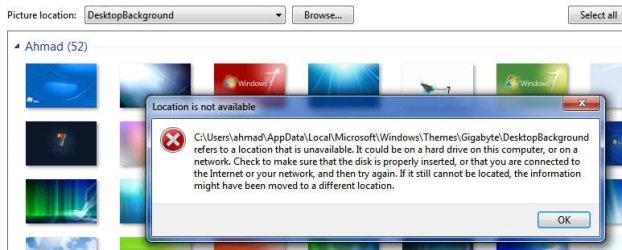
that is why when i click any of them i get the error message, the 2nd image in the attachment

now that i have un installed them i also want to remove there line from the menu

hope i made it clear now and thanks for the help
My System SpecsSystem Spec
.


12-25-2009   #4


have you made sure that the themes are no longer residing in Resources/Themes ?
My System SpecsSystem Spec
12-25-2009   #5


Windows 7 Ultimate


Quote   Quote: Originally Posted by Tews View Post
have you made sure that the themes are no longer residing in Resources/Themes ?


yes they are not there, and i went to : C:\Users\ahmad\AppData\Local\Microsoft\Windows\Themes\

and there is nothing there too.


this is what i have in Resources/Themes :

Aero > folder
aero.theme
architecture.theme
characters.theme
landscapes.theme
nature.theme
scenes.theme
My System SpecsSystem Spec
12-25-2009   #6


Windows 7 Ultimate


problem solved

removing a line in the drop down menu for "Choose your desktop background".

Quote:
Control Panel\Appearance and Personalization\Personalization\Desktop Background\Picture Location user defined drop down menu list entries are contained in the following registry location:

HKEY_CURRENT_USER\Software\Microsoft\Windows \CurrentVersion\Explorer\Wallpapers\Images

As you'll see, these entries are encrypted (I think they are in ascending chronological order) but you can safely delete them all if you wish as the default Vista/7 entries (in the latter's case: Windows Desktop Backgrounds, Pictures Library, Top Rated Photos and Solid Colors) will be unaffected.

When you select an existing Desktop Background which is held in one of the locations which you may have been deleted, this location will be re-added into the drop-down menu.


thanks guys and hope this will help some one else too
My System SpecsSystem Spec
Reply

 problem with Windows 7 OEM Theme Packs problems?


Thread Tools


Similar Threads for: problem with Windows 7 OEM Theme Packs
Thread Forum
Language packs problem General Discussion
Windows 7 Theme Problem(Unable to use any theme other than classic) Themes and Styles
Problem with Windows 7 asian language packs Windows Updates & Activation
windows theme packs with custom mouse pointers Themes and Styles
Multiple theme packs Themes and Styles


All times are GMT -5. The time now is 10:53 PM.


Windows 7 Forums is an independent web site and has not been authorized,
sponsored, or otherwise approved by Microsoft Corporation.
"Windows 7" and related materials are trademarks of Microsoft Corp.
© Designer Media Ltd
  

1 2 3 4 5 6 7 8 9 10 11 12 13 14 15 16 17 18 19 20 21 22 23 24 25 26 27 28 29 30