Windows 7 Forums Search
Welcome to Windows 7 Forums. Our forum is dedicated to helping you find solutions with any problems, errors or issues you are experiencing with Windows 7. The Windows 7 forum also covers news and updates and has an extensive Windows 7 tutorial section that covers a wide range of tips and tricks.


Windows 7 - Hardware - Stress Test With Prime95


Hardware - Stress Test With Prime95

How to Stress Test your Hardware for Stability and Heat Problems with Prime95
Published by Jonathan_King
07-28-2010
Default Hardware - Stress Test With Prime95

How to Stress Test your Hardware for Stability and Heat Problems with Prime95

Tip   Tip
Be sure to keep an eye on your temperatures when running these tests, especially the Large FFTs. I recommend the free utility Speedfan.


1. Download the appropriate 32-bit or 64-bit Windows version of Prime95 from this link: Free Software - GIMPS

You can skip down to step 2 on that page; it is not necessary to register, if all you want to do is torture test.

2. Run the Prime95.exe file. If the UAC warning appears, click "Yes" to allow it.

3. Select "Just Stress Testing" in the first window that appears.
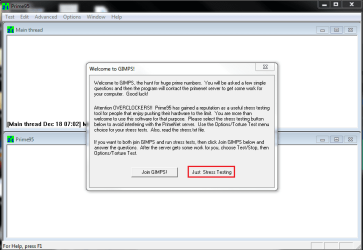
Hardware - Stress Test With Prime95-capture.png
4. Select "Small FFTs", or whatever tests someone asks you to run. Prime95 will automatically select the maximum number of threads reported by Windows in the "Number of threads to run" box.
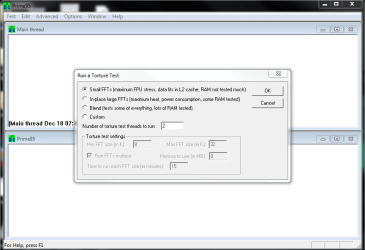
Hardware - Stress Test With Prime95-capture1.png
5. Keep an eye on your temperatures, and stop the test if the machine starts to overheat.

6. Leave the test running for up to 2 hours, unless errors occur sooner. Errors will show up by one or more of the workers stopping.

Note   Note
As with all hardware tests, Prime95 is not fail-safe. If the test passes for 2 hours with no errors, it is most likely to be stable. Unfortunately, it sometimes makes mistakes and gives a clean bill of health to faulty hardware.


Published by
Jonathan_King's Avatar
Senior Member


Join Date: Sep 2009
Location: Rednecksville
Posts: 13,837

Tutorial Tools
07-28-2010   #1
smarteyeball


7 Ultimate x64


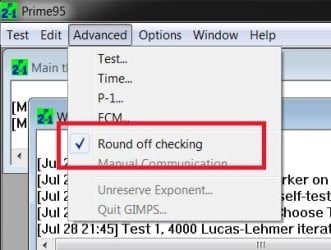
Don't forget to tick the 'Round off checking' option under Advanced:
Hardware - Stress Test With Prime95-round-off-checking.jpg

Otherwise you won't know if one of your cores has failed etc

(And I personally prefer Realtemp over Speedfan, but that's just my opinion)

My System SpecsSystem Spec
07-28-2010   #2
Jonathan_King


Windows 7 Professional x64


I have no idea what round-off checking is. Is it enabled by default? When I torture tested my CPU for my overclock, I didn't mess with that at all. I knew it had failed because one of the cores suddenly stopped testing and reported errors.
My System SpecsSystem Spec
07-29-2010   #3
Jonathan_King


Windows 7 Professional x64


Done. Now all I need is a thumbnail for it...any suggestions?
My System SpecsSystem Spec
.


07-29-2010   #4
scoopeeedoo


Quote   Quote: Originally Posted by smarteyeball View Post

(And I personally prefer Realtemp over Speedfan, but that's just my opinion)
Realtemp's only for Intel, isn't it?
My System SpecsSystem Spec
07-30-2010   #5
Jonathan_King


Windows 7 Professional x64


Quote   Quote: Originally Posted by scoopeeedoo View Post
Quote   Quote: Originally Posted by smarteyeball View Post

(And I personally prefer Realtemp over Speedfan, but that's just my opinion)
Realtemp's only for Intel, isn't it?
Yes, that is correct.
My System SpecsSystem Spec
07-31-2010   #6
Dave76


Windows 7 Ult x64 - SP1/ Windows 8 CP x64


Nice tutorial Jon, nice to be able to link to this instead of writing it all the time.

I use Realtemp as well.
My System SpecsSystem Spec
08-08-2010   #7
CarlTR6


Windows 7 Ultimate 32 bit


Excellent! Very well done and very helpful. Thanks much.
My System SpecsSystem Spec
10-29-2010   #8
Dave76


Windows 7 Ult x64 - SP1/ Windows 8 CP x64


Just thought I would add the CPU tempurature monitoring programs here for reference.

For Intel: Real Temp

For AMD and Intel: Core Temp

For AMD and Intel: Speedfan (as in the 'Tip' above)

I see these recommended on many forums, but others work as well.
My System SpecsSystem Spec
10-30-2010   #9
Jonathan_King


Windows 7 Professional x64


Thank you Dave.
My System SpecsSystem Spec
Comment

 Hardware - Stress Test With Prime95 problems?


Tutorial Tools


Similar Threads for: Hardware - Stress Test With Prime95
Windows 7 Tutorial Category
PC Shutdown after Orthos Stress Test. Hardware & Devices
Q6600 Stress Test Overclocking and Case Mods
BSOD during prime95 test? Crashes and Debugging
Stress Test Performance & Maintenance


All times are GMT -5. The time now is 10:56 PM.


Windows 7 Forums is an independent web site and has not been authorized,
sponsored, or otherwise approved by Microsoft Corporation.
"Windows 7" and related materials are trademarks of Microsoft Corp.
© Designer Media Ltd
  

1 2 3 4 5 6 7 8 9 10 11 12 13 14 15 16 17 18 19 20 21 22 23 24 25 26 27 28 29 30