
Office Icons – Change or Repair
Here's How:
1. Press Win+R in keyboard . The run window will appear. Type C:Windows\Installer there , and hit enter. In the resulting window, open the folder {90140000-0011-0000-0000-0000000FF1CE} . It should contain your office icons, in .exe format, such as Wordicon.exe for MS Word icon. Take Ownership of the folder.
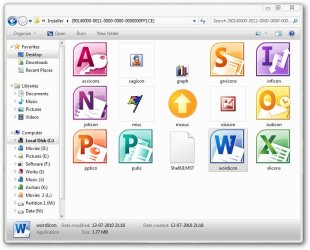
2. At first, let us change the MS Office icon. So right click on wordicon.exe, and open using resource hacker in the context menu. The resource hacker will open in the appropriate window, with "icon" selected in the left pane.
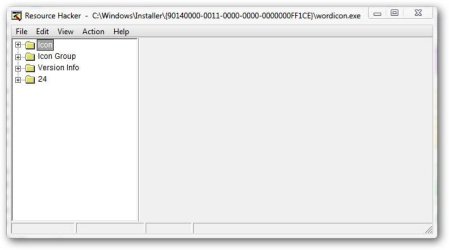
3. Below "icon", there is "icon group". Double click on it. On the top, there is folder 200. Double click on it, too. In the expansion tree , selecr 1033. A messege " OUT OF SYSTEM RESOURCES" may appear, just click OK there.

4. Right Click on 1033, and click on replace icon. The "Replace Icon With " window will appear.
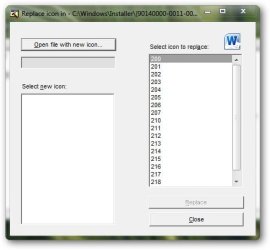
5. Click the box "Open File With New Icon" . Browse to the icon you want there. Click on "Select new icon, and the new icon will be visible in the right side pane. Now click "Replace "
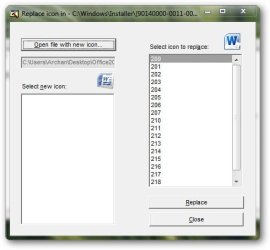
6. The "Out Of System Resources" may appear. Just click on OK as previous.
7. Click File > Save as ..... the save file window will appear . Save the new file on desktop, name it wordicon.exe.
8. Do the same steps for xlicons.exe (Excel), accicons.exe (Access), pptico.exe (PowerPoint), and the others you ant to change.
9. Finally, replace the modified files in the target folder C:Windows\Installer\{90140000-0011-0000-0000-0000000FF1CE}
10. Restart your computer , and it is done.
How to Change or Repair Microsoft Office Icons
Information
What do you need :
First, DON’T FORGET TO
http://www.sevenforums.com/tutorials/663-backup-complete-computer-create-image-backup.html
so that if you mess with the process, you can easily back to your previous setup, without a much trouble .
Second, Download and install Resource Hacker Setup (not portable !) so that there is “open using resource hacker in your right click context menu. Get it from here : Resource Hacker 3.5.2.84 - System Utilities - OS Assistant - OnlineDown.com
Third, Read the tutorial Take Ownership of file - Vista Forums
Finally , You need office icons to change or repair.
You may get icons up to your choice from deviantART: where ART meets application! .
First, DON’T FORGET TO
http://www.sevenforums.com/tutorials/663-backup-complete-computer-create-image-backup.html
so that if you mess with the process, you can easily back to your previous setup, without a much trouble .
Second, Download and install Resource Hacker Setup (not portable !) so that there is “open using resource hacker in your right click context menu. Get it from here : Resource Hacker 3.5.2.84 - System Utilities - OS Assistant - OnlineDown.com
Third, Read the tutorial Take Ownership of file - Vista Forums
Finally , You need office icons to change or repair.
You may get icons up to your choice from deviantART: where ART meets application! .
Warning
Please don’t forget to get an image backup. It is must.
Here's How:
1. Press Win+R in keyboard . The run window will appear. Type C:Windows\Installer there , and hit enter. In the resulting window, open the folder {90140000-0011-0000-0000-0000000FF1CE} . It should contain your office icons, in .exe format, such as Wordicon.exe for MS Word icon. Take Ownership of the folder.
2. At first, let us change the MS Office icon. So right click on wordicon.exe, and open using resource hacker in the context menu. The resource hacker will open in the appropriate window, with "icon" selected in the left pane.
3. Below "icon", there is "icon group". Double click on it. On the top, there is folder 200. Double click on it, too. In the expansion tree , selecr 1033. A messege " OUT OF SYSTEM RESOURCES" may appear, just click OK there.
4. Right Click on 1033, and click on replace icon. The "Replace Icon With " window will appear.
5. Click the box "Open File With New Icon" . Browse to the icon you want there. Click on "Select new icon, and the new icon will be visible in the right side pane. Now click "Replace "
6. The "Out Of System Resources" may appear. Just click on OK as previous.
7. Click File > Save as ..... the save file window will appear . Save the new file on desktop, name it wordicon.exe.
8. Do the same steps for xlicons.exe (Excel), accicons.exe (Access), pptico.exe (PowerPoint), and the others you ant to change.
9. Finally, replace the modified files in the target folder C:Windows\Installer\{90140000-0011-0000-0000-0000000FF1CE}
10. Restart your computer , and it is done.
Last edited by a moderator:


 Tried to fill in a gap. I saw you were trying to help a member in this issue(the guy have installed the Star Wars theme), searched for the way, and made it .


