| Windows 7: Driver Verifier - Enable and Disable |
01 Aug 2010
|
#19 | | Windows 7 Professional x64 Rednecksville |
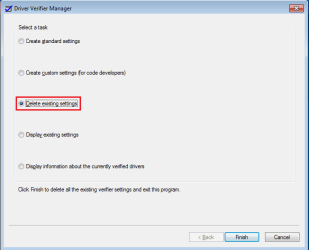
Driver Verifier - Enable and Disable  Information Driver Verifier runs in the background,...
Last edited by Jonathan_King; 09 Apr 2011 at 12:18 PM..
| My System Specs |
| System Manufacturer/Model Number Custom OS Windows 7 Professional x64 CPU Intel i7 2600K OC'd @ 4620 MHz Motherboard Asus P8Z68-V Pro Memory 16GB GSkill Sniper 2133 Mhz (4x4GB) Graphics Card EVGA GeForce GTX 480 SuperClocked+ Sound Card Realtek High Definition Audio Monitor(s) Displays 2x Acer S273HLbmii 27" Screen Resolution 2 x 1920x1080 Keyboard Logitech MK320 (wireless) Mouse Logitech MK320 (wireless) PSU Corsair HW Series 750w (modular) Case Cooler Master HAF 932 Advanced Blue Edition Cooling CM Hyper 212+ CPU cooler, 3x 230mm + 1x 140mm case fans Hard Drives 64GB Crucial M4 SSD
Storage: Hitachi 1TB 5400RPM, Samsung 1.5TB 5400RPM Internet Speed 30 Mb/s : 2 Mb/s |
17 Apr 2012
|
#20 | | Windows 7 Professional x64 Rednecksville |

Quote: Originally Posted by Influx Hello Jonathan,
Should this be run in Safe Mode?
You can enable Driver Verifier from Safe Mode, but it will not actually run in Safe Mode. Thus, if Driver Verifier is preventing system bootup, you can boot into Safe Mode and disable it. To actually test the drivers, reboot into Normal Mode. | My System Specs |
| System Manufacturer/Model Number Custom OS Windows 7 Professional x64 CPU Intel i7 2600K OC'd @ 4620 MHz Motherboard Asus P8Z68-V Pro Memory 16GB GSkill Sniper 2133 Mhz (4x4GB) Graphics Card EVGA GeForce GTX 480 SuperClocked+ Sound Card Realtek High Definition Audio Monitor(s) Displays 2x Acer S273HLbmii 27" Screen Resolution 2 x 1920x1080 Keyboard Logitech MK320 (wireless) Mouse Logitech MK320 (wireless) PSU Corsair HW Series 750w (modular) Case Cooler Master HAF 932 Advanced Blue Edition Cooling CM Hyper 212+ CPU cooler, 3x 230mm + 1x 140mm case fans Hard Drives 64GB Crucial M4 SSD
Storage: Hitachi 1TB 5400RPM, Samsung 1.5TB 5400RPM Internet Speed 30 Mb/s : 2 Mb/s |
17 Apr 2012
|
#21 | | Win7 Ultimate x64 SP1 / WCP x64 / Ubuntu 11 x64 Pearl of the Orient Seas |

Quote: Originally Posted by Jonathan_King 
Quote: Originally Posted by Influx Hello Jonathan,
Should this be run in Safe Mode?
You can enable Driver Verifier from Safe Mode, but it will not actually run in Safe Mode. Thus, if Driver Verifier is preventing system bootup, you can boot into Safe Mode and disable it. To actually test the drivers, reboot into Normal Mode. I did hear someone say that it's meant to be run on safe mode. Thanks for clarifying things up Jonathan. | My System Specs | | OS Win7 Ultimate x64 SP1 / WCP x64 / Ubuntu 11 x64 |
16 Sep 2012
|
#22 | | Windows 7 Ult x64 - SP1/ Windows 8 Pro x64 Wanderer |
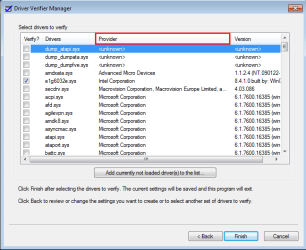
You might consider to add any driver with 'dump' as a prefix to Option one #5, for example; dump_dumpfve.sys and dump_iastor.sys. these should be unchecked also.
They are drivers created to provide disk access during crash dump file generation. | My System Specs | | Computer type PC/Desktop System Manufacturer/Model Number 76~2.0 OS Windows 7 Ult x64 - SP1/ Windows 8 Pro x64 CPU Intel Core i5-3570K 4.6GHz Motherboard Gigabyte GA-Z77X UD3H, f18 Memory 8GB (2X4GB) DDR3 1600 Corsair Vengeance CL8 1.5v Graphics Card Sapphire HD 7770 Vapor-X OC 1GB DDR5 Sound Card Onboard VIA VT2021 Monitor(s) Displays 22" LCD Dell Screen Resolution 1680x1050 Keyboard Logitech Wave Mouse CM Sentinel PSU Corsair HX650W Case Cooler Master Storm Scout Cooling Corsair H80 2x12cm Noctua NF P12 , 2x14cm case fans Hard Drives Samsung 840Pro 128GB SSD,
Seagate Barracuda 500GB SATA2 7200rpm 32MB cache, Seagate Barracuda 1TB SATA2 7200rpm 32MB cache, Internet Speed Dismal Antivirus Avast Browser Opera Next Other Info eSATA ports,
External eSATA Seagate 500GB SATA2 7200rpm,
External USB WD 500GB |
24 Sep 2012
|
#23 | | Windows 7 Home Premium SP1 32 bit Barranquilla |

Quote: Originally Posted by Dave76 You might consider to add any driver with 'dump' as a prefix to Option one #5, for example; dump_dumpfve.sys and dump_iastor.sys. these should be unchecked also.
They are drivers created to provide disk access during crash dump file generation. Wow thanks for the info, I tought I wasnt doing anything wrong. | My System Specs | | System Manufacturer/Model Number HP Pavilion a6532f OS Windows 7 Home Premium SP1 32 bit CPU AMD Athlon 64 X2 Dual Core 5200+ @ 2.71 GHz Motherboard MCP61PM-HM (Nettle3) Memory 2GB DDR2 RAM @ 3** MHz (2 Sticks of 1 GB each, SAMSUNG) Graphics Card ECS Nvidia GeForce 9800 GT Green Edition 1GB DDR3 Sound Card Integrated Realtek ALC888S Audio Monitor(s) Displays HP w2007 Screen Resolution 1680*1050 Keyboard Genius random(cheap) USB keyboard Mouse Microsoft random(cheap) USB Mouse PSU CoolerMaster eXtreme Power Plus 600W Case Mid Size ATX Cooling Default rear(back) fan pulling air out. Hard Drives SAMSUNG 500 GB SATA 7200 rpm Internet Speed 2 MBPS / ASDL |
03 Oct 2012
|
#24 | | Windows 7 Home Premium 64bit |
i've followed all the steps given but i think i ticked dump_dumpfve.sys and dump_iastor.sys.Is it matter?Now i running it for 5 hours already.So should i restart the process? | My System Specs | | OS Windows 7 Home Premium 64bit |
03 Oct 2012
|
#25 | | Windows 7 Ult x64 - SP1/ Windows 8 Pro x64 Wanderer |
No, I would leave it running.
If Driver Verifier generates a BSOD and blames dump_dumpfve.sys and/or dump_iastor.sys, then disable them and let it run again.
These two drivers aren't blamed very often, but there isn't any necessity to stress them so they don't need to be included in the testing. | My System Specs | | Computer type PC/Desktop System Manufacturer/Model Number 76~2.0 OS Windows 7 Ult x64 - SP1/ Windows 8 Pro x64 CPU Intel Core i5-3570K 4.6GHz Motherboard Gigabyte GA-Z77X UD3H, f18 Memory 8GB (2X4GB) DDR3 1600 Corsair Vengeance CL8 1.5v Graphics Card Sapphire HD 7770 Vapor-X OC 1GB DDR5 Sound Card Onboard VIA VT2021 Monitor(s) Displays 22" LCD Dell Screen Resolution 1680x1050 Keyboard Logitech Wave Mouse CM Sentinel PSU Corsair HX650W Case Cooler Master Storm Scout Cooling Corsair H80 2x12cm Noctua NF P12 , 2x14cm case fans Hard Drives Samsung 840Pro 128GB SSD,
Seagate Barracuda 500GB SATA2 7200rpm 32MB cache, Seagate Barracuda 1TB SATA2 7200rpm 32MB cache, Internet Speed Dismal Antivirus Avast Browser Opera Next Other Info eSATA ports,
External eSATA Seagate 500GB SATA2 7200rpm,
External USB WD 500GB |
11 Nov 2012
|
#26 | | |
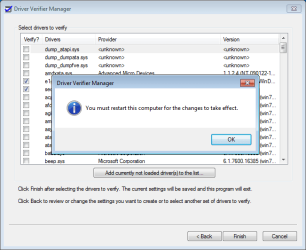
This didn't work for me. I applied all settings as described, it said I needed to restart so I told it "OK" and nothing happened. I manually restarted, and it just booted up normally without any special screen or status report for the verification. i tried it again but nothing happened.
What should I do to try and force this to work? | My System Specs | | OS Windows 7 Ultimate x64 |
11 Nov 2012
|
#27 | | Windows 7 Pro 64 SP1 East Bay Area, CA |

Quote: Originally Posted by Jonathan_King 
Quote: Originally Posted by EvilOzzmess This didn't work for me. I applied all settings as described, it said I needed to restart so I told it "OK" and nothing happened. I manually restarted, and it just booted up normally without any special screen or status report for the verification... I'm having BSODs though so that could be it.
What should I do to try and force this to work? It's probably working, it just doesn't show anything.
Open a command prompt and enter verifier /query. 
Quote: Originally Posted by hamine This didn't work for me. I applied all settings as described, it said I needed to restart so I told it "OK" and nothing happened. I manually restarted, and it just booted up normally without any special screen or status report for the verification. i tried it again but nothing happened.
What should I do to try and force this to work? Have a look at the authors response to a previous question like yours. | My System Specs | | Computer type PC/Desktop System Manufacturer/Model Number Compaq sr5410f case OS Windows 7 Pro 64 SP1 CPU AMD X2 4450E @ 2.3 ghz Motherboard Biostar MCP6P M2+ Memory 4.0 g Graphics Card Nvidia GeForce 9600 GT , 512mb Sound Card onboard Monitor(s) Displays auria eq2367 Screen Resolution 1920 x 1080 Keyboard logitech wave cordless Mouse logitech LX8 cordless laser mouse PSU 250 watts Case Compaq Cooling couple fans Hard Drives 1 tb Hitachi HDT721010SLA scsi, 500 gb external Internet Speed comcast hi speed 19 dn 8 up Antivirus Microsoft Security Essentials Browser IE10 Other Info Laptop specs: HP g7-1365dx /
CPU: AMD A6-3420M APU with Radeon(tm) HD Graphics /
RAM: Crucial 8Gb (2x4Gb) /
SSD: Crucial M4-CT128M4SSD2 ATA Device/ FW 000F /
GFX: AMD Radeon HD 6520G /
OS: Microsoft Windows 7 Professional 64-bit 7601 Multiprocessor Free Service Pack 1 |
24 Nov 2012
|
#28 | | |
i did this and my computer would lock up everytime i started it up windows would briefly start then log off and lock....why is this? | My System Specs | | Driver Verifier - Enable and Disable problems? All times are GMT -5. The time now is 08:37 AM. | |