Windows 7 Forums


Windows 7: Driver Verifier - Enable and Disable


Driver Verifier - Enable and Disable

How to Enable or Disable Driver Verifier in Windows 7
Published 01 Aug 2010
Published by

Featured Tutorial

Troubleshooting Steps for Windows 7


PCIe Link State Power Management - Turn On or Off in Windows

How to Turn On or Off PCIe Link State Power Management in Windows

Clean Reinstall - Factory OEM Windows 7

How to Clean Reinstall a Factory OEM Windows 7

Portable OS - Carry your OS on an External Drive

How to Create a Portable OS on an External Drive

User Profile - Customize During Installation

How to Customize Default User Profile in Audit Mode
information   Information
Driver Verifier runs in the background, "testing" drivers for bugs. If it finds one, a Blue Screen of Death (BSOD) will result; the corresponding dump file will hopefully show the faulty driver.


OPTION ONE
To Enable Driver Verifier
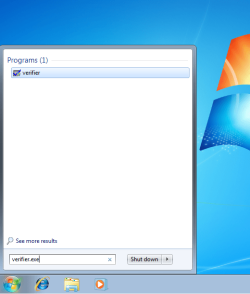
1. Start typing verifier.exe into the start menu, and open Verifier.
Driver Verifier - Enable and Disable-snip1.png
2. Select "Create custom settings (for code developers)", and hit Next.
Driver Verifier - Enable and Disable-snip2.png
3. Make sure Standard settings, Force pending I/O requests, and IRP Logging are selected, and hit Next.
Driver Verifier - Enable and Disable-snip3.png
4. Select "Select driver names From a list", and hit Next.
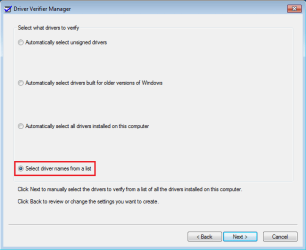
Driver Verifier - Enable and Disable-snip4.png
5. Click on "Provider" at the top to sort the list by manufacturer; select all drivers not provided by Microsoft Corporation.
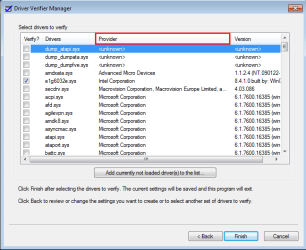
Driver Verifier - Enable and Disable-snip5.png
6. Press Next, and OK to the resulting window.
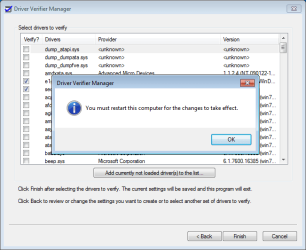
Driver Verifier - Enable and Disable-snip6.png
After a reboot, driver verifier should be enabled. Use your computer as you normally would, although expect frequent BSODs if there are driver issues. If the system doesn't crash after 24 hours, disable driver verifier.


OPTION TWO
To Disable Driver Verifier

1. Start typing verifier.exe into the start menu, and open Verifier.

Click image for larger version

Name:	snip1.PNG
Views:	1595
Size:	196.6 KB
ID:	88815


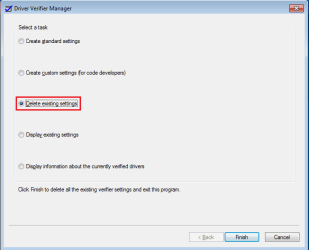
2. Select "Delete existing settings"

Driver Verifier - Enable and Disable-snip7.png


If you cannot get into Windows to turn off Verifier, try using Safe Mode.


Need more help? Try searching our extensive help and support site.
Loading
01 Aug 2010  
reventon


Nicely written!

My System SpecsSystem Spec

04 Aug 2010  
CarlTR6


Very well done, Jonathan. Good clear instructions with illustrations.
My System SpecsSystem Spec
04 Aug 2010  
theog


Nice one, JK.
My System SpecsSystem Spec
.


04 Aug 2010  
derekimo


Good one JK, I didn't know that was there.
My System SpecsSystem Spec
06 Aug 2010  
Jonathan_King


Thanks guys.
My System SpecsSystem Spec
08 Aug 2010  
EvilOzzmess


This didn't work for me. I applied all settings as described, it said I needed to restart so I told it "OK" and nothing happened. I manually restarted, and it just booted up normally without any special screen or status report for the verification... I'm having BSODs though so that could be it.

What should I do to try and force this to work?
My System SpecsSystem Spec
08 Aug 2010  
Jonathan_King


Quote   Quote: Originally Posted by EvilOzzmess View Post
This didn't work for me. I applied all settings as described, it said I needed to restart so I told it "OK" and nothing happened. I manually restarted, and it just booted up normally without any special screen or status report for the verification... I'm having BSODs though so that could be it.

What should I do to try and force this to work?
It's probably working, it just doesn't show anything.

Open a command prompt and enter verifier /query.
My System SpecsSystem Spec
22 Sep 2010  
Bali


HI JK! UMMM should i verify this drivers too? )= kinda need some help here x.x
Attached Files
File Type: rar Verifier.rar (101.1 KB, 1174 views)
My System SpecsSystem Spec
22 Sep 2010  
Jonathan_King


Yep, you want everything that doesn't say Microsoft, Unknown, or Macrovision.
My System SpecsSystem Spec
Comment

 Driver Verifier - Enable and Disable problems?


Tutorial Tools


Similar help and support threads for: Driver Verifier - Enable and Disable
Windows 7 Tutorial Category
Driver Verifier inquiry. Drivers
Solved Driver Verifier BSOD's BSOD Help and Support
Wireless Driver Enable & Disable itself Network & Sharing
Driver verifier crash BSOD Help and Support


All times are GMT -5. The time now is 04:10 AM.


Windows 7 Forums is an independent web site and has not been authorized,
sponsored, or otherwise approved by Microsoft Corporation.
"Windows 7" and related materials are trademarks of Microsoft Corp.
© Designer Media Ltd