
How to Use Safely Remove Hardware to Eject a Device in Windows 7 and Windows 8
Information
This tutorial will show you how to use Safely Remove Hardware in Windows 7, Windows 8/8.1, and Windows RT to safely shutdown and eject a storage device before just unplugging or disconnecting it to help prevent accidental data loss if data were still being copied or saved to or from the device. For example, if you have write caching enable on the device.
Tip
To have access to an external drive (ex: USB key) again after you have already ejected it using Safely Remove Hardware, you will just need to unplug it and plug it back in, or restart the PC.
Available Hotfix:
Available Hotfix:
Warning
It is not recommended to eject an internal drive. If you do, then restarting the computer will allow you to have access to it again.
Here's How:
1. Make sure that anything that is being copied or saved to or from the storage device that you want to eject has finished.
2. Click/tap on the Safely Remove Hardware notification area icon, and click/tap on the Eject drive option for the listed drive that you want to eject, and go to step 4 below. (see screenshot below)
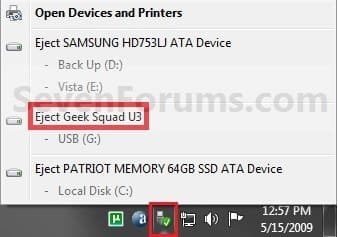
OR
3. Open Devices and Printers.
A) Right click or press and hold on the storage device that you want to eject, then click/tap on Eject. (see screenshot below)
OR
B) Right click or press and hold on your computer device (ex: WINDOWS7-PC), select Eject, then click/tap on a listed storage device that you want to eject. (see screenshot below)
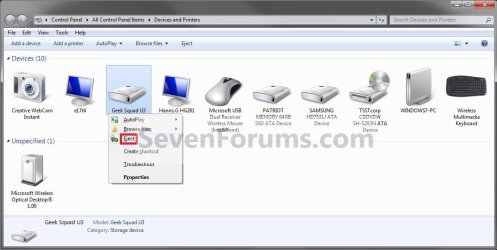
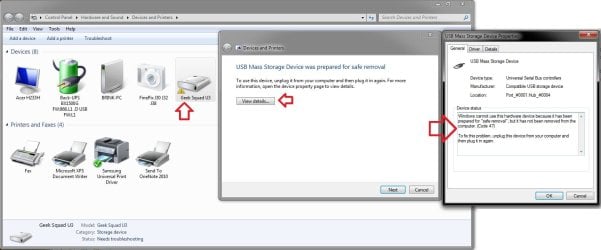
C) You will notice that your device will have a warning/alert overlay icon it now. This only indicates that you will not be able to use this device again unless you unplug it and then plug it in again. (see screenshot below)
4. When you see this notification message below, you can now safely remove the device from the computer. (see screenshot below)
NOTE: Some devices (ex: USB flash drives) may still have their light on even after you ejected it. As long as you got this Safe to remove hardware message below, it will be safe to disconnect your device even though the light is still on.
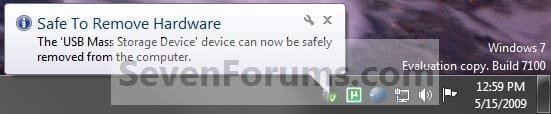
Tip
If you do not get the Safe to remove hardware notification message above, then for next time uncheck Always show all icons and notifications on the taskbar (click on link) box and click on OK. Afterwards check the Always show all icons and notifications on the taskbar box and click on OK. This will toggle these settings off an on to have it work again.
That's it,
Shawn
Related Tutorials
- How to Enable or Disable Write-Caching for a Storage Device in Windows 7
- How to Open Devices and Printers in Windows 7
- How to Create a "Safely Remove Hardware" Shortcut in Vista, Windows 7, and Windows 8
- How to Add "Safely Remove Hardware" to the Desktop Context Menu
- How to Disable "Do you want to scan and fix Removable Drive" Prompt in Windows
- How to Uninstall a Device in Windows 7 and Windows 8
Last edited:


