Windows 7 Forums


Windows 7: Gadgets - Restore Default Gadgets


Gadgets - Restore Default Gadgets

How to Restore the Default Windows 7 Gadgets
Published 16 May 2009
Published by

Featured Tutorial

Troubleshooting Windows 7 Failure to Boot


Portable OS - Carry your OS on an External Drive

How to Create a Portable OS on an External Drive

Secunia ONLINE Software Inspector

How to Scan for Common Software Vulnerabilities

Chrome GPU Hardware Acceleration - Turn On or Off

How to Turn GPU "Hardware Acceleration" On or Off in Chrome

User Profile - Customize During Installation

How to Customize Default User Profile in Audit Mode
How to Restore the Default Windows 7 Gadgets

information   Information
This will show you how to restore the desktop gadgets that come pre-installed with Windows 7.

EXAMPLE: Gadgets
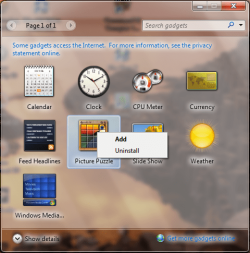
Note: Some gadgets already uninstalled.
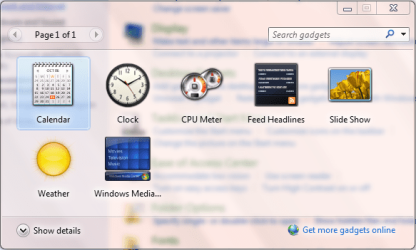
Gadgets - Restore Default Gadgets-desktop-gadgets.png


Here's How:

1. Open the Control Panel (category view), then click on Appearance & Personalization. (See screenshot below)
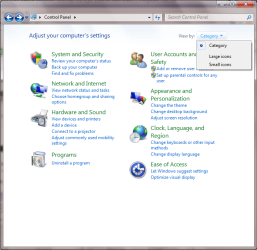
Gadgets - Restore Default Gadgets-control-panel-category-view.png


2. Click the 'Restore desktop gadgets installed with Windows' button as highlighted in the second image. (See screenshot below)
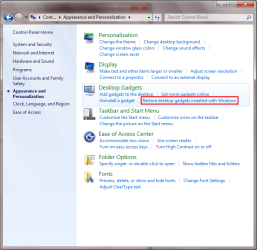
Gadgets - Restore Default Gadgets-control-panel-appearance-personalization.png


3. This will bring up the Desktop Gadgets window with a message stating 'All Windows and administrator installed gadgets have been restored' (See screenshot below)
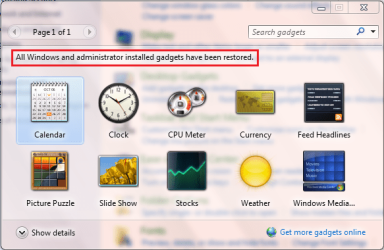
Gadgets - Restore Default Gadgets-desktop-gadgets-resored.png


4. When finished, just close the Desktop Gadgets and Control Panel windows.

That's all there is to it

Jeff


Need more help? Try searching our extensive help and support site.
Loading
06 Mar 2010  
JordanJP


thanks !

My System SpecsSystem Spec

01 Sep 2010  
oreo27


Will this remove all the other third party gadgets you installed?
My System SpecsSystem Spec
01 Sep 2010  
Airbot


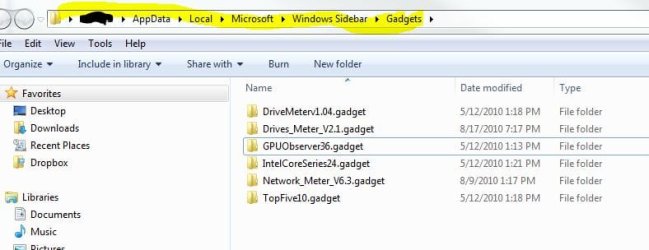
Shouldn't. It's only for the default ones pre-installed with Win 7. Third party ones are usually stored here:

Username- appdata (a hidden folder) local-Microsoft-Windows Sidebar-gadgets.

Gadgets - Restore Default Gadgets-3.jpg

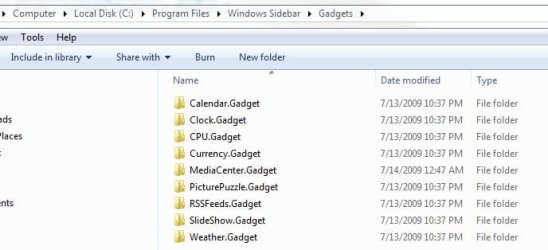
The default ones are here:

Program Files/Program Files (x86) -

Windows Sidebar-gadgets.

Gadgets - Restore Default Gadgets-4.jpg
My System SpecsSystem Spec
.


02 Sep 2010  
oreo27


Quote   Quote: Originally Posted by Airbot View Post
Shouldn't. It's only for the default ones pre-installed with Win 7. Third party ones are usually stored here:

Username- appdata (a hidden folder) local-Microsoft-Windows Sidebar-gadgets.


The default ones are here:

Program Files/Program Files (x86) -

Windows Sidebar-gadgets.
Okay. Thanks for the additional information mate. Rep Added
My System SpecsSystem Spec
02 Sep 2010  
Airbot


You're welcome, and thanks. Welcome aboard.
My System SpecsSystem Spec
26 Nov 2010  
edwardsangil

 
Thanks!

Thanks man! It solved my problem in sidebar gadgets..
My System SpecsSystem Spec
24 Jan 2011  
CarterW


I did what you and several other sites suggested but I am getting this message "There were no Windows or administrator gadgets to restore"
My System SpecsSystem Spec
24 Jan 2011  
CarterW


Now I ran the command prompt scan-now and got 'Windows Resource Protection did not find any integrity violations.' I'll subscribe to this thread if that's possible on this forum or website and I'll check back hopefully you all or someone will respond!
My System SpecsSystem Spec
24 Jan 2011  
Orbital Shark


Hi,

You could try disabling the gadgets then re-enabling them to see if that helps with your issue.

Gadgets - Enable or Disable


OS
My System SpecsSystem Spec
Comment

 Gadgets - Restore Default Gadgets problems?


Tutorial Tools


Similar help and support threads for: Gadgets - Restore Default Gadgets
Windows 7 Tutorial Category
Can't browse Gadgets on the MS Personalization/gadgets site Gadgets
restore windows 7 gadgets Gadgets
Gadgets not opening, cant restore but some are still Gadgets
Gadgets - Allow or Prevent Installation of Unsigned Gadgets Tutorials
Gadgets - Allow or Prevent User Installed Gadgets Tutorials


All times are GMT -5. The time now is 05:12 PM.


Windows 7 Forums is an independent web site and has not been authorized,
sponsored, or otherwise approved by Microsoft Corporation.
"Windows 7" and related materials are trademarks of Microsoft Corp.
© Designer Media Ltd