
Windows 7 Forums


Windows 7: Favorites - Restore Default Favorite Links in Navigation Pane


Favorites - Restore Default Favorite Links in Navigation Pane

How to Restore the Default Favorite Links in Windows 7 Navigation Pane
Published 15 Aug 2010
Published by

Featured Tutorial

Make Windows 7 bootable after motherboard swap

Paragon P2P Adjust OS - Make Windows 7 bootable after motherboard swap

User Profile - Customize During Installation

How to Customize Default User Profile in Audit Mode

Clean Reinstall - Factory OEM Windows 7

How to Clean Reinstall a Factory OEM Windows 7

Online Scanners - Scan Suspicious Files on your PC

How to Scan Suspicious Files using Online Scanners

Peppermint3 - Create Live CD/DVD/USB To Use For Emergency Backup

How to Perform an Emergency Data Backup When Windows 7 Will Not Boot
How to Restore the Default Favorite Links in Windows 7 Navigation Pane

information   Information
This will show you how to restore the default Desktop, Downloads, and Recent Places favorite links in Favorites in the Windows Explorer navigation pane.

Note   Note
If Favorites is completely empty, then also see How to Fix Empty Favorites in Windows Explorer Navigation Pane to see if this may be the issue instead.


EXAMPLE: Default Favorites
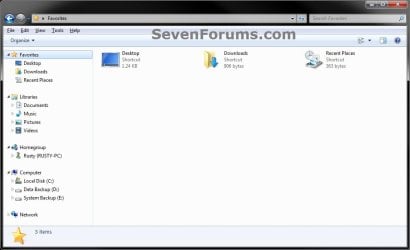
Favorites - Restore Default Favorite Links in Navigation Pane-favorites.jpg


OPTION ONE
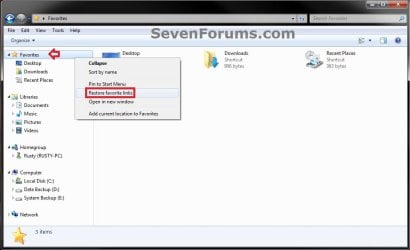
To Use "Restore favorite links" Context Menu Item
1. Open Windows Explorer.

2. Right click on Favorites in the navigation pane, and click on Restore favorite links. (see screenshot below)
Favorites - Restore Default Favorite Links in Navigation Pane-option1.jpg


OPTION TWO
To Download and Manually Restore Default Favorite Links
1. Click on the download button below to download the favorite link(s) that you are missing
A) Desktop
download
B) Downloads
download
C) Recent Places
download
2. Save the .zip file(s) to your Desktop.

3. Right click on each of the downloaded .zip files, click on Extract all, then extract the favorite link to your Desktop.

4. Unblock the extracted favorite link.

5. In Windows Explorer navigate to your C:\Users\(user-name)\Links folder. (see screenshot below)
Favorites - Restore Default Favorite Links in Navigation Pane-option2.jpg
6. Cut and Paste (move) the extracted favorite links to inside the C:\Users\(user-name)\Links folder. (see screenshot above)
That's it,
Shawn


Need more help? Try searching our extensive help and support site.
Loading
27 Jan 2012  
calmuse


Were it not for people like you, the rest of us would shoot ourselves. Thank you for taking the time to be so helpful - as a relative newb, I was able to follow your instructions (elsewhere, can't find the tutorial now) and change the registry key so the my links folder was restored to the navigation pane favourites. I am most grateful to you.

My System SpecsSystem Spec

27 Jan 2012  
Brink


You're most welcome Calmuse, and welcome to Seven Forums. Thank you for the kind words.
My System SpecsSystem Spec
17 Nov 2012  
elavarasan


Dear friends,
The solution provided in this tutorial is just amazing!! my Recent Places link was missing in windows explorer view for about a month and tried many tips shared in the web. nothing worked and got frustrated. This tutorial and the zipped binary file did the majic and I got my Recent Places folder intact!. Thanks a lot to the solution provider! :-) and sevenforums
elavarasan
My System SpecsSystem Spec
.


17 Nov 2012  
Brink


You're most welcome elavarasan, and welcome to Eight Forums. I'm glad it was able to help.
My System SpecsSystem Spec
29 Nov 2012  
dirk1234

 
empty favorites

Hi, the favorietes icon at the top left of my windows explrer pane is empty. Right clicking the icon does not show properties, but: expand/sort by name/open in new window/restore favorite links/add current locatio to favorites.

So i cannot track down this icon to a folderlocation (nice~). The icon it is supposed to break down in recent places, links etc. The 'recent items' is what i am interested in, because i frequently used it.

I do have a favorites folder C:\Users\<username>\Favorites, which has a folder favorites bar and is furtehr empty.

The recent items are tracked in my startmenu.

I reset all file locations and registry entries i could find in 7 forums, no results.

Any ideas? What would help is if i could track down the logic in windows how to display the favoriters i mentio, so i can fix it.

Thx,
Dirk
windows7
My System SpecsSystem Spec
29 Nov 2012  
Brink


Hello Dirk, and welcome to Seven Forums.

Have you already tried the steps in either or both options in the tutorial?
My System SpecsSystem Spec
29 Nov 2012  
dirk1234


Hi Brink,
Yes i did, nothing changed.
See also picture.
Thnaks,
Dirk
Attached Thumbnails
Favorites - Restore Default Favorite Links in Navigation Pane-capture.png  
My System SpecsSystem Spec
29 Nov 2012  
Brink


Ok. Sorry, but I have to ask just to make sure.

Did you also try what was in the blue Note box at the top of the tutorial?
My System SpecsSystem Spec
14 Dec 2012  
dirk1234


Hi Brink,
Yes, checked that too.
As i could not find any way to pin-oint the problem, i decided to go nuclear and reinstall a previous version of windows7, including all the updates. That worked. Quite some time for a little nuisance like this, but now i am at peace.
So, issue closed.
Thanks,
Dirk
My System SpecsSystem Spec
Comment

 Favorites - Restore Default Favorite Links in Navigation Pane problems?


Tutorial Tools


Similar help and support threads for: Favorites - Restore Default Favorite Links in Navigation Pane
Windows 7 Tutorial Category
Favorites - Add or Remove from Navigation Pane Tutorials
Favorites Empty in Navigation Pane - Fix Tutorials
Favorites in left pane does not display all Favorite folders General Discussion
Favorites - Links - Add or Remove in Navigation Pane Tutorials
Navigation Pane Customization - Hide Favorites etc. . . Customization


All times are GMT -5. The time now is 02:06 PM.


Windows 7 Forums is an independent web site and has not been authorized,
sponsored, or otherwise approved by Microsoft Corporation.
"Windows 7" and related materials are trademarks of Microsoft Corp.
© Designer Media Ltd