
How to Enable or Disable the Thumbnail Cache in Windows
Information
By default Windows stores the images for thumbnail previews in cache memory so that it can redisplay the images quickly each time you reopen a folder in Windows Explorer. However, with thumbnail caching enabled by default, this may pose a security issue with some people or companies since all of the thumbnail picture view images stored in the thumbnail cache can be view by anyone.
This will show you how to enable or disable thumbnail views from being cached in thumbs_*.db files, and force Vista, Windows 7, or Windows 8 to load the thumbnail picture views each time you reopen a folder.
You must be logged in as an administrator to be able to do the steps in this tutorial.
This will show you how to enable or disable thumbnail views from being cached in thumbs_*.db files, and force Vista, Windows 7, or Windows 8 to load the thumbnail picture views each time you reopen a folder.
You must be logged in as an administrator to be able to do the steps in this tutorial.
Note
The thumbnail cache thumbs_*.db database files are stored at the hidden system folder below:
C:\Users\User-Name\AppData\Local\Microsoft\Windows\Explorer
C:\Users\User-Name\AppData\Local\Microsoft\Windows\Explorer
Warning
When the thumbnail cache is disabled, it may cause a delay when opening folders while the thumbnail picture views are loaded from the hard disk instead of the thumbnail cache.
Tip
If you like you can use the free ThumbCacheViewer program to automatically detect the thumbnail caches present on your computer, and lets you view all the thumbnail images in each cache.
This way you can verify that your thumbnails are gone or not.

This way you can verify that your thumbnails are gone or not.
OPTION ONE
To Enable or Disable Thumbnail Caching using a REG File
NOTE: This option is recommended to use and is more thorough than OPTION TWO below.
1. To Enable Thumbnail Caching for All Users
A) Click/tap on the Download button below to download the file below.
Enable_Thumbnail_Cache.reg
Download
B) Go to step 3.
2. To Disable Thumbnail Caching for All Users
A) Click/tap on the Download button below to download the file below.
Disable_Thumbnail_Cache.reg
Download
3. Save the .reg file to your desktop.
4. Double click/tap on the downloaded .reg file to merge it.
6. Click/tap on Run, Yes, Yes, and OK when prompted.
7. Log off and log on, or restart the computer to apply.
8. When done, you can delete the downloaded .reg file if you like.
OPTION TWO
To Enable or Disable Thumbnail Caching in Group Policy
1. Open the all users, specific users or groups, or all users except administrators Local Group Policy Editor for how you want this policy applied.
2. In the left pane, click/tap on the arrow to expand User Configuration, Administrative Templates, Windows Components, and on Windows Explorer (Windows 7) or File Explorer (Windows 8). (See screenshot below)
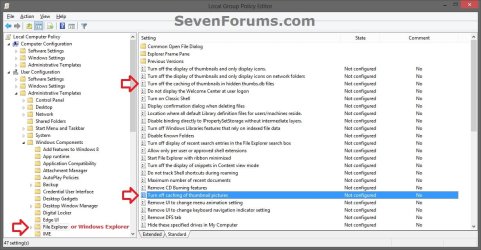
3. In the right pane of Windows Explorer (Windows 7) or File Explorer (Windows 8), double click/tap on Turn off caching of thumbnail pictures to edit it. (See screenshot above)
4. To Enable Thumbnail Caching
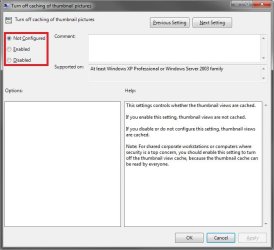
A) Select (dot) Not Configured or Disabled. (See screenshot below step 6)
B) Go to step 6.
5. To Disable Thumbnail Caching
A) Select (dot) Enabled. (See screenshot below step 6)
6. Click/tap on OK. (See screenshot below)
7. In the right pane of Windows Explorer (Windows 7) or File Explorer (Windows 8), double click/tap on Turn off the caching of thumbnails in hidden thumbs.db files to edit it. (see screenshot below step 2)
8. Do step 4 or 5 above, and go to step 9 below.
9. Close the Local Group Policy Editor. (See screenshot below step 2)
10. Log off and log on, or restart the computer to apply.
That's it,
Shawn
Related Tutorials
- How to Clear and Reset the Thumbnail Cache in Windows
- How to Enable or Disable Explorer Thumbnail Previews in Windows 7 and Windows 8
- Add "Enable/Disable Thumbnails" to Context Menu in Vista, Windows 7, and Windows 8
- How to Change the Thumbnail Previews Border in Windows 7
- How to Stop and Prevent Windows from Deleting the Thumbnail Cache
Attachments
Last edited:


