
How to Clear and Reset Thumbnail Cache in Windows
Information
By default, Windows stores the images for thumbnail previews in cache memory so that it can redisplay the images quickly each time you reopen a folder in Windows Explorer (Vista and Windows 7) or File Explorer (Windows 8).
This tutorial will show you how you to clear and reset the thumbnail cache to force Windows to reload the thumbnail picture views into the cache again as needed as you open folders.
This tutorial will show you how you to clear and reset the thumbnail cache to force Windows to reload the thumbnail picture views into the cache again as needed as you open folders.
Note
The thumbnail cache .db files are located in the hidden system folder location below:
C:\Users\User-Name\AppData\Local\Microsoft\Windows\Explorer
You may want to clear the thumbnail cache if the Windows Explorer thumbnail pictures have become corrupted and not displaying properly, or the thumbnail cache file has become to large and you want to clear some hard disk space.
C:\Users\User-Name\AppData\Local\Microsoft\Windows\Explorer
You may want to clear the thumbnail cache if the Windows Explorer thumbnail pictures have become corrupted and not displaying properly, or the thumbnail cache file has become to large and you want to clear some hard disk space.
CONTENTS:
- Option One: To Clear and Reset Thumbnail Cache using Disk Cleanup
- Option Two: To Clear and Reset Thumbnail Cache using a BAT File
OPTION ONE
To Clear and Reset Thumbnail Cache using Disk Cleanup
1. Open Disk Cleanup.
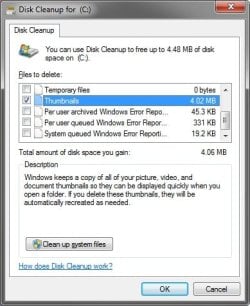
2. Check the Thumbnails box, and click/tap on OK. (see screenshot below)
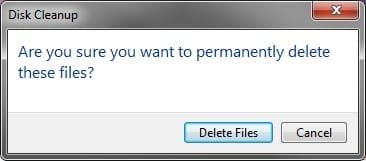
3. Click/tap on the Delete Files button. (See screenshot below)
4. Disk Cleanup will now clear the thumbnail cache and close.
OPTION TWO
To Clear and Reset Thumbnail Cache using a BAT File
1. Click on the Download button below to download the BAT file below.
Clear_and_Reset_Thumbnail_Cache.bat
Download
2. Save the .bat file to your desktop.
3. Run the .bat file.
4. If prompted, click on Run.
NOTE: If you like, you can stop getting the Run prompt by unblocking the downloaded .bat file.
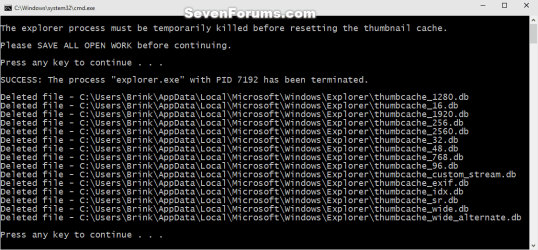
5. Follow the instructions in the command prompt to clear and reset your thumbnail cache.
That's it,
Shawn
Related Tutorials
- How to Enable or Disable the Thumbnail Cache in Windows
- How to Enable or Disable Explorer Thumbnail Previews in Windows 7 and Windows 8
- Add "Enable/Disable Thumbnails" to Context Menu in Vista, Windows 7, and Windows 8
- How to Change the Thumbnail Previews Border in Windows 7
- How to Rebuild the Icon Cache in Windows
- How to Reset the Favorites Favicons in Vista and Windows 7
- How to Stop and Prevent Windows from Deleting the Thumbnail Cache
Attachments
Last edited:


