| Windows 7: Partition : Recover Space Used by an Older OS Partition : Recover Space Used by an Older OS How to Recover A Partition Used by an Older OS in a Dual Boot
Published 07 Sep 2010
|  Published by | | |
 Featured Tutorial | | | How to Recover the First Partition on a HDD Used by an Older Operating System into the New OS in a Dual Boot Configuration
Most dual or multi boot setups have an older Operating System (OS) like Windows XP in the first position on the Hard Disk Drive (HDD) and a second, newer OS like Windows 7 in the second position on the HDD and when the time comes to remove the older OS partition, Windows is not capable of recovering that space into the second partition natively, a third party program must be used, this will show the best way to accomplish this from start to finish.  Information
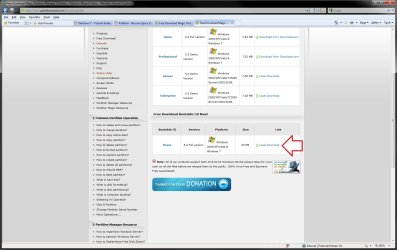
Partition Wizard is a very reliable tool for your tool kit and it is a free download for home / personal use, first download the Partition Wizard Bootable Disk (PWBD) ISO file to the desktop, be sure to get the PWBD and not the installed version; scroll down to see the download link for the Bootable CD ISO file at this link below. Partition Wizard Free Bootable Disk
Then burn the ISO file to a CD, it was designed for use and works best from a CD rather than a DVD  Warning
As with anything that makes changes to the Windows structure there is always the chance for an error to occur, it would be advisable to make reliable backups to the media of your choice of any important data, i.e. pictures, music or documents, that you would not want to lose before you make any changes to your system, it is always better to be safe than sorry. Once you have made backups and moved all the important data you need to save from the old Windows and you want to remove the older OS partition completely, it's not all that complicated a process. Let's get started!
 Step One  Mark Windows 7 as Active
In the snip below of Windows 7's disk management you can see that XP, on the first partition on the HDD is marked as "System, Active" if that partition is just removed as it is it will cause Windows 7 to not be able to boot-up at all, as the "System, Active" partition is where all the boot files for the dual boot are stored; a new set of boot files for Windows 7 has to be created to the W_7 partition before the XP partition can be removed. click any image to enlarge You will need to mark the Windows 7 partition as "Active" so that the repair procedure will know where you want the new system volume, (the partition the boot files that are needed to start Windows are stored on), then you will need to run 3 separate startup repairs with a system restart between each repair so that Windows will create the new boot files to the new "Active" Windows 7 partition.
View these tutorials below that explain the process in greater detail and if assistance is needed post a question in this same tutorial and we will assist you. How to Run a Startup Repair in Windows 7 Startup Repair - Run 3 Separate Times Be advised: Once Windows 7 is "System, Active" and the repairs have been run and Windows 7 is booting good on its own, Windows XP will no longer boot-up so make sure you have everything you need from that partition before you do this step.
If you should find yourself needing to retrieve something from the XP partition after the repairs have been done, the "Move To" option in this tutorial can be used to great effect to move personal data from XP to Windows 7 in Windows Explorer.
 Step Two  Wipe the XP Partition
In the BIOS set the boot order to boot first from the Optical Disk Drive (ODD), insert the Partition Wizard Bootable Disk (PWBD) and re-start the PC. It'll take a minute or two for it to setup with no input from the user needed.
Once the program has started you can remove the disk from the ODD.
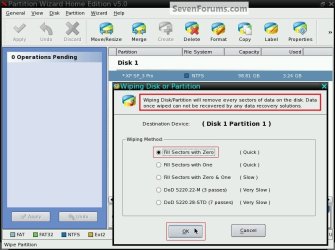
This will show how to do a partition specific wipe, also known as a "secure erase" to the Windows XP partition, this step will over-write every sector on the partition with zeroes, effectively 'removing' all the old XP code, along with the XP drivers and any other data on the partition making the best possible 'clean' space to recover into the Windows 7 partition.
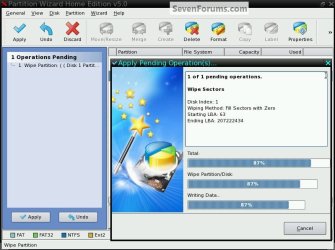
Once this procedure has been done any data left on the partition will be gone and not even the best data recovery programs will be able to retrieve it. 1) In the Partition Wizard program, right click the XP partition (the first partition) and click "Wipe Partition", in the dialog box that opens select the type of wipe you want to run and click OK.  2) In the left pane at the "Operations Pending" column click Apply then Yes to the 'conformation' dialog box. 3) You will get a progress graph, when it is finished click OK for the 'successful' dialog box.
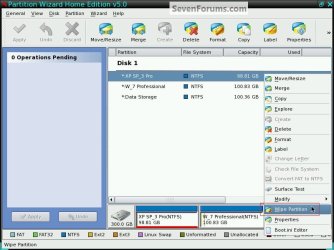
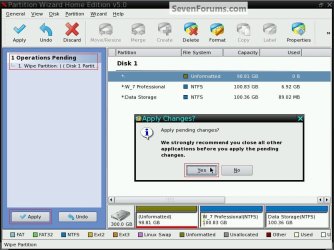
Depending on the size partition you do the wipe to it could take a considerable amount of time, to wipe this 98+GB partition it took just over 30 minutes, just relax and let it finish. 4) It would be a good idea to boot into Windows 7 to let it recognize the changes to the partition structure and make sure all is well before you go on to the next step.
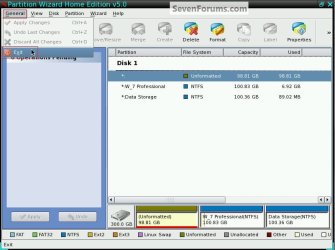
Remove the PWBD from the ODD and at the upper left corner at "General" click "Exit" to close the Partition Wizard program and start Windows 7.
 Step Three  Recover the Space
Put the PWBD back into the ODD and restart the PC.
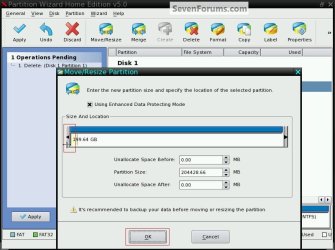
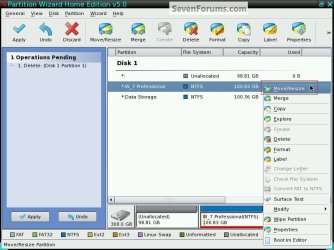
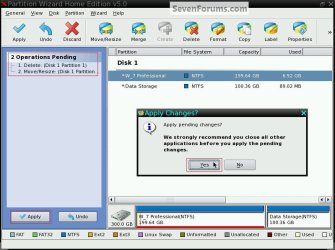
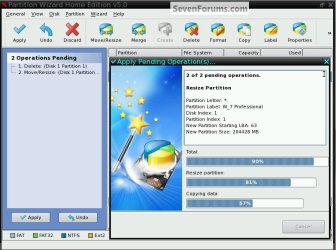
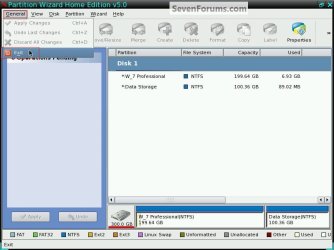
There are 2 steps to do here but they can both be done in one operation so read through this section first to get an idea before you get started. 1) Right click the space from the old XP partition and click delete, you will see an entry added to the "Operations Pending" column but don't click apply yet. 2) Now right click the Windows 7 partition and click "Move/Resize", in the dialog box that opens click and hold to drag the left slider so that there is no "Unallocated Space" before or after the Windows 7 partition and click OK.  3) Now in the left pane "Operations Pending" column click Apply and then Yes to the 'conformation' dialog box. 4) You will get a progress graph, when it finishes click OK for the 'successful' box. That's it, you're finished with the Partition Wizard program, remove the PWBD from the ODD and at the upper left corner at "General" click "Exit" to close the PW program and start Windows. Enjoy! 
| | | Need more help? Try searching our extensive help and support site.
Loading | |
08 Sep 2010
|
| | |
Outstanding tutorial. Would have saved me hours of typing in the past year.
Anyone who uses this, be sure to rep Barefoot as he spent a lot of time getting this pulled together. | My System Specs |
| |
08 Sep 2010
|
| | |
Thanks Greg, all the time you put in here is appreciated also! | My System Specs | | System Manufacturer/Model Number * BFK Customs * OS W 7 64-bit Ultimate CPU Intel Q9550 Yorkfield Motherboard ASUS P5Q Pro Memory 8GB Dominator 8500C5D Graphics Card ATI : XFX 5870 Sound Card Realtek HD Audio 7-1 Monitor(s) Displays 1x 47" LCD HDMI & 3x 26" LCD HDMI Screen Resolution 1920x1080P & 1920x1200 Keyboard Microsoft 500 Mouse Razer Diamondback 3G PSU Corsair 620HX Case Cooler Master RC-690 Cooling Tuniq Tower 120, 2x 140mm and 3x 120mm case fans Hard Drives 1x 80GB Intel X25-M G2 SSD : 1x 500GB & 1x 640GB WD Caviar Black(s) Internet Speed 14 Mb/s Other Info 1x Koutech 3Gb/s SATA HDD Hot Swap Rack |
09 Sep 2010
|
| | |
Just had a look through Ted and I'm very impressed, thank you this will make my job very easy when I start the process, although I don't know exactly when that will be soon though.
A very big thank you, it wont let me rep you, | My System Specs | | Computer type PC/Desktop System Manufacturer/Model Number Zoostorm Desktop/ Asus K55A Notebook PC OS Windows 7 Ultimate SP1 32 bit/Windows 8 64bit CPU Intel Core 2 Duo E4600 @ 2400 MHz/Intel B820,1.7GHz Motherboard Foxconn 45CMX/45GMX/45CMX-K/Asus Memory 2048 MB (2 x 1024 DDR2-SDRAM)/8GB 2 x 4GB DDR3 Graphics Card Intel Corp 82945G Integrated Graphics Controller/Intel Sound Card Onboard Realtek/Onboard Monitor(s) Displays Hanns.G HH221 22" inches Widescreen/Asus 15.6 Screen Resolution 1920 x 1080/1366 x 768 Keyboard Microsoft Natural Ergonomic Keyboard 4000 (UK)/Inbuilt Mouse Microsoft Optical Wheel Mouse/Touchpad Hard Drives ExcelStor (250GB)/Asus Internet Speed Just under 4MB download it's ADSL. Antivirus MSE/MSE Browser IE10/IE10 Other Info Epson Stylus SX415 All-in-one Printer,
Seagate Expansion 500GB External Desktop Drive
USB2 HDD Enclosure |
09 Sep 2010
|
| | |
Hello Joan.
Don't be concerned about the rep, I just wanted to help you, it's my pleasure.
No need to hurry, just take your time and if you have any questions post them here at the tutorial and I'll answer. | My System Specs | | System Manufacturer/Model Number * BFK Customs * OS W 7 64-bit Ultimate CPU Intel Q9550 Yorkfield Motherboard ASUS P5Q Pro Memory 8GB Dominator 8500C5D Graphics Card ATI : XFX 5870 Sound Card Realtek HD Audio 7-1 Monitor(s) Displays 1x 47" LCD HDMI & 3x 26" LCD HDMI Screen Resolution 1920x1080P & 1920x1200 Keyboard Microsoft 500 Mouse Razer Diamondback 3G PSU Corsair 620HX Case Cooler Master RC-690 Cooling Tuniq Tower 120, 2x 140mm and 3x 120mm case fans Hard Drives 1x 80GB Intel X25-M G2 SSD : 1x 500GB & 1x 640GB WD Caviar Black(s) Internet Speed 14 Mb/s Other Info 1x Koutech 3Gb/s SATA HDD Hot Swap Rack |
10 Sep 2010
|
| | |
A quick question Ted, I'd already got the ISO download for Partition Wizard but it was stored in a zip file, I told the program to extract the files to my desktop and it put 2 folders there, one was boot.image and the other, sorry can't remember the name now but that is the one I burnt to CD and it contains 4 files.
Not sure if that was right and what the purpose of the other folder is, I can always do it again if I got it wrong | My System Specs | | Computer type PC/Desktop System Manufacturer/Model Number Zoostorm Desktop/ Asus K55A Notebook PC OS Windows 7 Ultimate SP1 32 bit/Windows 8 64bit CPU Intel Core 2 Duo E4600 @ 2400 MHz/Intel B820,1.7GHz Motherboard Foxconn 45CMX/45GMX/45CMX-K/Asus Memory 2048 MB (2 x 1024 DDR2-SDRAM)/8GB 2 x 4GB DDR3 Graphics Card Intel Corp 82945G Integrated Graphics Controller/Intel Sound Card Onboard Realtek/Onboard Monitor(s) Displays Hanns.G HH221 22" inches Widescreen/Asus 15.6 Screen Resolution 1920 x 1080/1366 x 768 Keyboard Microsoft Natural Ergonomic Keyboard 4000 (UK)/Inbuilt Mouse Microsoft Optical Wheel Mouse/Touchpad Hard Drives ExcelStor (250GB)/Asus Internet Speed Just under 4MB download it's ADSL. Antivirus MSE/MSE Browser IE10/IE10 Other Info Epson Stylus SX415 All-in-one Printer,
Seagate Expansion 500GB External Desktop Drive
USB2 HDD Enclosure |
10 Sep 2010
|
| | |
Hello Joan,
The download link I clicked on below only downloaded a pwh52.iso file. Is this the one you used? http://www.partitionwizard.com/download.html | My System Specs | | Computer type PC/Desktop System Manufacturer/Model Number Self built custom OS 64-bit Windows 7 Ultimate SP1 & Windows 8 Enterprise CPU Intel i7-3930K 3.2 Ghz (O/C 4 Ghz) Motherboard ASRock X79 Extreme11 Memory 32 GB (8GBx4) G.SKILL DDR3 Quad PC3-19200 2400MHz Graphics Card Sapphire HD5870 Eyefinity 6 2GB Sound Card SB Recon 3Di Integrated Chip Monitor(s) Displays 3x 27" Asus VE278Q Screen Resolution 1920x1080 Keyboard Logitech Cordless Desktop MX 5500 Revolution Mouse Logitech Cordless Desktop MX 5500 Revolution PSU OCZ Series Gold OCZZ1000M 1000W Case Thermaltake Level 10 GT Snow Edition Cooling Corsair Hydro H100 Hard Drives 256GB OCZ Vector
160GB OCZ RevoDrive X2
2 x 1TB Samsung HDD HD154UI SATA Internet Speed 50 Mb/s Download and 2 Mb/s Upload Other Info Microsoft LifeCam Cinema
Lite-On iHBS212 12x BD Writer
Samsung CLX-3175FW Printer
Netgear WNDR3800 Router
Motorola SBG6580 Cable Modem
2x APC Back-UPS XS 1500 |
10 Sep 2010
|
| | |
Thanks Shawn.
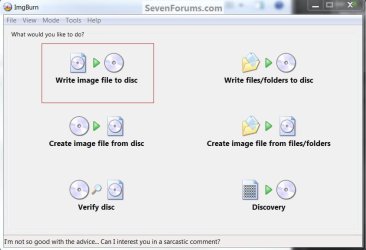
Joan then use Burn Disc Image - ISO or IMG file
or ImgBurn to burn it to a CD at no more than 4x speed with a verify. IngBurn Free ISO Burner  | My System Specs | | System Manufacturer/Model Number * BFK Customs * OS W 7 64-bit Ultimate CPU Intel Q9550 Yorkfield Motherboard ASUS P5Q Pro Memory 8GB Dominator 8500C5D Graphics Card ATI : XFX 5870 Sound Card Realtek HD Audio 7-1 Monitor(s) Displays 1x 47" LCD HDMI & 3x 26" LCD HDMI Screen Resolution 1920x1080P & 1920x1200 Keyboard Microsoft 500 Mouse Razer Diamondback 3G PSU Corsair 620HX Case Cooler Master RC-690 Cooling Tuniq Tower 120, 2x 140mm and 3x 120mm case fans Hard Drives 1x 80GB Intel X25-M G2 SSD : 1x 500GB & 1x 640GB WD Caviar Black(s) Internet Speed 14 Mb/s Other Info 1x Koutech 3Gb/s SATA HDD Hot Swap Rack |
10 Sep 2010
|
| | |
Shawn no I didn't I'd already got the ISO back in May stored in my Document folder, it was in a PowerArchiver Zip file.
I'm going to forget that download and do a new one from the link you show and Ted I have Ashampoo Burning Studio on here plus what 7 will do and probably have a copy of that Image burn because I think that's what I used when burning the ISO of Windows 7 in the beta days.
This will probably happen over the weekend, I'll be shutting down soon so don't have time now, I'll get there slow but sure | My System Specs | | Computer type PC/Desktop System Manufacturer/Model Number Zoostorm Desktop/ Asus K55A Notebook PC OS Windows 7 Ultimate SP1 32 bit/Windows 8 64bit CPU Intel Core 2 Duo E4600 @ 2400 MHz/Intel B820,1.7GHz Motherboard Foxconn 45CMX/45GMX/45CMX-K/Asus Memory 2048 MB (2 x 1024 DDR2-SDRAM)/8GB 2 x 4GB DDR3 Graphics Card Intel Corp 82945G Integrated Graphics Controller/Intel Sound Card Onboard Realtek/Onboard Monitor(s) Displays Hanns.G HH221 22" inches Widescreen/Asus 15.6 Screen Resolution 1920 x 1080/1366 x 768 Keyboard Microsoft Natural Ergonomic Keyboard 4000 (UK)/Inbuilt Mouse Microsoft Optical Wheel Mouse/Touchpad Hard Drives ExcelStor (250GB)/Asus Internet Speed Just under 4MB download it's ADSL. Antivirus MSE/MSE Browser IE10/IE10 Other Info Epson Stylus SX415 All-in-one Printer,
Seagate Expansion 500GB External Desktop Drive
USB2 HDD Enclosure |
10 Sep 2010
|
| | |
Just take your time and have fun, no need to hurry. | My System Specs | | System Manufacturer/Model Number * BFK Customs * OS W 7 64-bit Ultimate CPU Intel Q9550 Yorkfield Motherboard ASUS P5Q Pro Memory 8GB Dominator 8500C5D Graphics Card ATI : XFX 5870 Sound Card Realtek HD Audio 7-1 Monitor(s) Displays 1x 47" LCD HDMI & 3x 26" LCD HDMI Screen Resolution 1920x1080P & 1920x1200 Keyboard Microsoft 500 Mouse Razer Diamondback 3G PSU Corsair 620HX Case Cooler Master RC-690 Cooling Tuniq Tower 120, 2x 140mm and 3x 120mm case fans Hard Drives 1x 80GB Intel X25-M G2 SSD : 1x 500GB & 1x 640GB WD Caviar Black(s) Internet Speed 14 Mb/s Other Info 1x Koutech 3Gb/s SATA HDD Hot Swap Rack Partition : Recover Space Used by an Older OS problems? All times are GMT -5. The time now is 04:11 AM. | |