
Windows 7 Forums Search
Welcome to Windows 7 Forums. Our forum is dedicated to helping you find solutions with any problems, errors or issues you are experiencing with Windows 7. The Windows 7 forum also covers news and updates and has an extensive Windows 7 tutorial section that covers a wide range of tips and tricks.


Windows 7 - Office 2010 - Perform Repairs


Office 2010 - Perform Repairs

How To Perform Repairs in Microsoft Office 2010
Published by Capt.Jack Sparrow
09-12-2010
Default Office 2010 - Perform Repairs

How To Perform Repairs in Microsoft Office 2010

information   Information
There are two methods in Office® 2010 to perform repairs and diagnostics - manually and automatically. These methods are described below


OPTION ONE

Manually Run Repairs
1. Close all the Office® 2010 applications.

2. Open Windows® Control Panel from the Start menu and double-click Add or Remove Programs (Windows® XP, Windows® Server 2003) or Programs and Features (Window Vista®, Windows® 7, Windows® Server 2008).

3. On the list of programs, select Microsoft Office 2010, and click Change. For Window Vista®, Windows® 7, Windows® Server 2008, you would right-click on the program select Change.

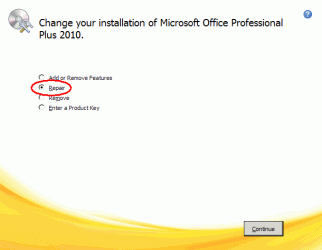
4. On the change screen, select Repair, and click Continue.
Office 2010 - Perform Repairs-27079_1.gif
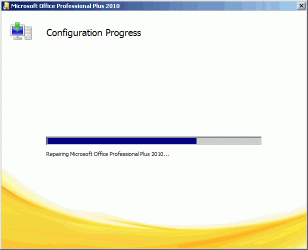
5. The repair process will begin. This process may take several minutes.
Office 2010 - Perform Repairs-27079_3.gif
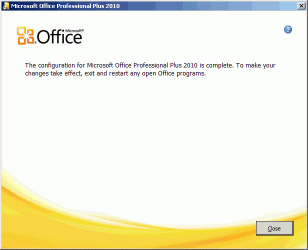
6. When the repair is complete, the following dialog box will appear. Click Close, then reboot the computer to complete the process.
Office 2010 - Perform Repairs-27079_4.gif


OPTION TWO

Automatic Diagnostic


You can configure Office to periodically download a diagnostic utility from Microsoft® to check for system problems that may affect Office® 2010. Follow the steps below to set this up:
1. From any Microsoft® Office® 2010 application, click the File tab, then click Options.

2. On the Options screen, select Trust Center, then click Trust Center Settings.

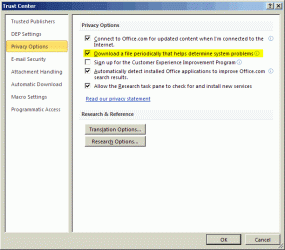
3. From the Trust Center screen, select Privacy Options on the left.

4. Under the Privacy Options section on the right, check the box for Download a file periodically that helps determine system problems.

5. Click OK to save these settings.
Office 2010 - Perform Repairs-27079_2.gif
Hope this helps,

Captain
Published by
Capt.Jack Sparrow's Avatar
Crash Dump Analyst


Join Date: Nov 2009
Posts: 4,524

Tutorial Tools
09-13-2010   #1
Dinesh


Windows 7 Ultimate x64


That's great Shyam.

My System SpecsSystem Spec
09-13-2010   #2
Dave76


Windows 7 Ult x64 - SP1/ Windows 8 CP x64


Another great tutorial, excellent reference, thanks.
My System SpecsSystem Spec
09-13-2010   #3
derekimo


Windows 7 Pro 64 SP1


Nice work Shyam, well done!
My System SpecsSystem Spec
.


09-13-2010   #4
CarlTR6


Windows 7 Ultimate 32 bit


Nice work, Shyam. I will probably make use of this when I upgrade.
My System SpecsSystem Spec
09-13-2010   #5
Capt.Jack Sparrow


Windows 7 Ultimate, Ubuntu 10.04 LTS - the Lucid Lynx


Thanks guys !
My System SpecsSystem Spec
06-23-2011   #6
gogreen


Windows 7 Home Premium x64 SP 1


I was just looking for this the other day! Nice tutorial. I have a few questions, if I may:

What is the file that is periodically downloaded? What does it actually do, and how does it work? Also, can the file be downloaded manually, and can the diagnostic it performs be started manually?

Thanks.
Attached Thumbnails
Office 2010 - Perform Repairs-download.png  
My System SpecsSystem Spec
06-23-2011   #7
Capt.Jack Sparrow


Windows 7 Ultimate, Ubuntu 10.04 LTS - the Lucid Lynx


Hello there,

Honestly I'm not sure what it downloads periodically but enabling that option try to repair Outlook automatically instead of we manually initiating it. Unlike other Office versions we can't run the Diagnostic manually. Microsoft removed that option which I'm not very happy about
My System SpecsSystem Spec
06-23-2011   #8
gogreen


Windows 7 Home Premium x64 SP 1


Quote:
Unlike other Office versions we can't run the Diagnostic manually. Microsoft removed that option which I'm not very happy about
Agreed. I did a repair installation when MS Word would not retain a setting I had placed. That seems to have fixed the problem. Still, I had checked downloading the diagnostic, but it obviously did not catch this problem. So I was wondering what this mysterious utility is and if it can be run manually.
My System SpecsSystem Spec
Comment

 Office 2010 - Perform Repairs problems?


Tutorial Tools


Similar Threads for: Office 2010 - Perform Repairs
Windows 7 Tutorial Category
Microsoft Office 2010/ Replace Office 2010 Microsoft Office
Office 2010(Win7, 64bit) won't open Office 2007(WinXPr3 32 bit) files Microsoft Office
Office 2010 Office File Type Descriptions & Icons Incorrect Microsoft Office
File Validation from Office 2010 to Office 2003 and Office 2007 News
Office 2010 Pro Plus Win7 x 64 Excel reconfigures Office 2010 Microsoft Office


All times are GMT -5. The time now is 11:00 PM.


Windows 7 Forums is an independent web site and has not been authorized,
sponsored, or otherwise approved by Microsoft Corporation.
"Windows 7" and related materials are trademarks of Microsoft Corp.
© Designer Media Ltd
  

1 2 3 4 5 6 7 8 9 10 11 12 13 14 15 16 17 18 19 20 21 22 23 24 25 26 27 28 29 30