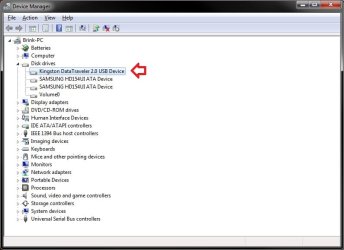
How to Convert a FAT or FAT32 Volume to NTFS in Windows 7
Information
Note
Before you start to convert a FAT or FAT32 volume to NTFS, please consider the following limitations and requirements:
- UDF and CDfs file systems are only used with optical media and cannot be converted to NTFS.
- FAT12 is the only format used on floppy diskettes (as if these are used anymore
 ). This does not apply to a USB flash key though.
 - The conversion to NTFS is a one-way process. After you convert a drive or a partition to NTFS, you cannot convert it back to FAT or to FAT32 unless you format it again as FAT or FAT32.
- The convert command requires that you have enough free space on the drive or on the partition that you want to convert to be able to convert it. If Convert.exe determines that there is not sufficient free space on the volume, it will not convert the volume.
- If the files are being used on the volume that you are trying to convert, then you will be prompted with:
"Convert cannot run because the volume is in use by another process. Convert may run if this volume is dismounted first. ALL OPENED HANDLES TO THIS VOLUME WOULD THEN BE INVALID. Would you like to force a dismount on this volume? <Y/N>"
- Quit all the programs that are using the files on the drive, and then type Y at the command prompt to convert the drive to NTFS.
- If the drive or partition volume that you are trying to convert is in use, then you will be prompted with:
"Convert cannot gain exclusive access to the drive letter drive, so it cannot convert it now. Would you like to schedule it to be converted the next time the system restarts? <Y/N>"
- To resolve this issue, type Y at the command prompt. The volume or drive will be converted to NTFS the next time that you restart the computer.
Warning
Although the chance of corruption or data loss during the conversion is minimal, it is recommended that you backup any data that you do not want to lose on the volume that you want to convert before you start the conversion to be extra safe.
The only way to convert a NTFS disk back to a FAT or FAT32 disk is to format the disk.
Before you begin, note that the FAT32 file system has size limitations. In this version of Windows, you cannot create a FAT32 partition greater than 32 GB (32728 MB). In addition, you cannot store a file larger than 4 GB on a FAT32 partition. For more information, see Comparing NTFS and FAT file systems.
The only way to convert a NTFS disk back to a FAT or FAT32 disk is to format the disk.
Before you begin, note that the FAT32 file system has size limitations. In this version of Windows, you cannot create a FAT32 partition greater than 32 GB (32728 MB). In addition, you cannot store a file larger than 4 GB on a FAT32 partition. For more information, see Comparing NTFS and FAT file systems.
Here's How:
1. To Use a Elevated Command Prompt in Windows
A) Open an elevated command prompt.
B) Go to step 3.
2. To Use a Command Prompt at Boot
A) Open a command prompt at boot.
B) In the command prompt, type diskpart and press Enter. (see screenshot below)
C) In the command prompt, type list volume and press Enter. (see screenshot below)
NOTE: This will let you see what the drive letter is for the drive that you want to connvert since it may not always be the same drive letter that it is in Windows.
D) After making note of the drive letter, type exit and press Enter. (see screenshot below)
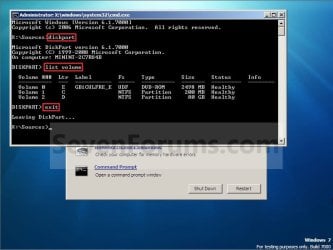
E) Continue on to step 3 to convert the drive.
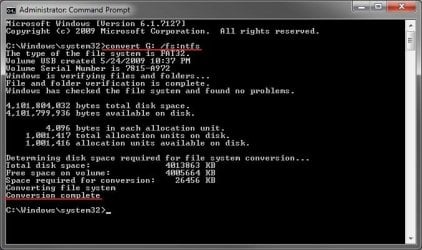
3. In the command prompt, type convert drive letter: /fs:ntfs and press Enter. (See screenshot below)
NOTE: Substitute drive letter for the drive letter of the FAT or FAT32 drive or partition that you want to convert to NTFS. For example, I want to convert my USB flash key with the drive letter G: , so I would type convert g: /fs:ntfs and press enter.
4. If prompted to Enter current volume label for drive (drive letter) (ex: G: ), then enter the name (ex: NEW VOLUME) of this drive letter as it is displayed in the Computer window and press Enter. (see screenshots below)
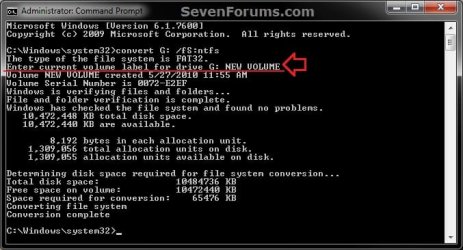
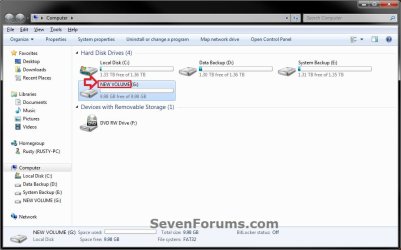
5. When the conversion to NTFS is complete, you receive the Conversion complete message. (See screenshot above)
NOTE: This may take a while to convert depending on full and large the drive is. It may also seem like it has hung at points, but be patient and let it finish.
6. Close the command prompt.
NOTE: If you used a command prompt at boot, then also close the System Recovery Options window and restart the computer.
That's it,
Shawn
Related Tutorials
- How to Extend a Partition or Volume in Windows 7
- How to Create a New Partition or Volume in Windows 7
- How to Delete a Partition or Volume in Windows 7
- How to Shrink a Partition or Volume in Windows 7
- How to Convert a MBR Disk to a GPT Disk
- How to Convert a GPT Disk to a MBR Disk
- How to Convert a Basic Disk to a Dynamic Disk
- How to Clean or Clean All a Disk with the Diskpart Command
- How to Quick Format a HDD or USB Drive
- How to Set Disk Quota Limits for Users in Windows 7 and Vista
Last edited: