How to Create a "Downloads" Library with Correct Icon in Windows 7 and Windows 8
Information
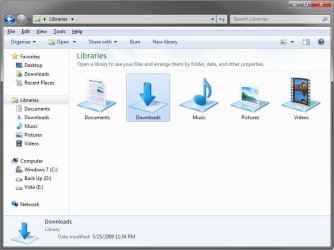
This will show you how to create a Downloads library in Windows 7 and Windows 8 that has the original default Downloads library icon with the blue arrow pointing downwards on a glass plate.
EXAMPLE: Original Downloads Library Icon
Here's How:
1. To Download the Downloads Library Icon
A) Click/tap on the Download button below to download the Downloads_Library.zip file that contains the original Downloads library icon.
Download
B) Save the ZIP file to your desktop.
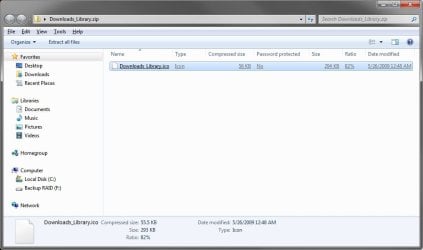
C) Double click/tap on the ZIP file to open it, then extract (drag and frop) the Downloads_Library.ico file to the location that you want to keep it at.
WARNING: The icon file will need to remain at this location while it is being used (step 3) for the Downloads library. If you move it, then the icon will no longer be displayed for the Downloads library.
D) Right click or press and hold on the Downloads_Library.ico file, and click/tap on Properties, General tab, on the Unblock button, and on OK. (see screenshot below)
NOTE: If you do not have a Unblock button under the General tab, then the shortcut is already unblocked and you can continue on to step 2.
2. To Create the Downloads Library
A) In Windows Explorer, navigate to your C:\Users\(user-name) folder, then create a new library with the Downloads folder. (see screenshot below)

B) Open the new Downloads library, and include the C:\Users\Public\Public Downloads folder. (see screenshot below)
NOTE: If you like, you could include any other folder location(s) that you would like to also be included inside the Downloads library as well.

3. Do step 4 or 5 below depending on if you are in Windows 7 or Windows 8.
4. To Change the Downloads Library Icon in Windows 7
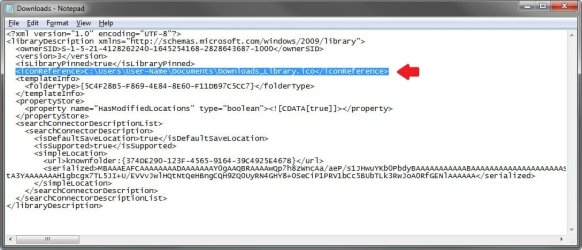
A) Change the Downloads library icon to use the Downloads_Library.ico icon file at the location you have saved it to in step 1. (see screenshots below)
Note
For example, I saved my icon from step 1 to C:\Users\(user-name)\My Documents, so I would add the line below (right screenshot below) while changing the icon at step 5 at that link.
<iconReference>"C:\Users\User-Name\Documents\Downloads_Library.ico"</iconReference>
You would substitute the path in red to the full path of where you saved the Downloads_Library.ico file instead in step 1.
<iconReference>"C:\Users\User-Name\Documents\Downloads_Library.ico"</iconReference>
You would substitute the path in red to the full path of where you saved the Downloads_Library.ico file instead in step 1.

B) Go to step 6 below.
5. To Change the Downloads Library Icon in Windows 8
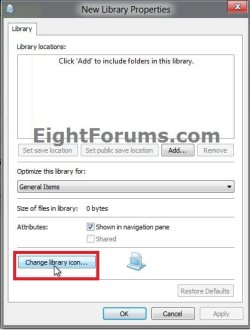
A) Using OPTION ONE in the tutorial below, change the new library's icon using the Downloads_Library.ico icon file at the location you have saved it to in step 1. (see screenshot below)
How to Change a Library Icon in Windows 8
6. You will now notice that the Downloads library icon has changed.
NOTE: See example screenshot at the top of the tutorial.
That's it,
Shawn
Related Tutorials
- How to Create a "Games" Library with Correct Icon in Windows 7 and Windows 8
- How to Create a "Favorites" Library with Correct Icon in Windows 7 and Windows 8
- How to Create a "Searches" Library with Correct Icon in Windows 7 and Windows 8
- How to Create a "Links" Library with Correct Icon in Windows 7 and Windows 8
- How to Change a Library Icon in Windows 7
- How to Hide or Show a Library in the Windows 7 Navigation Pane
- How to Restore the Default Libraries in Windows 7
- How to Fix Libraries when Hidden and Empty in Windows 7
- How to Create a New Library in Windows 7
- How to Create a New Library in Windows 8
- How to Include a Folder in a Library in Windows 7
- How to Remove a Included Folder from a Library in Windows 7
- How to Set the Default Save Folder for a Library in Windows 7
- How to Add or Remove the Libraries Desktop Icon in Windows 7
- User Folders in Windows 7 Libraries
- How to Turn the Library Pane On or Off in Windows 7
Attachments
Last edited: