
Windows Update Error 80246008 in Windows 7 - Fix
Information
Reasons
This error is caused by issues with Background Inteligence Transfer Service or with COM+ Event System
Troubleshooting
1.Go to Start>>Search>>Services.msc
and check below services exist, have correct settings and are working
COM+ Event System :Automatic (started)
Background Intelligent Transfer Service (BITS):Manual or Automatic(Delayed Start)
If you have another settings you have to correct it.If COM+ Event System is not started then please run it manually,next run manually BITS service.
Note
Please save order with running services.BITS service dependce from COM+ Event System -if this service is not working BITS service will not work too.
If you have only issue with running BITS service
STEP I
Reset Windows Update backgrounds components
how,see Windows Update - Reset
STEP II
Make sure that following folder exist
C:\ProgramData\Microsoft\Network\Downloader
Note
Folder C:\ProgramData is hidden.To see this folder you have to in Control panel>>Folder Options enable option "Show hidden files and folders" or use any good 3p file manager which can see everything independly from system settings
if you don't have this folders,create it manually.Check also permissions for this folder
Administrators group and System have full access (all checked) to this folder, no one else has permission to that.
//how to check & change permissions see this tutorial CLICK //
see also
STEP III
Empty folder C:\ProgramData\Microsoft\Network\Downloader.
STEP IV
Reset fully Windows Updates
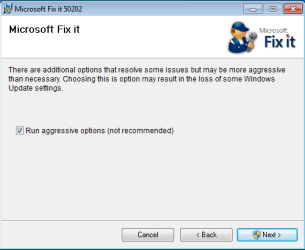
Please run this MS Fix 50202 in AGGRESSIVE MODE (image)
STEP V
Uninstall all 3p security software,download accelerators and any program for managing and monitoring network connections.
If you have issue with COM+ Event System too...
As I said before if this service not working, BITS service will not work too. If unable to run this service or service doesn't exist please import this EventSystemWin7.reg fix to registry.
Download
and next restart computer
If you don't have BITS service or cannot to run it,none of previous method help...
Import BITSWin7.reg below fix for BITS service to registry.
Download
Because for some subkeys Administrators defaultly don't have full control to workaround this problem,import this fix from SYSTEM account
1.Download PsTools,extract from this psexec.exe file and put it in C:\Windows\System32
2.Download my fix for BITS service and unpack it anywhere e.g on your desktop
3..Run cmd.exe with administrative previlliges (right click on cmd.exe and choose "run as admin") and type:
psexec -s -i -d regedit
//This command run regedit from System account.//
4.Go to File>>Import choose location where you stored BITSWIN7.reg file,choose it and apply.
5.Restart Computer
Attachments
Last edited by a moderator:


 and I suppose in the process of aggressively sweeping the PC
  I may have broken a couple of the windows services (windows update and BITS). Thank you thank you for this tutorial, I spent hours trying to figure out how to get BITS to work again and had it figure down to registry setting but couldn't locate the proper values~
