|  | | SSD Alignment
Published 26 Sep 2010
|  Published by | | |
 Featured Tutorial | | | Problem description The traditional rotating disks are divided into physical sectors. The Windows operating systems and their components operate according to this sector logic. Despite the fact that SSDs store the data in a completely different way, they are still being treated with this sector logic. The alignment of the SSD is required to assure that a logical sector starts exactly at the beginning of a physical page of the SSD. Without the alignment, the sector boundaries and the page boundaries will not match and sectors will span pages. That would require for a Windows write operation to clear two blocks in lieu of only one thus reducing the write speed by 50%. Situation If you install Windows7 on a brand new SSD, you need not make any special arrangements because the Windows7 installer will do the alignment for you. For Vista you are lucky because the start sector happens to match a SSD page. For XP the start sector is 126 which would be in the middle of a SSD page, thus a prior alignment is required. A similar situation is present when you clone an existing OS (including Windows7) on a new SSD. Solution The easiest way to align an SSD is to create an aligned partition on the SSD with the help of Diskpart. Open an elevated command prompt and run the following sequence of commands – each line followed by Enter. Diskpart List disk Select disk n (where n is the number that was given for your SSD in List disk) Clean Create partition primary align=1024 Format fs=ntfs quick Active (assuming you want to install an OS) Exit Note: If you want to create a 100MB partition with alignment, the create command is: Create partition primary size=100 align=1024
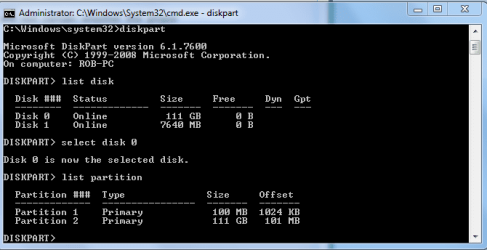
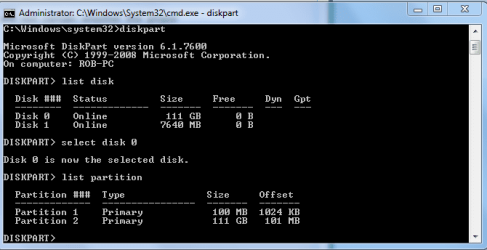
The size unit is always MB. Verification If you want to verify the alignment (e.g. for a SSD where you are not certain whether the proper alignment was done), you use the following commands. Diskpart List disk Select disk n List partition Now you should see a result like this. Partition ### Type Size Offset ------------- ---------------- ------- ------- Partition 1 Primary 59 GB 1024 KB - but 64KB or any number divisible by 4 is also good The offset (in KBs) has to be divisible by 4. Note: Some readers and users of this tutorial got confused because the alignment numbers in a typical Windows7 installation are shown as:
1024KB for the 100MB partition 101MB for the next partition - which is most likely the C partition
They think that 101MB is not divisible by 4 and that there must be a problem. But that is not so. If you convert 101MBs into KBs (multiply by 1024), then the number is divisible by 4 and the partition is aligned. | | | Need more help? Try searching our extensive help and support site.
Loading | |
20 Nov 2010
|
| | |
I have a question, mine shows the 100MB mini default partition as the one with the 1024KB offset, and the 111GB partition having 101MB offset, it did this all by default. Is this right or not?
It seems like the larger 111GB partition should be the one with the 1024 offset? I'm not sure if this matters or not. | My System Specs |
| System Manufacturer/Model Number Home built OS Windows 7 Ult, Windows 8 Pro, CPU Q9650-4.275GHz, E8600 4.5GHz, E6750-3.8GHz Motherboard Evga 780i FTW Memory G.Skill PC2 9600 1200Mhz 5 5 5 15 2T Graphics Card GTX480 Sound Card Asus Xonar D2 Monitor(s) Displays HannsG Screen Resolution 1680X1050 Keyboard Logitech G15 Mouse Logitech G9 PSU ThermalTake Toughpower 1000Watt modular Case ThermalTake XaserV Cooling Xigmatek S1283 Hard Drives GSkill Phoenix Pro 120GB SSD Internet Speed T1 |
20 Nov 2010
|
| | |
The only program I know that will align a partition without disturbing the data is from Paragon ( Paragon Alignment Tool - Overview ). But they want $30 and I did not see a trial.
But it seems to be pretty common that the second partition on a SSD is not properly aligned - which, of course, is not good. But with Diskpart, you can only align the whole volume. | My System Specs | | System Manufacturer/Model Number HP, Dell, Gateway, Toshiba - 4 laptops and 2 desktops OS Vista, Windows7, Mint Mate, Zorin, Windows 8 CPU from 1.6GHz Duo to i7 Monitor(s) Displays 2x HP w2207 Keyboard with trackball - no mices Mouse Trackball mice Hard Drives 5x HDD, 7x SSD, 12x Externals Internet Speed DSL 6000 |
20 Nov 2010
|
| | |
I dunno about lucky, whs.
MS deliberately set Vista alignment that way.
Unless you want to shell out for PAT ( works very well, btw ), you could try this:
Image your main partition with macrium/paragon.
Delete the main partition with diskpart from 7 dvd.
Create new main partition with alignment you want - still using Diskpart.
Restore the image you made to that new partition.
See if the alignment is retained - I expect it will be.
Before you do that- you need to ask:
If 1024 is divisible by 4, is 101 x 1024 also divisible by 4 ? | My System Specs | | OS Vista x64 / 7 X64 CPU E8400 Motherboard ASRock 1333 GLAN R2.0 Memory 2x1 gb 800mhz Graphics Card 9500gt 1gb Case Coolermaster Cooling Winpower 500w Hard Drives Maxtor 160gb-2mb cache |
20 Nov 2010
|
| | |
1024 multiplied with any number is divisible by 4. But what does that tell me? Are you suggesting that the 101 offset of the second partition is OK? | My System Specs | | System Manufacturer/Model Number HP, Dell, Gateway, Toshiba - 4 laptops and 2 desktops OS Vista, Windows7, Mint Mate, Zorin, Windows 8 CPU from 1.6GHz Duo to i7 Monitor(s) Displays 2x HP w2207 Keyboard with trackball - no mices Mouse Trackball mice Hard Drives 5x HDD, 7x SSD, 12x Externals Internet Speed DSL 6000 |
21 Nov 2010
|
| | |
I will say that my write speeds are up there with what everyone else shows. The SSD works flawlessy, not to mention all my WEI scores "winsat SSD test" were in the mid to high 7's.
I would think that Windows 7 would get this right since it's a default installation on a new SSD.
1024*101= 103,424/4= 25,856
It would seem silly if I needed to omit the 100MB boot partition just to get the alignment right.
Windows should be getting this right by default because it was made to work with SSD's.
After doing some reading I found out that in fact Windows did get right by starting the alignment with the 100MB boot partition. It has to be a multiple of 64. that is 64,128...1024,2048 etc. Very crudely put, SSD write in 64 blocks. If your alignment is 63 (as set by Acronis) each write/read will span two blocks etc. Hence the so called 50% inefficiency. For example, if you do a freah install of Win 7 on a fresh SSD, Win 7 will create a initial partition of 100MB with the correct alignment. all subsequent partitions (C Drive etc.) will follow this initial partition set in full MB multiples- hence preserving the 64bit multiple alignment/ offset. I have attached a copy of my properly aligned/offset SSD drive. AttachmentSizeSSDOffset.jpg
From the Acronis site.> Is everyone exaggerating the steps for SSD alignment when upgrading to an SSD? | Knowledge Base
Last edited by chev65; 27 Nov 2010 at 12:25 PM..
| My System Specs | | System Manufacturer/Model Number Home built OS Windows 7 Ult, Windows 8 Pro, CPU Q9650-4.275GHz, E8600 4.5GHz, E6750-3.8GHz Motherboard Evga 780i FTW Memory G.Skill PC2 9600 1200Mhz 5 5 5 15 2T Graphics Card GTX480 Sound Card Asus Xonar D2 Monitor(s) Displays HannsG Screen Resolution 1680X1050 Keyboard Logitech G15 Mouse Logitech G9 PSU ThermalTake Toughpower 1000Watt modular Case ThermalTake XaserV Cooling Xigmatek S1283 Hard Drives GSkill Phoenix Pro 120GB SSD Internet Speed T1 |
01 Mar 2011
|
| | |
What about an ssd raid 0. Of course you break the raid and follow the tut that the barefoot kid wrote and completely erase them with diskpart, then what before you combine the two ssd's, do you align them first or after you create the raid? My raid 0 is rating a 7.8 on the wei scale as of now but I'm not sure know after reading this that I have doubts now. | My System Specs | | System Manufacturer/Model Number Alienware OS Windows 7 Ultimate x64 CPU I7 Motherboard GA-X58-USB3 Memory 6 x 1.5V DDR3 DIMM sockets supporting up to 24 GB of system Graphics Card GeForce GTX 580 Sound Card Realtek ALC892 codec 2/4/5.1/7.1-channel Monitor(s) Displays NEC Display Solutions E321 Black 32" Screen Resolution 1366 x 768 Keyboard Microsoft Mouse Microsoft PSU XFX Black Edition XPS-850W-BES 850W ATX12V Case Antec Cooling Zalman Hard Drives OCZ Colossus LT Series OCZSSD2-1CLSLT1T 3.5" 1TB SATA II MLC Internal Solid State Drive |
01 Mar 2011
|
| | |
seth, I am not 100% certain because I have never aligned a Raid0. But I would say, if you align them independently, you cannot go wrong. | My System Specs | | System Manufacturer/Model Number HP, Dell, Gateway, Toshiba - 4 laptops and 2 desktops OS Vista, Windows7, Mint Mate, Zorin, Windows 8 CPU from 1.6GHz Duo to i7 Monitor(s) Displays 2x HP w2207 Keyboard with trackball - no mices Mouse Trackball mice Hard Drives 5x HDD, 7x SSD, 12x Externals Internet Speed DSL 6000 |
01 Mar 2011
|
| | |
Thanks whs appreciate the reply I will do that and use disk part after creating the raid to partition the raid for Windows 7...also it makes sense you would do this before joining the two ssd's they would match perfectly, but it would probably be a good idea to do it again when the raid is created because the raid creation destroys all partitions... | My System Specs | | System Manufacturer/Model Number Alienware OS Windows 7 Ultimate x64 CPU I7 Motherboard GA-X58-USB3 Memory 6 x 1.5V DDR3 DIMM sockets supporting up to 24 GB of system Graphics Card GeForce GTX 580 Sound Card Realtek ALC892 codec 2/4/5.1/7.1-channel Monitor(s) Displays NEC Display Solutions E321 Black 32" Screen Resolution 1366 x 768 Keyboard Microsoft Mouse Microsoft PSU XFX Black Edition XPS-850W-BES 850W ATX12V Case Antec Cooling Zalman Hard Drives OCZ Colossus LT Series OCZSSD2-1CLSLT1T 3.5" 1TB SATA II MLC Internal Solid State Drive |
16 Mar 2011
|
| | |

Quote: Originally Posted by chev65 I have a question, mine shows the 100MB mini default partition as the one with the 1024KB offset, and the 111GB partition having 101MB offset, it did this all by default. Is this right or not?
It seems like the larger 111GB partition should be the one with the 1024 offset? I'm not sure if this matters or not. Yesterday I done a fresh windows 7 installation on my 64GB SSD. I was reading and following all these neat tutorials and I found this thread.
After the installation completed I had my os partition with an offset of 101MB. I bought for £15 the Paragon Alignment Tool 2.0 hoping that it could fix the "problem" but actually it just told me everything was fine and the os partition was aligned perfectly. The only drive not aligned was the usb pen.
At the end I asked for a refund (received within 30mins).
Cheers.
L. | My System Specs | | OS Windows 7 Professional x64 All times are GMT -5. The time now is 01:52 PM. | |