
How to Add or Remove "Share with" Context Menu Item in Windows 7 and Windows 8
Information
This tutorial will show you how to add or remove the Share with context menu item when you right click on a file, folder, drive, or library in Windows 7 and Windows 8.
EXAMPLE: "Share with" in the Context Menu
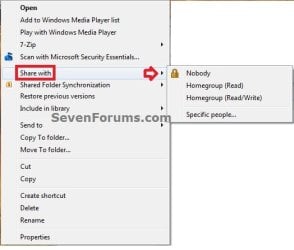
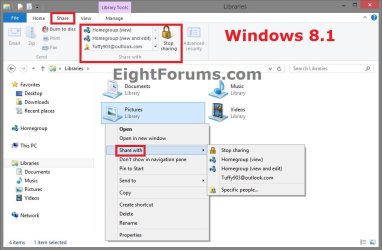
OPTION ONE
To Restore "Share with" Context Menu Item
NOTE: This is the default setting.
1. Open Folder Options in Windows 7 or Windows 8, check the Use Sharing Wizard box, and click/tap on OK. (see screenshot below)
NOTE: This option has to be checked to have Share with in the context menu for files.
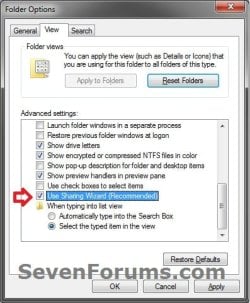
2. If the above doesn't help, then click/tap on the Download button below to download the REG file below.
NOTE: You must be logged in as an administrator to be able to do this step.
Restore_Share_with_to_Context_Menu.reg
Download
A) Save the .reg file to your desktop.
B) Double click/tap on the downloaded .reg file to merge it.
C) If prompted, click/tap on Run, Yes (UAC), Yes, and OK to approve the merge.
D) When finished, you can delete the downloaded .reg file if you like.
3. The missing Share with context menu item should now be restored.
OPTION TWO
To Remove "Share with" Context Menu Item
1. Open Folder Options in Windows 7 or Windows 8, uncheck the Use Sharing Wizard box, and click/tap on OK. (see screenshot below)
2. If the above doesn't help, then click on the Download button below to download the REG file below.
NOTE: You must be logged in as an administrator to be able to do this step.
Remove_Share_with_to_Context_Menu.reg
Download
A) Save the .reg file to your desktop.
B) Double click/tap on the downloaded .reg file to merge it.
C) If prompted, click/tap on Run, Yes (UAC), Yes, and OK to approve the merge.
D) When finished, you can delete the downloaded .reg file if you like.
3. The Share with context menu item should now be removed.
That's it,
Shawn
Related Tutorials
- How to Create a "Shared Folder Creation Wizard" Shortcut in Windows 7 and Windows 8
- How to Create a Shared Folders Troubleshoot Shortcut in Windows 7
- SHARING PCs AND PRINTERS ON WIN 7 AND WIN 98 NETWORK
- Create Shares Between XP and Windows 7 (and vice versa)
- How to Turn Public Folder Sharing On or Off in Windows 7
- How to Turn "Public Folder Sharing" On or Off for Networks in Windows 8
- How to "Share with" and "Stop Sharing" Files and Folders on a Network or Shared PC in Windows 8
- How to Turn "Password Protected Sharing" On or Off in Windows 8
- How to Change the File Sharing Connections Encryption Settings in Windows 8
- How to Create a Shared Folders Shortcut in Vista, Windows 7, and Windows 8
Attachments
Last edited:


 Remove.


