
| Windows 7: Notifications - Enable or Disable Message Balloons Notifications - Enable or Disable Message Balloons How to Enable or Disable Balloon Notifications in Vista, Windows 7, and Windows 8
Published 29 May 2009
|  Published by | | |
 Featured Tutorial | | | How to Enable or Disable Balloon Notifications in Vista, Windows 7, and Windows 8  Information The notification area is located at the far right side of the taskbar. A notification informs users of events that are unrelated to the current user activity, by briefly displaying a balloon from an icon in the notification area. The notification could result from a user action or significant system event, or could offer potentially useful information from Windows or an application.
For more information about balloon notifications, see: Notifications
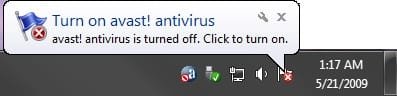
This tutorial will show you how to enable or disable displaying all balloon notifications in the taskbar notification area for all or specific users in Vista, Windows 7, and Windows 8.  Note This can be handy since the only options available in the customize Notification Area Icon settings are Show icon and notifications, Hide icon and notifications, or Only show notifications, and no Only show icons option. When Notifications is disabled, it will let you show all notification icons without showing any balloon notifications for any of the icons. EXAMPLE: Balloon Notification
 OPTION ONE 
To Enable or Disable Balloon Notifications using a REG File
1. To Enable Balloon Notifications for All Users NOTE: This is the default setting.A) Click/tap on the Download button below to download the file below, and go to step 3 below.Enable_Notifications.reg  2. To Disable Balloon Notifications for All usersA) Click/tap on the Download button below to download the file below, and go to step 3 below.Disable_Notifications.reg 
3. Save the .reg file to your desktop. 4. Double click/tap on the downloaded .reg file to merge it. 5. Click/tap on Run, Yes (UAC Windows 7/8) or Continue (UAC Vista), Yes, and OK when prompted. 6. Log off and log on, or restart the computer to apply. 7. When finished, you can delete the downloaded .reg file if you like. 8. If enabled, don't forget to set your Notification Area Icons customize settings how you like.
 OPTION TWO 
To Enable or Disable Balloon Notifications Using Group Policy
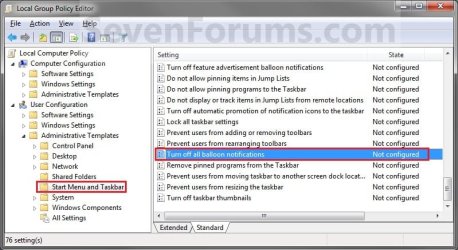
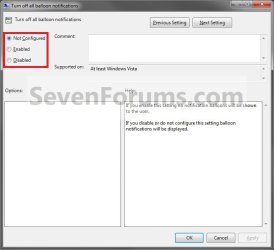
1. Open the all users, specific users or groups, or all users except administrators Local Group Policy Editor for how you want this policy applied. 2. In the left pane, click/tap on the arrow to expand User Configuration, Administrative Templates, then click/tap on Start Menu and Taskbar. (See screenshot below) 3. In the right pane of Start Menu and Taskbar, double click/tap on Turn off all balloon notifications to edit it. (See screenshot above) 4. To Enable Balloon NotificationsA) Select (dot) Not Configured or Disabled, and go to step 6 below. (See screenshot below step 6) NOTE: Not Configured is the default setting. 5. To Disable Balloon NotificationsA) Select (dot) Enabled, and go to step 6 below. (See screenshot below step 6) 6. Click/tap on OK. (See screenshot below) 7. Close the Local Group Policy Editor. 8. If enabled, don't forget to set your Notification Area Icons customize settings how you like. That's it,
Shawn | | | Need more help? Try searching our extensive help and support site.
Loading | |
10 Feb 2010
|
| | |
I'm using Windows 7 Home Premium, after I did used the option #1 (through a download) and completely did those steps, the balloon notifications still not appear on my taskbar, especially when I want disconnect the USB modem and I don't see the safe remove hardware balloon notification.
When I click the safe remove hardware icon for unplug my USB Flashdisk , the balloon notifications ( You are now safe to remove your device ..) will appear, but if I click the icon for unplug my USB Modem, the balloon notification is not appear. .so I unplug my USB Modem straightly..
Please help me.. thanks
Last edited by Brink; 10 Feb 2010 at 11:27 PM..
Reason: merged posts
| My System Specs |
| |
10 Feb 2010
|
| | |
Andr1don2,
You're balloon notifications are enabled if you are getting one for the USB flash drive.
I'm not sure that you would get a balloon notification for a USB modem since it's not a hard drive that could be in use being written to or read from. You might post this in the "Hardware and Devices" forum area to see if anyone else that has a USB modem is getting one with theirs. | My System Specs | | Computer type PC/Desktop System Manufacturer/Model Number Self built custom OS 64-bit Windows 7 Ultimate SP1 & Windows 8 Enterprise CPU Intel i7-3930K 3.2 Ghz (O/C 4 Ghz) Motherboard ASRock X79 Extreme11 Memory 32 GB (8GBx4) G.SKILL DDR3 Quad PC3-19200 2400MHz Graphics Card Sapphire HD5870 Eyefinity 6 2GB Sound Card SB Recon 3Di Integrated Chip Monitor(s) Displays 3x 27" Asus VE278Q Screen Resolution 1920x1080 Keyboard Logitech Cordless Desktop MX 5500 Revolution Mouse Logitech Cordless Desktop MX 5500 Revolution PSU OCZ Series Gold OCZZ1000M 1000W Case Thermaltake Level 10 GT Snow Edition Cooling Corsair Hydro H100 Hard Drives 256GB OCZ Vector
160GB OCZ RevoDrive X2
2 x 1TB Samsung HDD HD154UI SATA Internet Speed 50 Mb/s Download and 2 Mb/s Upload Other Info Microsoft LifeCam Cinema
Lite-On iHBS212 12x BD Writer
Samsung CLX-3175FW Printer
Netgear WNDR3800 Router
Motorola SBG6580 Cable Modem
2x APC Back-UPS XS 1500 |
10 Feb 2010
|
| | |
ok Boss..thank very much for your advise..success for you | My System Specs | | |
10 Feb 2010
|
| | |
You're welcome. Please keep us informed if you find out anything else on it. | My System Specs | | Computer type PC/Desktop System Manufacturer/Model Number Self built custom OS 64-bit Windows 7 Ultimate SP1 & Windows 8 Enterprise CPU Intel i7-3930K 3.2 Ghz (O/C 4 Ghz) Motherboard ASRock X79 Extreme11 Memory 32 GB (8GBx4) G.SKILL DDR3 Quad PC3-19200 2400MHz Graphics Card Sapphire HD5870 Eyefinity 6 2GB Sound Card SB Recon 3Di Integrated Chip Monitor(s) Displays 3x 27" Asus VE278Q Screen Resolution 1920x1080 Keyboard Logitech Cordless Desktop MX 5500 Revolution Mouse Logitech Cordless Desktop MX 5500 Revolution PSU OCZ Series Gold OCZZ1000M 1000W Case Thermaltake Level 10 GT Snow Edition Cooling Corsair Hydro H100 Hard Drives 256GB OCZ Vector
160GB OCZ RevoDrive X2
2 x 1TB Samsung HDD HD154UI SATA Internet Speed 50 Mb/s Download and 2 Mb/s Upload Other Info Microsoft LifeCam Cinema
Lite-On iHBS212 12x BD Writer
Samsung CLX-3175FW Printer
Netgear WNDR3800 Router
Motorola SBG6580 Cable Modem
2x APC Back-UPS XS 1500 |
17 Dec 2010
|
| | |
What about editing HKEY_CURRENT_USER\Software\Microsoft\Windows\CurrentVersion\Policies\Explorer\TaskbarNoNotification?
The key didn't exist for me (actually neither did the Explorer Key, it had to be created as well), but creating a DWORD value called 'TaskbarNoNotification' and setting the data to '1' did the trick for me. This is the key that the Group Policy Editor changes, the difference is if you set it in group policy, it applies to all users. If you edit (or create) this key it can be done on a per user basis.
Rob | My System Specs | | |
17 Dec 2010
|
| | |
Hello Rob,
That's correct, and is what the REG files in OPTION ONE will do for you automatically instead of having to manually do it in Registry Editor. | My System Specs | | Computer type PC/Desktop System Manufacturer/Model Number Self built custom OS 64-bit Windows 7 Ultimate SP1 & Windows 8 Enterprise CPU Intel i7-3930K 3.2 Ghz (O/C 4 Ghz) Motherboard ASRock X79 Extreme11 Memory 32 GB (8GBx4) G.SKILL DDR3 Quad PC3-19200 2400MHz Graphics Card Sapphire HD5870 Eyefinity 6 2GB Sound Card SB Recon 3Di Integrated Chip Monitor(s) Displays 3x 27" Asus VE278Q Screen Resolution 1920x1080 Keyboard Logitech Cordless Desktop MX 5500 Revolution Mouse Logitech Cordless Desktop MX 5500 Revolution PSU OCZ Series Gold OCZZ1000M 1000W Case Thermaltake Level 10 GT Snow Edition Cooling Corsair Hydro H100 Hard Drives 256GB OCZ Vector
160GB OCZ RevoDrive X2
2 x 1TB Samsung HDD HD154UI SATA Internet Speed 50 Mb/s Download and 2 Mb/s Upload Other Info Microsoft LifeCam Cinema
Lite-On iHBS212 12x BD Writer
Samsung CLX-3175FW Printer
Netgear WNDR3800 Router
Motorola SBG6580 Cable Modem
2x APC Back-UPS XS 1500 |
23 Dec 2010
|
| | |
Just thought it might make a nice option 3 for those that are more comfortable modifying their own registry than downloading someone else's .reg file.
Rob | My System Specs | | |
23 Dec 2010
|
| | |
No worries Rob. That's fine. | My System Specs | | Computer type PC/Desktop System Manufacturer/Model Number Self built custom OS 64-bit Windows 7 Ultimate SP1 & Windows 8 Enterprise CPU Intel i7-3930K 3.2 Ghz (O/C 4 Ghz) Motherboard ASRock X79 Extreme11 Memory 32 GB (8GBx4) G.SKILL DDR3 Quad PC3-19200 2400MHz Graphics Card Sapphire HD5870 Eyefinity 6 2GB Sound Card SB Recon 3Di Integrated Chip Monitor(s) Displays 3x 27" Asus VE278Q Screen Resolution 1920x1080 Keyboard Logitech Cordless Desktop MX 5500 Revolution Mouse Logitech Cordless Desktop MX 5500 Revolution PSU OCZ Series Gold OCZZ1000M 1000W Case Thermaltake Level 10 GT Snow Edition Cooling Corsair Hydro H100 Hard Drives 256GB OCZ Vector
160GB OCZ RevoDrive X2
2 x 1TB Samsung HDD HD154UI SATA Internet Speed 50 Mb/s Download and 2 Mb/s Upload Other Info Microsoft LifeCam Cinema
Lite-On iHBS212 12x BD Writer
Samsung CLX-3175FW Printer
Netgear WNDR3800 Router
Motorola SBG6580 Cable Modem
2x APC Back-UPS XS 1500 |
11 Mar 2012
|
| | |
Thank you for the registry key info. I have Windows 7 Home and could not find a "group policy editor". I don't believe its included. Appreciate the registry key as I'ld rather know what to change instead of run code from an unknown source.
While mucking with the Registry might be dangerous I've managed to do so for ever without creating a problem so it can't be that bad.
Thanks again. | My System Specs | | System Manufacturer/Model Number Toshiba Portega R705 OS win 7 home premium 64bit CPU i3 Memory 4G Notifications - Enable or Disable Message Balloons problems? All times are GMT -5. The time now is 07:24 AM. | |