Windows 7 Forums


Windows 7: Windows Media Player - Rebuild Corrupted Libraries

30 Sep 2010   #19
Gornot

Windows 8 Release Preview
Belgrade, Serbia
 
 
Windows Media Player - Rebuild Corrupted Libraries

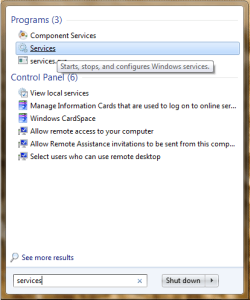
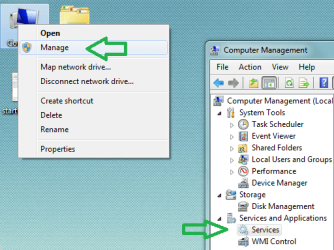
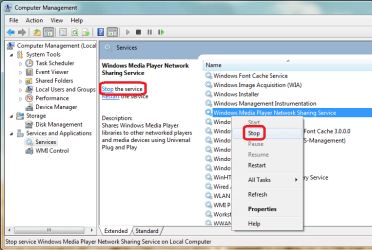
How to Rebuild Windows Media Player Corrupted Libraries


...


Last edited by Brink; 26 Oct 2011 at 06:02 PM..
My System SpecsSystem Spec

20 Mar 2012   #20
EFE

windos 7 Home Premium
Prescott, AZ


Quote   Quote: Originally Posted by Dude View Post

Should I try this new link when I've already taken the first few steps (3) of the above repair? WMP is in stop mode now from step 1 & 2?????

Thanks,
EFE
My System SpecsSystem Spec

20 Mar 2012   #21
Dude

Windows 7 Home Premium 64-bit SP1
Texas


I would give it a shot, then post and let everyone know.

My System SpecsSystem Spec
20 Mar 2012   #22
EFE

windos 7 Home Premium
Prescott, AZ


Before I try another repair, can anyone think of why I can't find the Microsoft page where the WMP library files are located????????

My System SpecsSystem Spec
20 Mar 2012   #23
oreo27

Windows 7 Ultimate x64 Service Pack 1
Philippines


Quote   Quote: Originally Posted by EFE View Post
Quote   Quote: Originally Posted by oreo27 View Post
Quote   Quote: Originally Posted by EFE View Post
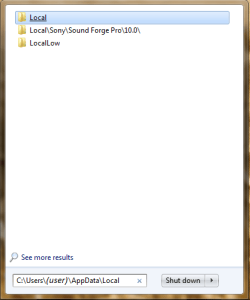
Thanks for this information. I got to this part where I typed in "C:\Users\(user)\AppData\Local" but "Local" doesn't open to any option for Microsoft media???????? When I clicked on "Local", it opened to "temp" files???????? Not sure what I'm doing wrong? Thanks for any help you can provide at this point.

EFE

PS:
My problem is WMP has a corruption that won't erase the files completely, after I deleted all the music files so I could start over with a clean library, all my music icons still show in the library although none will play, the music is gone but not the icons and lists of songs?

New Acer laptop with Windows 7 and Intel processor.
You should replace (user) with the actual username in Windows. e.g.

C:\Users\oreo27\AppData\Local

Let me know if this works out for you
Thanks oreo27,

Tried that (my name in place of user) and it gave me a list again but not with "Microsoft" and WMP files that could be deleted? The only "Local" icon opens up to temp files. There are list of 3 Microsoft files, one is Microsoft Feed, Microsoft a 8be and Microsoft a 823, none of them give me WM files??????????? Confounded! ))) ;
Weird indeed.

Can you try hitting Windows Key + R and putting the same path there. Hit enter and it should open up the directory.

Once open, can you take a screenshot of it? Let me know.
My System SpecsSystem Spec
.


20 Mar 2012   #24
EFE

windos 7 Home Premium
Prescott, AZ


Okay,
I found the problem, mt computer illiteracy is really bad! ((( ; I put my name in-between ( ) and should have just put my name?!? )))) ;

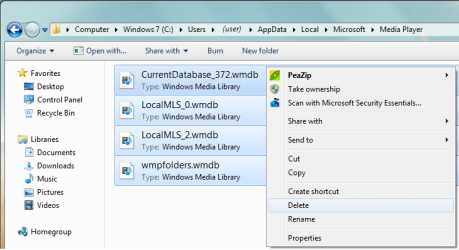
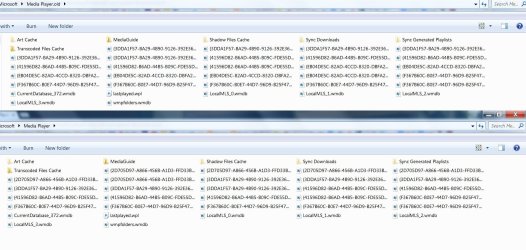
Now I opened the Media files and deleted all of them as per step 3, but one file wouldn't delete because it says WMP is running and I needed to shut it off first?? In step 2 I already stopped the player, so I don't understand what it wants me to shut off or how to shut it off anymore than I already have??? The file is "CurrentDatabase_372", maybe this file shouldn't be deleted?

The "CurrentDatabase_372" file has 12.444kb of data in it and I'm sure it probably consist of the corrupted files, so I need to delete it but it won't delete because it says the WMP must stop running first??? Anybody have any ideas how to stop WMP from running? I checked and the previous window has the player in "stop" mode??

EFE

Last edited by Brink; 20 Mar 2012 at 11:27 PM.. Reason: merged
My System SpecsSystem Spec
20 Mar 2012   #25
EFE

windos 7 Home Premium
Prescott, AZ


It appears that the corrupted file (mentioned above) is acting like it is running even though the WMP is not? I can't delete it as long as it appears to be running?? It's the only thing stopping this repair from finishing, any ideas???

EFE
My System SpecsSystem Spec
21 Mar 2012   #26
EFE

windos 7 Home Premium
Prescott, AZ


FIXED! Thanks for the repair instructions and help from all!

My System SpecsSystem Spec
21 Mar 2012   #27
oreo27

Windows 7 Ultimate x64 Service Pack 1
Philippines


Quote   Quote: Originally Posted by EFE View Post
FIXED! Thanks for the repair instructions and help from all!

Glad to hear you sorted it out. How were you able to delete the file?

Last edited by oreo27; 21 Mar 2012 at 10:19 AM.. Reason: Spelling error.
My System SpecsSystem Spec
21 Mar 2012   #28
EFE

windos 7 Home Premium
Prescott, AZ


I shut the computer off, started it up and went directly to that same file and it deleted. I use this computer strictly for playing all my music (over 400 CD's), I ended up deleting them all (mistake) and had to reinstall them but now I know that doesn't have to happen. It's only the WMP that get's corrupted and it can be repaired without deleting all the music since the music is actually in another folder and just brought into the WMP. I'm learning the hard way!

Thanks,
EFE
EFE TECHONLOGY Speakers
My System SpecsSystem Spec
21 Mar 2012   #29
oreo27

Windows 7 Ultimate x64 Service Pack 1
Philippines


Quote   Quote: Originally Posted by EFE View Post
I shut the computer off, started it up and went directly to that same file and it deleted. I use this computer strictly for playing all my music (over 400 CD's), I ended up deleting them all (mistake) and had to reinstall them but now I know that doesn't have to happen. It's only the WMP that get's corrupted and it can be repaired without deleting all the music since the music is actually in another folder and just brought into the WMP. I'm learning the hard way!

Thanks,
EFE
EFE TECHONLOGY Speakers
It could have been that some service was still accessing said file. Good to hear you're all set now.
My System SpecsSystem Spec
Comment

 Windows Media Player - Rebuild Corrupted Libraries problems?


Tutorial Tools


Similar help and support threads for: Windows Media Player - Rebuild Corrupted Libraries
Windows 7 Tutorial Category
windows media player 12 updates the libraries every time I open it Music, Pictures & Video
Can i add more libraries to windows media player? Music, Pictures & Video
Solved Windows Media Player 12 Libraries ? Music, Pictures & Video
Libraries, Media Player, and Media Center Music, Pictures & Video
corrupted windows media player Music, Pictures & Video


All times are GMT -5. The time now is 11:53 AM.


Seven Forums Android App Seven Forums IOS App Follow us on Facebook

Windows 7 Forums is an independent web site and has not been authorized,
sponsored, or otherwise approved by Microsoft Corporation.
"Windows 7" and related materials are trademarks of Microsoft Corp.
© Designer Media Ltd
  

1 2 3 4 5 6 7 8 9 10 11 12 13 14 15 16 17 18 19 20 21 22 23 24 25 26 27 28 29 30 31 32