
Windows 7 Forums


Windows 7: Windows Media Player - Rebuild Corrupted Libraries


Windows Media Player - Rebuild Corrupted Libraries

How to Rebuild Windows Media Player Corrupted Libraries
Published 30 Sep 2010
Published by

Featured Tutorial

Screen Capture and Video Editing in High Quality


Microsoft Account - Sign up for and Create

How to Sign up for and Create a Microsoft Account

SF Diagnostic Tool - Using for Troubleshooting

Using SF Diagnostic Tool for Troubleshooting

Microsoft Account Display Name - Change

How to Change your Microsoft Account Display Name

Dual Boot - Windows 7 and Linux

How to Correctly Setup a Dual Boot with Windows 7 and LinuxMint13

Portable OS - Carry your OS on an External Drive

How to Create a Portable OS on an External Drive
How to Rebuild Windows Media Player Corrupted Libraries


information   Information
This tutorial will show you how to rebuild your Windows Media Player (WMP) libraries in order to remove corrupted files (for example, files deleted from the hard disk that linger in the WMP library) in just a few, easy steps. This tutorial can also be applied to other issues.
Note   Note
  • Using this tutorial will not delete any media files physically; instead, it will reset the WMP libraries to their default state, without changing your previously made settings.
  • Windows Libraries are not affected by this tutorial.

Tip   Tip
Please make sure Windows Media Player is closed during this process.


Here's how:

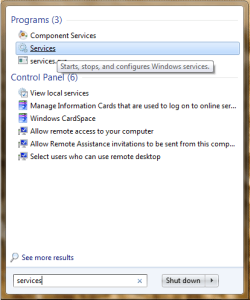
1. Click on the Start Orb and type "services" into the search, then select Services from the list of search results.
Windows Media Player - Rebuild Corrupted Libraries-startmenusearch.png

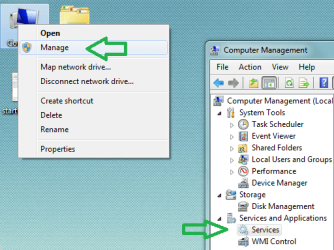
Alternatively, you can right-click the Computer icon, select Manage, then choose Services under "Services and Applications" in Computer Management.
Windows Media Player - Rebuild Corrupted Libraries-computermanagement.png

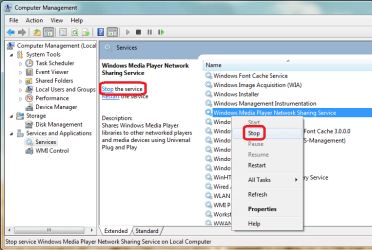
2. In the list of services, locate "Windows Media Player Network Sharing Service" and stop it via one of the highlighted options.
Windows Media Player - Rebuild Corrupted Libraries-stopwmpnss.png

Tip   Tip
Please keep the Services window open, you will need it later.


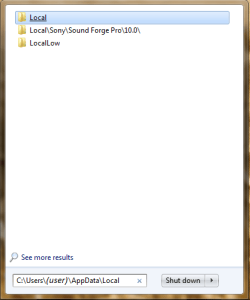
3. Click on the Start Orb and use the search again, this time type in C:\Users\(user)\AppData\Local and click the Local folder from the list of search results.
Windows Media Player - Rebuild Corrupted Libraries-searchappdatalocal.png

4. Inside the "Local" folder, navigate to the "Microsoft", then "Media Player" folder. Delete all the files contained in this folder and close the Explorer window.
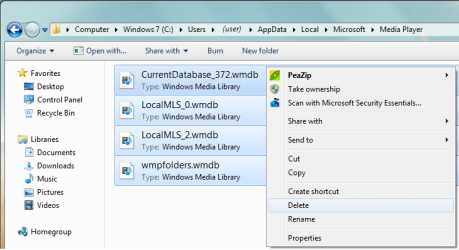
Windows Media Player - Rebuild Corrupted Libraries-delfiles.png

5. Now go back to the Services window and start the Windows Media Player Network Sharing Service. Next time you start Windows Media Player, it will automatically rebuild all libraries using the information on folders that are included in the Windows Libraries.
Need more help? Try searching our extensive help and support site.
Loading
13 Oct 2010   #1
Sejanes

7 ult 64
 
 
Thanks Gornot

Thanks for the great description of how to do this. I had to do this before but forgot about it when my media player started acting strange again. Media sharing wasn't working properly and cleaning out the Media Player folder seems to have immediately fixed the problem. This also works for Vista systems which is where I had to do it before.

My System SpecsSystem Spec

28 Nov 2010   #2
jarp53


when i turn the player on i always have to wait for to load up the files, then it'll repeat many of them,and it will label them (wma and m4a) so should i use this method also, or do i have to do something else
My System SpecsSystem Spec
05 Dec 2010   #3
jarp53


never mine problem solved
My System SpecsSystem Spec
.


13 Feb 2011   #4
pruneau31

Windows 7 Ultimate x64


thank you it work exactly the way i wanted
My System SpecsSystem Spec
13 Feb 2011   #5
whs

Vista, Windows7, Mint Mate, Zorin, Windows 8
Florida in winter, Black Forest/Germany


I think it suffices if you delete the .wmdb folders only.
My System SpecsSystem Spec
10 Jun 2011   #6
Nelly

Windows 7 Home Premium


Thank you.
Just the info I was looking for.
Top man.
My System SpecsSystem Spec
13 Jun 2011   #7
drtalk

Windows 7 Home Premium (64 bit)


I was SO hoping that this was the fix. But alas, my problem remains.
My System SpecsSystem Spec
13 Jun 2011   #8
boohbah

Microsoft Windows 7 Home Premium 64-bit 7600
cornwall UK


I have mp3 files that used to play in wmp but no longer do i get a red cross beside the track im trying to play, the same files however play in winamp so it is a bit of a bummer as i spent a long time getting my music library in order
My System SpecsSystem Spec
19 Sep 2011   #9
too

Windows 7 x64 Ultimate


Thanks! I had to use it againg :-)
My System SpecsSystem Spec
Comment

 Windows Media Player - Rebuild Corrupted Libraries problems?


Tutorial Tools


Similar help and support threads for: Windows Media Player - Rebuild Corrupted Libraries
Windows 7 Tutorial Category
windows media player 12 updates the libraries every time I open it Music, Pictures & Video
Can i add more libraries to windows media player? Music, Pictures & Video
Solved Windows Media Player 12 Libraries ? Music, Pictures & Video
Libraries, Media Player, and Media Center Music, Pictures & Video
corrupted windows media player Music, Pictures & Video


All times are GMT -5. The time now is 03:59 AM.


Seven Forums Android App Seven Forums IOS App Follow us on Facebook

Windows 7 Forums is an independent web site and has not been authorized,
sponsored, or otherwise approved by Microsoft Corporation.
"Windows 7" and related materials are trademarks of Microsoft Corp.
© Designer Media Ltd
  

1 2 3 4 5 6 7 8 9 10 11 12 13 14 15 16 17 18 19 20 21 22 23 24 25 26 27 28 29 30 31 32