
How to Have More Accurate Search Results in Windows 7 and Vista
Information
By default, Windows searches using the index. While faster, search results from the index may not always be up to date or accurate due to waiting on the index to slowly update itself in the background when there is low or idle usage of the computer. You could rebuild the index to speed up updating the index, but this could get annoying if you make a lot of changes to file types and folder locations that are included in the index list and do a lot of searches often.
Normally you could also disable the index Windows Search service to have Windows default to using non-index search results. This would be fine in Vista, but in Windows 7, this would cause you to no longer be able to search in Libraries.
This tutorial will show you how to always have accurate non-indexed search results in Windows 7 and Vista without disabling the index Windows Search service.
Normally you could also disable the index Windows Search service to have Windows default to using non-index search results. This would be fine in Vista, but in Windows 7, this would cause you to no longer be able to search in Libraries.
This tutorial will show you how to always have accurate non-indexed search results in Windows 7 and Vista without disabling the index Windows Search service.
Tip
For some advanced searching techniques, see:
Advanced search techniques - Windows Vista Team Blog - The Windows Blog
and
Find a file or folder
and
Finding your files - Help & How-to - Microsoft Windows
Warning
Non-indexed searches will take a bit longer to complete than indexed searches. It is a trade off for speed (indexed) VS accuracy (non-indexed).
Here's How:
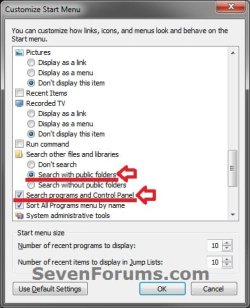
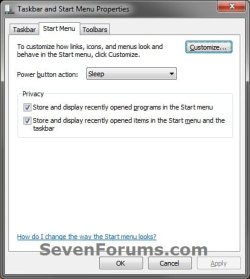
1. Open the Customize Start Menu properties settings, select (dot) Search with public folders, check Search programs and Control Panel, then click on OK twice. (see screenshots below)
2. Open Search Options in Folder Options.
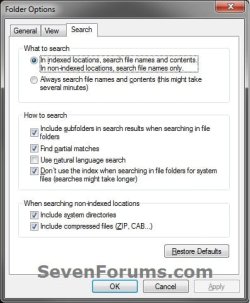
3. To Have Accurate Non-indexed Search Results
NOTE: This option will take a bit longer to get search results, but they will be accurate. A) Set your seach settings like they are below, and click on OK. (see screenshot below)
4. To Use Indexed Searching
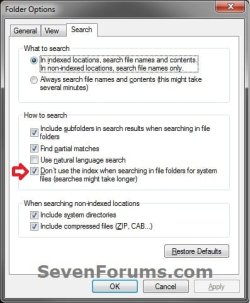
NOTE: This is the default setting. If you disbled disable the index Windows Search service, then you will need to also start and enable it again. This option will give you faster results, but may not be accurate if you did not include the location or add the file types you are searching in and for to the index, and if the index has not finished updating itself for changes you made since the last time the index was updated. You could rebuild the index to force it to update. A) Uncheck the Don't use the index when searching in file folders for system files box, and click on OK. (see screenshot below)
That's it,
Shawn
Related Tutorials
- How to Change or Restore the Default Windows 7 Search Options
- How to Search in Windows 7
- How to Enable or Disable the Search Index in Vista and Windows 7
- How to Add or Remove Windows 7 Index Locations
- How to Add or Remove a File Type from the Windows 7 Index
- How to Rebuild the Windows 7 Index
- How to Create a Search Shortcut in Windows 7
- How to Save a Search in Windows 7
- How to Enable or Disable Windows 7 Explorer Recent Search Box Suggestions
- How to Change the Size of the Windows 7 Explorer Address and Search Bar
- How to Edit or Reset Windows 7 Explorer Recent Search Box Suggestions
- How to Create a Search and Indexing Troubleshoot Shortcut in Windows 7
- How to Configure and Fully Utilize Windows 7 Search
- How to Add "Search" to "My Computer" Context Menu in Vista and Windows 7
- How to Use Windows Search Filters and Operators to get better Search Results in Windows 7
Last edited:
