Run as Administrator

How to Run a Program as an Administrator in Windows 7


   Information
This will show you how to have a program run as administrator with full elevated rights and privileges in Windows 7.

A Standard user will still not be able to run a elevated program without getting a UAC prompt and having to enter the administrator's password.
   Note
If a program that you are trying to run is giving you a Access Denied or No Permission type error, then running it as an administrator can usually give the program the permission it needs to run properly.
   Warning
You should only allow a program that you trust to run as administrator. Once you have applied UAC permission, the program will have full access to your computer.


OPTION ONE

"Run as administrator" using a Keyboard Shortcut


NOTE: This will allow you to temporarily run a program as an administrator once until you close it.
1. Press and hold Ctrl+Shift while opening the program.

2. If prompted by UAC, then click on Yes to apply permission to allow the program to run with full permission as an Administrator.
NOTE: If you are doing this is while logged in as standard user instead of an administrator, then you will need to provide the administrator's password before the program will run as administrator.


OPTION TWO

"Run as administrator" using Context Menu of Program


NOTE: This will show you how to temporarily run a program as an administrator once until you close it.
1. Right click on the program's shortcut or an .EXE file, BAT file, CMD file, or MSI file, and click on Run as administrator. (see screenshot below)
Context_Menu.jpg
2. If prompted by UAC, then click on Yes to apply permission to allow the program to run with full permission as an administrator.
NOTE: If you are doing this is while logged in as standard user instead of an administrator, then you will need to provide the administrator's password before the program will run as administrator.


OPTION THREE

"Run as administrator" from Pinned Program on Taskbar


NOTE: This will show you how to temporarily run a program pinned to the taskbar as an administrator once until you close it.
1. Right click on the icon of the pinned program on the taskbar to open it's Jump List. (see screenshot below)

2. In the Jump List, right click on the program's name, and click on Run as administrator. (see screenshot below)
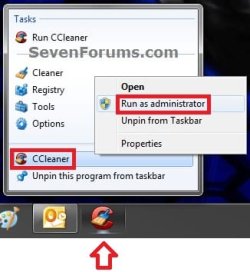
Taskbar1.jpg
3. If prompted by UAC, then click on Yes to apply permission to allow the program to run with full permission as an Administrator.
NOTE: If you are doing this is while logged in as standard user instead of an administrator, then you will need to provide the administrator's password before the program will run as administrator.


OPTION FOUR

"Run as administrator" from Start Menu Search Box


NOTE: This will show you how to temporarily run a program as an administrator once until you close it.
1. Type in the file name (ex: cmd) of the program that you want to run elevated. (see screenshot below)
Start_Menu.jpg
2. Do either step 3 or 4 below.

3. Press Ctrl+Shift+Enter to open the program (ex: cmd) elevated, and go to step 5 below.

OR

4. Do OPTION TWO as above to right click on the program (ex: cmd) in the search results at the top of the Start Menu, and click on Run as administrator. (see screenshot below step 1)

5. If prompted by UAC, then click on Yes to apply permission to allow the program to run with full permission as an Administrator.
NOTE: If you are doing this is while logged in as standard user instead of an administrator, then you will need to provide the administrator's password before the program will run as administrator.


OPTION FIVE

"Run as administrator" using Compatibility Mode


NOTE: This will show you how to always have the program run as an administrator when you open it.
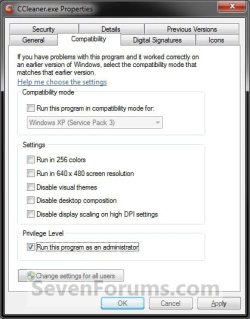
1. Right click on the program shortcut or program .exe file, then click on Properties, and on the Compatibility tab. (see screenshots below)
NOTE: If you are doing this while logged on as a standard user instead of an administrator, then you will need to also click on the Change settings for all users button and type in the administrator's password.
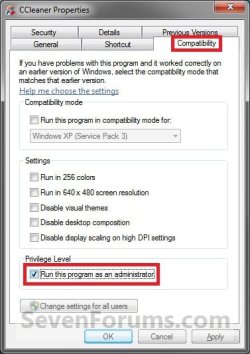
Compatibility_Mode1.jpgCompatibility_Mode2.jpg
2. To Always Run this Program as an Administrator
A) Check the Run this program as an administrator box, and click on OK. (see screenshots above)
3. To Not Always Run this Program as an Administrator
A) Uncheck the Run this program as an administrator box, and click on OK. (see screenshots below step 1)
4. Open the program.

5. If prompted by UAC, then click on Yes to apply permission to allow the program to run with full permission as an administrator.
NOTE: If you are doing this is while logged in as standard user instead of an administrator, then you will need to provide the administrator's password before the program will run as administrator.


OPTION SIX

"Run as administrator" using Advanced Properties


NOTE: This will show you how to always have only this specific shortcut of the program run as an administrator when you open it, and not from any other shortcut or .exe of the program.
1. Right click on a shortcut that you want to run as administrator, and click on Properties.

2. Click on the Shortcut tab for a program shortcut, then cllick on the Advanced button. (see screenshot below)
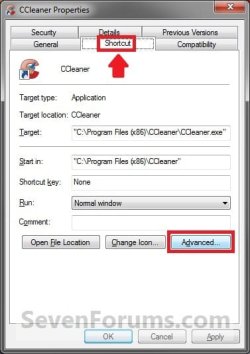
Advanced_Properties1A.jpg
3. To Always Run this Specific Shortcut as an Administrator
A) Check the Run as administrator box, and click on OK. (see screenshot below)
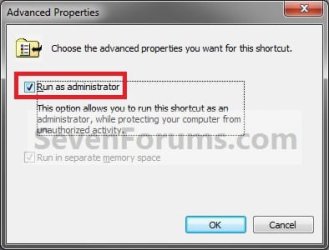
Advanced_Properties2.jpg
4. To Not Always Run this Specific Shortcut as an Administrator
A) Uncheck the Run as administrator box, and click on OK. (see screenshot above)
5. Click on OK. (see screenshot below step 2)

6. Open the program.

7. If prompted by UAC, then click on Yes to apply permission to allow the program to run with full permission as an Administrator.
NOTE: If you are doing this is while logged in as standard user instead of an administrator, then you will need to provide the administrator's password before the program will run as administrator.


OPTION SEVEN

"Run as administrator" using an Elevated Shortcut


1. For how, see:
How to Create a Elevated Program Shortcut without a UAC Prompt

OR

How to Create a Elevated Program Shortcut a Standard User is able to Run in Windows 7


OPTION EIGHT

"Run as administrator" Manually in Registry Editor


1. For how, use the RUNASADMIN value with the full path to the program's file in OPTION THREE here: How to Run a Program in Compatibility Mode in Windows 7
That's it,
Shawn


Last edited:
Nick,

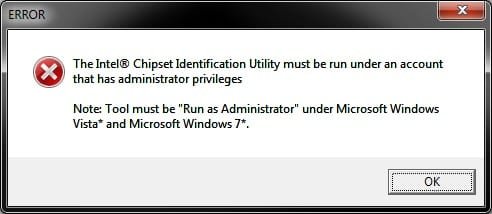
It's a issue with the program itself. I have tried to run it by right clicking and "Run as admistrator", and in the built-in Administrator account as well with no luck. I get the same error as you below. :(

error.jpg
 

My Computer

Computer type
PC/Desktop
Computer Manufacturer/Model Number
Self built custom
OS
64-bit Windows 11 Pro for Workstations
CPU
Intel i7-8700K OC'd to 5 GHz
Motherboard
ASUS ROG Maximus XI Formula Z390
Memory
64 GB (4x16GB) G.SKILL TridentZ RGB DDR4 3600 MHz
Graphics Card(s)
ASUS ROG-STRIX-GTX1080TI-O11G-GAMING
Sound Card
Integrated
Monitor(s) Displays
2 x Samsung Odyssey G7 27"
Screen Resolution
2560x1440
Hard Drives
1TB Samsung 990 PRO M.2,
4TB Samsung 990 PRO PRO M.2,
TerraMaster F8 SSD Plus NAS
PSU
Seasonic Prime Titanium 850W
Case
Thermaltake Core P3
Cooling
Corsair Hydro H115i
Keyboard
Logitech wireless K800
Mouse
Logitech MX Master 4
Internet Speed
2 Gb/s Download and 100 Mb/s Upload
Antivirus
Malwarebyte Anti-Malware Premium
Browser
Google Chrome
Other Info
Logitech Z625 speaker system,
Logitech BRIO 4K Pro webcam,
HP Color LaserJet Pro MFP M477fdn,
APC SMART-UPS RT 1000 XL - SURT1000XLI,
Galaxy S23 Plus phone
well at least I know it wasn't something I was doing wrong!
Thank you for taking the time to help!
 

My Computer

OS
windows 7 home premium
You're most welcome Nick.

Do you know your motherboard brand and model number? You should be able to look the chipset up with it.
 

My Computer

Computer type
PC/Desktop
Computer Manufacturer/Model Number
Self built custom
OS
64-bit Windows 11 Pro for Workstations
CPU
Intel i7-8700K OC'd to 5 GHz
Motherboard
ASUS ROG Maximus XI Formula Z390
Memory
64 GB (4x16GB) G.SKILL TridentZ RGB DDR4 3600 MHz
Graphics Card(s)
ASUS ROG-STRIX-GTX1080TI-O11G-GAMING
Sound Card
Integrated
Monitor(s) Displays
2 x Samsung Odyssey G7 27"
Screen Resolution
2560x1440
Hard Drives
1TB Samsung 990 PRO M.2,
4TB Samsung 990 PRO PRO M.2,
TerraMaster F8 SSD Plus NAS
PSU
Seasonic Prime Titanium 850W
Case
Thermaltake Core P3
Cooling
Corsair Hydro H115i
Keyboard
Logitech wireless K800
Mouse
Logitech MX Master 4
Internet Speed
2 Gb/s Download and 100 Mb/s Upload
Antivirus
Malwarebyte Anti-Malware Premium
Browser
Google Chrome
Other Info
Logitech Z625 speaker system,
Logitech BRIO 4K Pro webcam,
HP Color LaserJet Pro MFP M477fdn,
APC SMART-UPS RT 1000 XL - SURT1000XLI,
Galaxy S23 Plus phone
Run as Administrator (right click) elevates a program to run with full permission and full access of the computer.

Hope this help,
Shawn

Hello Shawn

Just to clarify, does "Run as administrator" run the program
a) as if it were run by an Administrator account, or
b) as if it were run by a member of the Administrators group?
 

My Computer

Computer type
PC/Desktop
Computer Manufacturer/Model Number
Scan 3XS P55 liteDAW
OS
Windows Home Premium (64)
CPU
Intel Core i7 860
Motherboard
Gigabyte GA-P55A-UD4
Memory
8GB (4x2GB) Corsair TwinX XMS3
Graphics Card(s)
1GB Gainward 9500 GT
Sound Card
M-Audio Delta 66
Monitor(s) Displays
Acer v223wBBd
Screen Resolution
1680 x 1050
Hard Drives
1 x 500 GB WD Barracuda (OS+Docs)
2 x 1TB Samsung Spinpoint F3 (Data)
PSU
Enermax EMD625AWT II - 625W Enermax Modu82+ II
Case
Fractal Design Define R2 Black
Cooling
Prolima Megahalems Super 6 Heatpipe Tower Cooler
Keyboard
Microsoft Digital Media Pro
Mouse
Belkin Optical Ergo
Internet Speed
8 Mbps nominal (14.9 achieved !)
Other Info
Digital Audio Workstation
Hello DarkStar,

When you use "Run as administrator" it will elevate the program to run as if it were run by a member of the Administrators group.

In normal administrator account (not the built-in Administrator), everything runs the same as if you were a standard user by default. You have to approve UAC permission before anything can run elevated (run as administrator).

Hope this helps,
Shawn
 

My Computer

Computer type
PC/Desktop
Computer Manufacturer/Model Number
Self built custom
OS
64-bit Windows 11 Pro for Workstations
CPU
Intel i7-8700K OC'd to 5 GHz
Motherboard
ASUS ROG Maximus XI Formula Z390
Memory
64 GB (4x16GB) G.SKILL TridentZ RGB DDR4 3600 MHz
Graphics Card(s)
ASUS ROG-STRIX-GTX1080TI-O11G-GAMING
Sound Card
Integrated
Monitor(s) Displays
2 x Samsung Odyssey G7 27"
Screen Resolution
2560x1440
Hard Drives
1TB Samsung 990 PRO M.2,
4TB Samsung 990 PRO PRO M.2,
TerraMaster F8 SSD Plus NAS
PSU
Seasonic Prime Titanium 850W
Case
Thermaltake Core P3
Cooling
Corsair Hydro H115i
Keyboard
Logitech wireless K800
Mouse
Logitech MX Master 4
Internet Speed
2 Gb/s Download and 100 Mb/s Upload
Antivirus
Malwarebyte Anti-Malware Premium
Browser
Google Chrome
Other Info
Logitech Z625 speaker system,
Logitech BRIO 4K Pro webcam,
HP Color LaserJet Pro MFP M477fdn,
APC SMART-UPS RT 1000 XL - SURT1000XLI,
Galaxy S23 Plus phone
Ah ha, thank you. That clarifies things:

So an account which is created as an Administrator account normally runs a program as a standard user.

But he/she can run the program using "Run as Administrator" gaining the elevated privileges.

It's a shame that Microsoft did not define different names for the account types and the Groups.
 

My Computer

Computer type
PC/Desktop
Computer Manufacturer/Model Number
Scan 3XS P55 liteDAW
OS
Windows Home Premium (64)
CPU
Intel Core i7 860
Motherboard
Gigabyte GA-P55A-UD4
Memory
8GB (4x2GB) Corsair TwinX XMS3
Graphics Card(s)
1GB Gainward 9500 GT
Sound Card
M-Audio Delta 66
Monitor(s) Displays
Acer v223wBBd
Screen Resolution
1680 x 1050
Hard Drives
1 x 500 GB WD Barracuda (OS+Docs)
2 x 1TB Samsung Spinpoint F3 (Data)
PSU
Enermax EMD625AWT II - 625W Enermax Modu82+ II
Case
Fractal Design Define R2 Black
Cooling
Prolima Megahalems Super 6 Heatpipe Tower Cooler
Keyboard
Microsoft Digital Media Pro
Mouse
Belkin Optical Ergo
Internet Speed
8 Mbps nominal (14.9 achieved !)
Other Info
Digital Audio Workstation
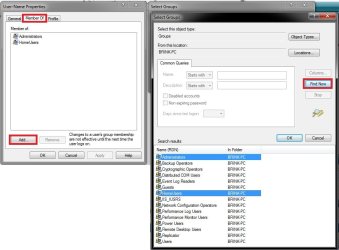
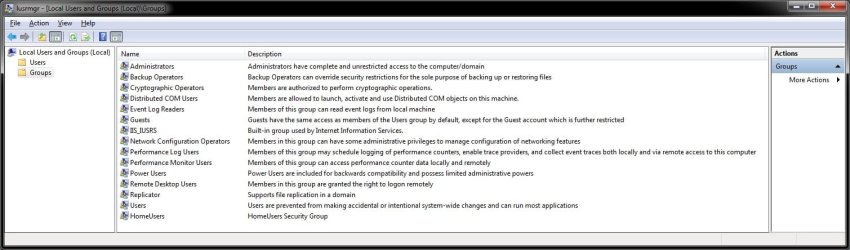
They do in Local Users and Groups (not available in your edition of Windows 7 though), but for security purposes the administrator runs the program the same as a standard user group until elevated using UAC to the administrators group. This way the program does not have full access to the computer if ran as a standard user. It has full access when elevated though.

Lusrmgr.msc.jpgLUSRMGR-2.jpg
 
Last edited:

My Computer

Computer type
PC/Desktop
Computer Manufacturer/Model Number
Self built custom
OS
64-bit Windows 11 Pro for Workstations
CPU
Intel i7-8700K OC'd to 5 GHz
Motherboard
ASUS ROG Maximus XI Formula Z390
Memory
64 GB (4x16GB) G.SKILL TridentZ RGB DDR4 3600 MHz
Graphics Card(s)
ASUS ROG-STRIX-GTX1080TI-O11G-GAMING
Sound Card
Integrated
Monitor(s) Displays
2 x Samsung Odyssey G7 27"
Screen Resolution
2560x1440
Hard Drives
1TB Samsung 990 PRO M.2,
4TB Samsung 990 PRO PRO M.2,
TerraMaster F8 SSD Plus NAS
PSU
Seasonic Prime Titanium 850W
Case
Thermaltake Core P3
Cooling
Corsair Hydro H115i
Keyboard
Logitech wireless K800
Mouse
Logitech MX Master 4
Internet Speed
2 Gb/s Download and 100 Mb/s Upload
Antivirus
Malwarebyte Anti-Malware Premium
Browser
Google Chrome
Other Info
Logitech Z625 speaker system,
Logitech BRIO 4K Pro webcam,
HP Color LaserJet Pro MFP M477fdn,
APC SMART-UPS RT 1000 XL - SURT1000XLI,
Galaxy S23 Plus phone
Brink,

Looks like I need your help again... I do not have RAA when I right click on an app's icon.

I am running Stardock's Object Desktop & Avanquest's PowerDesk Pro8; & either of these may have something to do w/this- so I'll check further. But in the mean-time I would appreciate it if you know of something off hand...

TIAa (thanks in adv. again!) elisedai

**** EDIT to add later info*** I'm leaving this for all to see- I noticed that some apps do not have the RAA, but others do, & that was after disabling the Avanquest context menu memory resident applet... so I guess it depends on the app if there is a run-as-admin option when right-clicking ***END EDIT***
 
Last edited:

My Computer

Computer Manufacturer/Model Number
Gateway GT5040 Home Media Center
OS
Win 7 x64 Home Premium
CPU
Pentium D 820 dual core 2.8 Ghz
Memory
3Gb
So is there a way to run a program with admin privilege and u don't have to type password everytime?
 

My Computer

OS
window 7 Ultimate 32bit
Hello Aragon, and welcome to Seven Forums.

You could run a program without having to type in a password if you run the program while logged in an "administrator" account instead of a "standard" account. Otherwise, no.

Hope this helps,
Shawn
 

My Computer

Computer type
PC/Desktop
Computer Manufacturer/Model Number
Self built custom
OS
64-bit Windows 11 Pro for Workstations
CPU
Intel i7-8700K OC'd to 5 GHz
Motherboard
ASUS ROG Maximus XI Formula Z390
Memory
64 GB (4x16GB) G.SKILL TridentZ RGB DDR4 3600 MHz
Graphics Card(s)
ASUS ROG-STRIX-GTX1080TI-O11G-GAMING
Sound Card
Integrated
Monitor(s) Displays
2 x Samsung Odyssey G7 27"
Screen Resolution
2560x1440
Hard Drives
1TB Samsung 990 PRO M.2,
4TB Samsung 990 PRO PRO M.2,
TerraMaster F8 SSD Plus NAS
PSU
Seasonic Prime Titanium 850W
Case
Thermaltake Core P3
Cooling
Corsair Hydro H115i
Keyboard
Logitech wireless K800
Mouse
Logitech MX Master 4
Internet Speed
2 Gb/s Download and 100 Mb/s Upload
Antivirus
Malwarebyte Anti-Malware Premium
Browser
Google Chrome
Other Info
Logitech Z625 speaker system,
Logitech BRIO 4K Pro webcam,
HP Color LaserJet Pro MFP M477fdn,
APC SMART-UPS RT 1000 XL - SURT1000XLI,
Galaxy S23 Plus phone
Thanks!

Thanks for the help, I've been having the same problem with Onenote and Windows Desktop Search.:D
 

My Computer

OS
Windows 7 Home Premium 64bit.
CPU
AMD Athlon 64 Dual Core 6 6000+
Motherboard
ASUS
Memory
2 Gig
Graphics Card(s)
nVidia 8600 GT
Monitor(s) Displays
Philips MWC1230F
Hard Drives
Samsung Spinpoint 1T
You're most welcome Tonbar, and welcome to Seven Forums. :)
 

My Computer

Computer type
PC/Desktop
Computer Manufacturer/Model Number
Self built custom
OS
64-bit Windows 11 Pro for Workstations
CPU
Intel i7-8700K OC'd to 5 GHz
Motherboard
ASUS ROG Maximus XI Formula Z390
Memory
64 GB (4x16GB) G.SKILL TridentZ RGB DDR4 3600 MHz
Graphics Card(s)
ASUS ROG-STRIX-GTX1080TI-O11G-GAMING
Sound Card
Integrated
Monitor(s) Displays
2 x Samsung Odyssey G7 27"
Screen Resolution
2560x1440
Hard Drives
1TB Samsung 990 PRO M.2,
4TB Samsung 990 PRO PRO M.2,
TerraMaster F8 SSD Plus NAS
PSU
Seasonic Prime Titanium 850W
Case
Thermaltake Core P3
Cooling
Corsair Hydro H115i
Keyboard
Logitech wireless K800
Mouse
Logitech MX Master 4
Internet Speed
2 Gb/s Download and 100 Mb/s Upload
Antivirus
Malwarebyte Anti-Malware Premium
Browser
Google Chrome
Other Info
Logitech Z625 speaker system,
Logitech BRIO 4K Pro webcam,
HP Color LaserJet Pro MFP M477fdn,
APC SMART-UPS RT 1000 XL - SURT1000XLI,
Galaxy S23 Plus phone
this is a really good thread, alot of important things people need to know about
 

My Computer

Computer Manufacturer/Model Number
Dell Inspiron
OS
Windows 7 Home Premium 64x
CPU
Amd Athlon
Memory
3.00 GB
Graphics Card(s)
ATI Mobility Radeon HD 4250
Hard Drives
TSST Corp DVD+ -RW TS-L633C ATA Device
Keyboard
Standard PS/2 Keyboard
This is THE thread for UAC info - I agree. But I want to make sure I fully understand this so bear with me, all.

I have one standard user. She needs to run an installed app called Autobase.exe off a shortcut off the desktop. This app works perfectly in XP Pro, where there are no UAC or permissions issues. We've migrated to Windows 7 Pro with a brand new Acer desktop. I hate to think what you're going to say to me, but...

I created an "Admin" account and used it to set up the various routine apps including AutoBase. We don't use that many frankly - most business is conducted through the browser. Before installing the few apps (like Office, CCleaner etc.) I created the standard user acct called HA017. Office runs fine with no UAC intervention. CCleaner puts up a UAC prompt but allows us to Continue unabated. But Autobase - always generates the propmpt begging for administrator's password. I wish I knew why the difference. Of course we don't want to give away the admin password - for obvious reasons. It permits her too much access to the whole computer in general. OK...

I went through and granted permissions to \users\HA017 to elevate this standard user to full control of the Autobase folder. She still gets the admin password prompt. I pressed further and granted permissions to \users\HA017 on both the shortcut and the target executable and the entire folder plus subfolders. Still wants the admin password. I'd like to halt that behavior.

But if I read Brink's 8/29 reply, I'm hopelessly doomed here! As I read it, I will have to make this standard user an admin and thus spoil all the good security measures that Win 7 provides machine wide. That just doesn't sound right to me! I have the feeling I'm just not reading something right.

Can someone give me a direction to go in, please?

H
 

My Computer

Computer Manufacturer/Model Number
Acer VX275
OS
Windows 7 Pro - 32 bit
CPU
Itel Core II Duo
Motherboard
Acer
Memory
3 gB
Graphics Card(s)
Onboard
Sound Card
Onboard
Monitor(s) Displays
Varies
Hard Drives
320 gb Hitachi
PSU
Acer
Case
Acer
Cooling
Acer
Hello Hoib, and welcome to Seven Forums.

You might see if using OPTION THREE in the tutorial to see if you may get lucky and be able to uncheck the Run this program as an administrator box, or try running the program in XP SP3 compatibility mode to see if that may be able to help.

If not, then I do not think that you will be able to allow a standard user to run it. :(
 

My Computer

Computer type
PC/Desktop
Computer Manufacturer/Model Number
Self built custom
OS
64-bit Windows 11 Pro for Workstations
CPU
Intel i7-8700K OC'd to 5 GHz
Motherboard
ASUS ROG Maximus XI Formula Z390
Memory
64 GB (4x16GB) G.SKILL TridentZ RGB DDR4 3600 MHz
Graphics Card(s)
ASUS ROG-STRIX-GTX1080TI-O11G-GAMING
Sound Card
Integrated
Monitor(s) Displays
2 x Samsung Odyssey G7 27"
Screen Resolution
2560x1440
Hard Drives
1TB Samsung 990 PRO M.2,
4TB Samsung 990 PRO PRO M.2,
TerraMaster F8 SSD Plus NAS
PSU
Seasonic Prime Titanium 850W
Case
Thermaltake Core P3
Cooling
Corsair Hydro H115i
Keyboard
Logitech wireless K800
Mouse
Logitech MX Master 4
Internet Speed
2 Gb/s Download and 100 Mb/s Upload
Antivirus
Malwarebyte Anti-Malware Premium
Browser
Google Chrome
Other Info
Logitech Z625 speaker system,
Logitech BRIO 4K Pro webcam,
HP Color LaserJet Pro MFP M477fdn,
APC SMART-UPS RT 1000 XL - SURT1000XLI,
Galaxy S23 Plus phone
Thank you for the welcome.

Boy, I don't like that answer!! :sarc:
I will be going to the site tomorrow so I can try option 3 - I did zero in on that one in this very nice forum.

Late question added: When you do Option 3, do you do it from the admin account or do you do it from the standard user account. On the later scenario, would you do it after assigning admin priveleges to that standard user (then revert back later)?
Larger issue - Big picture question: Do you happen to know exactly, "WHY" is this being imposed in such a brutally frustrating and wholly inefficient and disruptive fashion? If I were developing software and had to accomodate Win 7, I'd surely have to know these rules and plan for them, wouldn't I? As an expert, doesn't it seem to you to be counter-productive: spend all this user time and user effort to broker security only to then have to toss out all security? I understand about having the system be secure - I've fixed dozens of friends and neighbor's computers who got hacked/hijacked. But, as this is my first venture into the world of Win 7, doesn't this brand of "absolutism" seem pretty dumb/lame? And, I have to just wonder what exactly do software authors do now?

So other than option 3, there's no other way around this. May I please ask if you know how programs (again, I'l cite CCleaner for example) set themselves up to run on a standard user account; what are the differences, how are they implemented? Is it in some special way that they're coded?

Makes me want to go to Linux...


Brink - let me ask another question so I can try to sort this out before I go in tomorrow...

If I completely disable UAC (IOW drop that slider all the way to the bottom - forsaking all the so called nice security features and warnings for the needed business application functionality) that disabling action still DOES NOT get around the fact that the standard user has no permission to run this legacy app, right? UAC is simply the messenger - it's really a permissions issue, right? And as such, no matter what I set the permissions to on the folders/shorcuts/executables, it's not going to work! Until the authors of this legacy app create a new Win 7 compatible program, right? It doesn't matter one wit if I installed this with the admin acct - standard users cannot run the app. I doesn't matter in which order the user or app is applied to Windows - standard users do not have priveleges with these legacy apps. I want to understand (because it's so hard to believe we've be painted into a corner...) Running the legacy app in "compatibility mode" should bridge the gap, but for some reason the admin token does not inherit down to the standard user, in this case, right? (See? I've been reading....!)

I'd just like some quick thoughts on this... I do thank you and appreciate the time you spend with us here. It must be a labor of love...

H
 
Last edited by a moderator:

My Computer

Computer Manufacturer/Model Number
Acer VX275
OS
Windows 7 Pro - 32 bit
CPU
Itel Core II Duo
Motherboard
Acer
Memory
3 gB
Graphics Card(s)
Onboard
Sound Card
Onboard
Monitor(s) Displays
Varies
Hard Drives
320 gb Hitachi
PSU
Acer
Case
Acer
Cooling
Acer
Hoib,

Option Three will need to be done on the .exe file from an administrator account.

I think I found an alternative method that may work for what you are wanting. You can use AppLocker in the tutorial below to create a new rule for the Autobase.exe file for the standard user to see it that may be able to let that account run it without having to enter the administrator's password.

http://www.sevenforums.com/tutorials/7844-applocker-create-new-rules.html
 

My Computer

Computer type
PC/Desktop
Computer Manufacturer/Model Number
Self built custom
OS
64-bit Windows 11 Pro for Workstations
CPU
Intel i7-8700K OC'd to 5 GHz
Motherboard
ASUS ROG Maximus XI Formula Z390
Memory
64 GB (4x16GB) G.SKILL TridentZ RGB DDR4 3600 MHz
Graphics Card(s)
ASUS ROG-STRIX-GTX1080TI-O11G-GAMING
Sound Card
Integrated
Monitor(s) Displays
2 x Samsung Odyssey G7 27"
Screen Resolution
2560x1440
Hard Drives
1TB Samsung 990 PRO M.2,
4TB Samsung 990 PRO PRO M.2,
TerraMaster F8 SSD Plus NAS
PSU
Seasonic Prime Titanium 850W
Case
Thermaltake Core P3
Cooling
Corsair Hydro H115i
Keyboard
Logitech wireless K800
Mouse
Logitech MX Master 4
Internet Speed
2 Gb/s Download and 100 Mb/s Upload
Antivirus
Malwarebyte Anti-Malware Premium
Browser
Google Chrome
Other Info
Logitech Z625 speaker system,
Logitech BRIO 4K Pro webcam,
HP Color LaserJet Pro MFP M477fdn,
APC SMART-UPS RT 1000 XL - SURT1000XLI,
Galaxy S23 Plus phone
Oh Man! What a find - I can't wait to get in tomorrow give this a try.
I sat around and worried about this all day!!! :D

Observe that the article says, "A computer running Windows Server 2008 R2, Windows 7 Ultimate, Windows 7 Enterprise, or Windows 7 Professional to create the AppLocker rules. Windows 7 Professional can be used to create the rules, but the rules cannot be enforced on computers running Windows 7 Professional." This again seems to contradict itself because you can't "enforce" on computers running Win 7 Pro. How absolutely wierd.

I'll be sure to report back promptly...

Thanks.

H
 

My Computer

Computer Manufacturer/Model Number
Acer VX275
OS
Windows 7 Pro - 32 bit
CPU
Itel Core II Duo
Motherboard
Acer
Memory
3 gB
Graphics Card(s)
Onboard
Sound Card
Onboard
Monitor(s) Displays
Varies
Hard Drives
320 gb Hitachi
PSU
Acer
Case
Acer
Cooling
Acer
That is a bit confusing. I rewrote that part to help make it easier to understand. :)
 

My Computer

Computer type
PC/Desktop
Computer Manufacturer/Model Number
Self built custom
OS
64-bit Windows 11 Pro for Workstations
CPU
Intel i7-8700K OC'd to 5 GHz
Motherboard
ASUS ROG Maximus XI Formula Z390
Memory
64 GB (4x16GB) G.SKILL TridentZ RGB DDR4 3600 MHz
Graphics Card(s)
ASUS ROG-STRIX-GTX1080TI-O11G-GAMING
Sound Card
Integrated
Monitor(s) Displays
2 x Samsung Odyssey G7 27"
Screen Resolution
2560x1440
Hard Drives
1TB Samsung 990 PRO M.2,
4TB Samsung 990 PRO PRO M.2,
TerraMaster F8 SSD Plus NAS
PSU
Seasonic Prime Titanium 850W
Case
Thermaltake Core P3
Cooling
Corsair Hydro H115i
Keyboard
Logitech wireless K800
Mouse
Logitech MX Master 4
Internet Speed
2 Gb/s Download and 100 Mb/s Upload
Antivirus
Malwarebyte Anti-Malware Premium
Browser
Google Chrome
Other Info
Logitech Z625 speaker system,
Logitech BRIO 4K Pro webcam,
HP Color LaserJet Pro MFP M477fdn,
APC SMART-UPS RT 1000 XL - SURT1000XLI,
Galaxy S23 Plus phone
Back
Top