
How to Run a Program as an Administrator in Windows 7
Information
This will show you how to have a program run as administrator with full elevated rights and privileges in Windows 7.
A Standard user will still not be able to run a elevated program without getting a UAC prompt and having to enter the administrator's password.
A Standard user will still not be able to run a elevated program without getting a UAC prompt and having to enter the administrator's password.
Note
If a program that you are trying to run is giving you a Access Denied or No Permission type error, then running it as an administrator can usually give the program the permission it needs to run properly.
Warning
You should only allow a program that you trust to run as administrator. Once you have applied UAC permission, the program will have full access to your computer.
OPTION ONE
"Run as administrator" using a Keyboard Shortcut
NOTE: This will allow you to temporarily run a program as an administrator once until you close it.
1. Press and hold Ctrl+Shift while opening the program.
2. If prompted by UAC, then click on Yes to apply permission to allow the program to run with full permission as an Administrator.
NOTE: If you are doing this is while logged in as standard user instead of an administrator, then you will need to provide the administrator's password before the program will run as administrator.
OPTION TWO
"Run as administrator" using Context Menu of Program
NOTE: This will show you how to temporarily run a program as an administrator once until you close it.
1. Right click on the program's shortcut or an .EXE file, BAT file, CMD file, or MSI file, and click on Run as administrator. (see screenshot below)
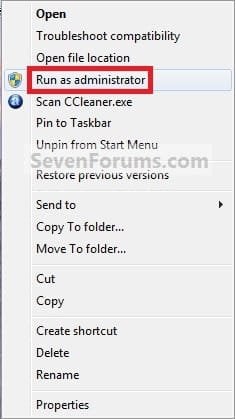
2. If prompted by UAC, then click on Yes to apply permission to allow the program to run with full permission as an administrator.
NOTE: If you are doing this is while logged in as standard user instead of an administrator, then you will need to provide the administrator's password before the program will run as administrator.
OPTION THREE
"Run as administrator" from Pinned Program on Taskbar
NOTE: This will show you how to temporarily run a program pinned to the taskbar as an administrator once until you close it.
1. Right click on the icon of the pinned program on the taskbar to open it's Jump List. (see screenshot below)
2. In the Jump List, right click on the program's name, and click on Run as administrator. (see screenshot below)
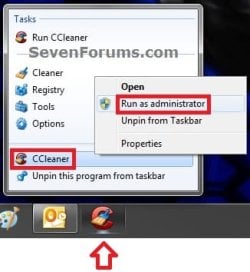
3. If prompted by UAC, then click on Yes to apply permission to allow the program to run with full permission as an Administrator.
NOTE: If you are doing this is while logged in as standard user instead of an administrator, then you will need to provide the administrator's password before the program will run as administrator.
OPTION FOUR
"Run as administrator" from Start Menu Search Box
NOTE: This will show you how to temporarily run a program as an administrator once until you close it.
1. Type in the file name (ex: cmd) of the program that you want to run elevated. (see screenshot below)
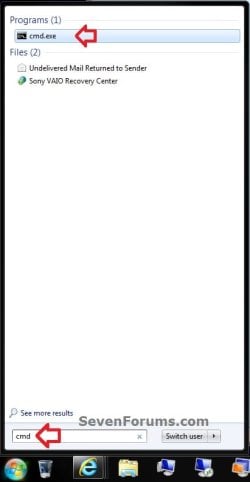
2. Do either step 3 or 4 below.
3. Press Ctrl+Shift+Enter to open the program (ex: cmd) elevated, and go to step 5 below.
OR
4. Do OPTION TWO as above to right click on the program (ex: cmd) in the search results at the top of the Start Menu, and click on Run as administrator. (see screenshot below step 1)
5. If prompted by UAC, then click on Yes to apply permission to allow the program to run with full permission as an Administrator.
NOTE: If you are doing this is while logged in as standard user instead of an administrator, then you will need to provide the administrator's password before the program will run as administrator.
OPTION FIVE
"Run as administrator" using Compatibility Mode
NOTE: This will show you how to always have the program run as an administrator when you open it.
1. Right click on the program shortcut or program .exe file, then click on Properties, and on the Compatibility tab. (see screenshots below)
NOTE: If you are doing this while logged on as a standard user instead of an administrator, then you will need to also click on the Change settings for all users button and type in the administrator's password.
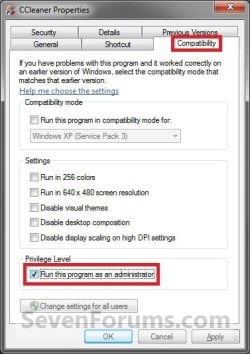
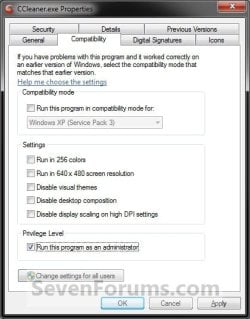
2. To Always Run this Program as an Administrator
A) Check the Run this program as an administrator box, and click on OK. (see screenshots above)
3. To Not Always Run this Program as an Administrator
A) Uncheck the Run this program as an administrator box, and click on OK. (see screenshots below step 1)
4. Open the program.
5. If prompted by UAC, then click on Yes to apply permission to allow the program to run with full permission as an administrator.
NOTE: If you are doing this is while logged in as standard user instead of an administrator, then you will need to provide the administrator's password before the program will run as administrator.
OPTION SIX
"Run as administrator" using Advanced Properties
NOTE: This will show you how to always have only this specific shortcut of the program run as an administrator when you open it, and not from any other shortcut or .exe of the program.
1. Right click on a shortcut that you want to run as administrator, and click on Properties.
2. Click on the Shortcut tab for a program shortcut, then cllick on the Advanced button. (see screenshot below)
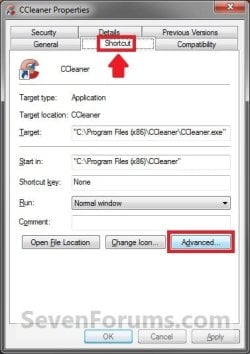
3. To Always Run this Specific Shortcut as an Administrator
A) Check the Run as administrator box, and click on OK. (see screenshot below)
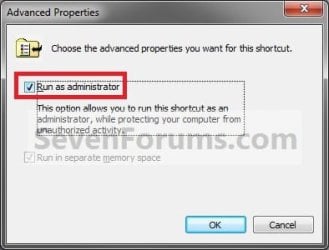
4. To Not Always Run this Specific Shortcut as an Administrator
A) Uncheck the Run as administrator box, and click on OK. (see screenshot above)
5. Click on OK. (see screenshot below step 2)
6. Open the program.
7. If prompted by UAC, then click on Yes to apply permission to allow the program to run with full permission as an Administrator.
NOTE: If you are doing this is while logged in as standard user instead of an administrator, then you will need to provide the administrator's password before the program will run as administrator.
OPTION SEVEN
"Run as administrator" using an Elevated Shortcut
1. For how, see:
How to Create a Elevated Program Shortcut without a UAC Prompt
OR
How to Create a Elevated Program Shortcut a Standard User is able to Run in Windows 7
OPTION EIGHT
"Run as administrator" Manually in Registry Editor
1. For how, use the RUNASADMIN value with the full path to the program's file in OPTION THREE here: How to Run a Program in Compatibility Mode in Windows 7
That's it,
Shawn
Related Tutorials
- How to See if Process is running as administrator (elevated) in Vista and Windows 7
- How to Create an Elevated Program Shortcut without a UAC Prompt
- How to Create an Elevated Program Shortcut a Standard User is able to Run in Windows 7
- How to Run a Program as a Different User in Windows 7
- How to Create a Shortcut to Run a Program as a Specified User
- How to Add or Remove "Run as Different User" in Windows 7 Context Menu
- How to Open an Elevated Command Prompt in Windows 7
- How to Create an Elevated Command Prompt Shortcut in Windows 7 and Windows 8
- How to Create an Elevated Windows 7 Task Manager Shortcut
- How to Create a Task to Run a Program at Startup and Log On in Windows 7
- How to Run a Program in Compatibility Mode in Windows 7
- How to Add "Run as administrator" to VBS File Context Menu
- How to Add "Run as administrator" to MSI File Context Menu
- How to Add or Remove "Run as Administrator" from Context Menu in Windows 7 and Windows 8
Last edited:


