
How to Change the Default Program a File Type Opens With in Windows 7
Information
A default program is the program that Windows 7 uses when you open a particular type of file extension. This will show you how to change a file type to open with a different default program for just this one time or always using the context menu in Windows 7.
These Default Programs association settings are a per user setting and not applied to all users.
These Default Programs association settings are a per user setting and not applied to all users.
Here's How:
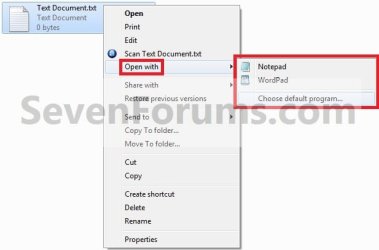
1. Right click on the file type (ex: .txt file) that you want to change the default program for, then click on Open with. (see screenshot below)
Note
If you do not have Open with in the context menu, then this means this file does not have a program associated to open it with.
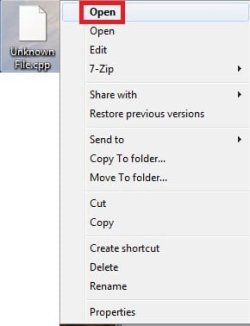
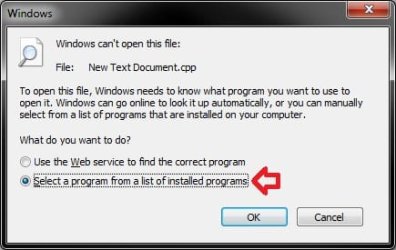
- Instead, click on Open.
- Select (dot) Select a program from a list of installed programs, and click on OK.
- Go to step 3.
2. To Select a Program that is Already Listed in Context Menu
NOTE: This option will only open the file type with this program for just this one time and not everytime by default.
A) After you have expanded Open with, select a listed program (ex: Notepad or Wordpad) that you want to open the file with for just this one time. (see screenshot below)
B) Go to step 4.
3. To Select a Program that is Not Listed in Context Menu
NOTE: This option will allow you to be able to select to have the file type to always open with the selected program by default if you like.
A) After you have expanded Open with, select Choose default program. (see screenshot below step 1)
B) Under Other Programs, click on the drop down arrow to the far right to exapnd it and see more programs to select from. (See screenshot below)
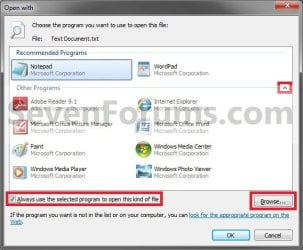
C) Select the program that you want to open the file with. (See screenshot above)
NOTE: If the program you wanted to select is still not listed, then click on the Browse button and navigate to the program's exe file. Select it, and click on the Open button to add it to be able to select it.
D) To Always Open this File Type with the Selected Program by Default
- Check the Always use the selected program to open this kind of file box. (See screenshot below step 3B)
- Go to step 3F.
- Uncheck the Always use the selected program to open this kind of file box. (See screenshot below step 3B)
4. The file will now be opened by the selected program.
That's it,
Shawn
Related Tutorials
- How to Add "Open with" to Context Menu of URL Files in Windows 7 and Vista
- How to Add "Open with" to Context Menu of BAT Files in Windows 7 and Vista
- How to Associate a File Type or Protocol Default Program in Window 7
- How to Unassociate a File Extension Type in Vista, Windows 7, and Windows 8
- Restore Default Windows 7 File Extension Type Associations
- How to Set Default Associations for a Program in Windows 7
- How to Hide or Show Known File Type Extensions in Windows 7
- How to Add or Remove "Always use selected program" in Open with
- How to Have "Always use selected program" Always Checked or Unchecked in "Open with"
- How to Remove or Restore the Open With Context Menu Item in Windows
- How to Change the Default Icon of a File Extension in Windows 7
- How to Create a Default Programs Shortcut in Windows 7
- How to Add or Remove "Open with Notepad" from the Context Menu of Files
- How to Clean Up and Remove Programs from the "Open with" Context Menu
- How to Add a Program to "Open with" in Windows 7
- How to Create a "Set Program Access and Computer Defaults" Shortcut
- How to Enable or Disable the "Set Program Access and Computer Defaults" Page
- How to Fix "Open with" Opening with Notepad or Error Message
Last edited:


