
Windows 7 Forums Search
Welcome to Windows 7 Forums. Our forum is dedicated to helping you find solutions with any problems, errors or issues you are experiencing with Windows 7. The Windows 7 forum also covers news and updates and has an extensive Windows 7 tutorial section that covers a wide range of tips and tricks.


Windows 7 - Lastwake Command


Lastwake Command

How to See What Woke Up Your Computer Last
Published by Brink
11-01-2010
Default Lastwake Command

How to See What Woke Up Your Computer Last

information   Information
This will show you how to see what device, task, or etc... has woken up your computer from sleep or hibernation last.

This will work best if you do this right after your computer wakes up, and before the next time is sleeps. Otherwise you may miss what last woke it previously.


OPTION ONE

Using the "lastwake" Command
1. Open a command prompt.

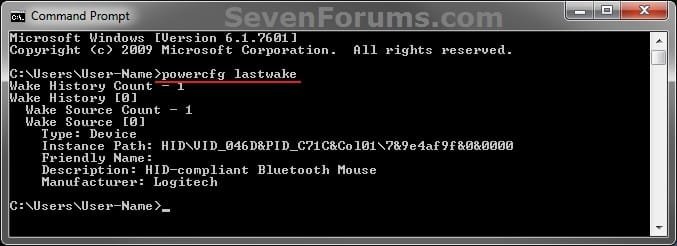
2. In the command prompt, copy and paste the command below and press enter. (see screenshot below step 3)
powercfg lastwake
3. You will now see what last woke up your computer. (see screenshot below)
Lastwake Command-cmd.jpg

For example:
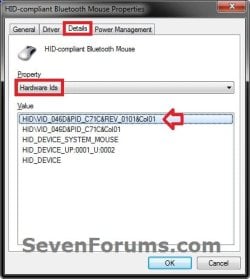
This is what last woke up my computer from above. Just for information purposes, you can look this up in Device Manager (devmgmt.msc).
HID=Harware ID
  • Description - HID-compliant Bluetooth Mouse
Lastwake Command-description.jpg
  • Instance Path - HID\VID_046D&PID_C71C&REV_0101&Col01
Lastwake Command-instance-path.jpg
4. See related links below if you wish to not allow this device or item to wake the computer anymore.


OPTION TWO

Reading the "Wake Source" Event Viewer Log
1. For how, see: How to Read the Wake Source Log in Event Viewer for Windows 7 and Vista
That's it,
Shawn


Published by
Brink's Avatar
Administrator

Join Date: Oct 2008
Location: Texas
Posts: 37,304

Tutorial Tools
05-08-2011   #1
tanitani


Windows 7 Professional x64


Thank you. The powercfg -lastwake command is not working as you described. The following is the result of running it every time the laptop woke up. The first one was a spontaneous wake the rest were by opening the display, NOT a BUTTON!
Thanks.
Gábor

Quote:
Microsoft Windows [Version 6.1.7601]
Copyright (c) 2009 Microsoft Corporation. All rights reserved.

C:\Windows\system32>powercfg -lastwake
Wake History Count - 1
Wake History [0]
Wake Source Count - 0

C:\Windows\system32>powercfg -lastwake
Wake History Count - 1
Wake History [0]
Wake Source Count - 1
Wake Source [0]
Type: Fixed Feature
Power Button

C:\Windows\system32>powercfg -lastwake
Wake History Count - 1
Wake History [0]
Wake Source Count - 1
Wake Source [0]
Type: Fixed Feature
Power Button

C:\Windows\system32>powercfg -lastwake
Wake History Count - 1
Wake History [0]
Wake Source Count - 1
Wake Source [0]
Type: Fixed Feature
Power Button

C:\Windows\system32>powercfg -lastwake
Wake History Count - 1
Wake History [0]
Wake Source Count - 1
Wake Source [0]
Type: Fixed Feature
Power Button

C:\Windows\system32>powercfg -lastwake
Wake History Count - 1
Wake History [0]
Wake Source Count - 1
Wake Source [0]
Type: Fixed Feature
Power Button


My System SpecsSystem Spec
05-08-2011   #2
Brink


Windows 7 Ultimate x64 SP1


Hello Gábor, and welcome to Seven Forums.

"Power Button" may just be a general term used for whatever action "opening the display" you did to wake the computer.

You might also check the items listed in this tutorial to see if it may help determine what woke up your computer as well.

Power Options and Sleep Mode Problems - Vista Forums
My System SpecsSystem Spec
05-22-2011   #3
tanitani


Windows 7 Professional x64


Hello Brink,

Thank you for the quick reply. And thank you for the welcome as well.
I followed your tutorial, and after checking everything the only setting that was different was the:

PCI Express -> Link State Power Management -> Off

For me it was "On". I made the change and so far (about a week) it seems that it works: the laptop did not wake on its own.

The "opening the display" just meant that I opened the screen/lid/display of my laptop up.
Which should not happen actually, since I set the action for "When I close the lid" as "Do nothing".
On all the other laptops I worked with this setting allowed me to also open the laptop without it turning on, but this is a bit off topic.

Thanks again and now that the world did not come to an end (May 21 was supposed to be the end of the world, later it was rescheduled to be October 21 and May 21 was to be the date of "Rapture") I wish you have a good day!

Gábor
My System SpecsSystem Spec
.


05-22-2011   #4
Brink


Windows 7 Ultimate x64 SP1


Hello Gábor,

That's great news. I'm happy to hear that you got it sorted. Thank you for posting back with your results.

Next it will be for Halloween night.
My System SpecsSystem Spec
Comment

 Lastwake Command problems?


Tutorial Tools


Similar Threads for: Lastwake Command
Windows 7 Tutorial Category
Run administrative command prompt from command prompt General Discussion
cd command General Discussion
Command bar ie9 win 7 Browsers & Mail
Command Prompt command <ipconfig> not working Network & Sharing


All times are GMT -5. The time now is 12:26 AM.


Windows 7 Forums is an independent web site and has not been authorized,
sponsored, or otherwise approved by Microsoft Corporation.
"Windows 7" and related materials are trademarks of Microsoft Corp.
© Designer Media Ltd
  

1 2 3 4 5 6 7 8 9 10 11 12 13 14 15 16 17 18 19 20 21 22 23 24 25 26 27 28 29 30