
How to See a List of Devices that are able to Wake Up the Computer
Information
This will show you how to see a list of devices installed on your computer that are configured to be able to wake up your computer from sleep in Vista, Windows 7, and Windows 8.
Here's How:
1. Open a command prompt in Vista, Windows 7, or Windows 8.
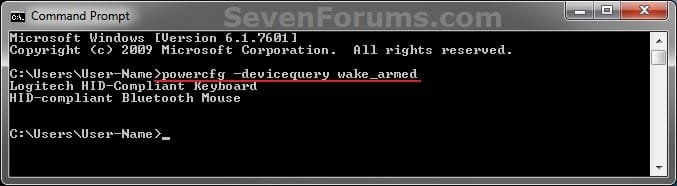
2. In the command prompt, copy and paste the command below and press enter. (see screenshot below step 3) powercfg -devicequery wake_armed3. You will now see a list of device names that are able to wake up your computer. (see screenshot below)
NOTE: For example, my HID-compliant Bluetooth Mouse and Logitech HID-Compliant Keyboard are listed as being able to wake up my computer.
 4. If you like, you can now prevent these devices from being able to wake the computer. A) For how, see: How to Allow or Prevent Devices to Wake Up ComputerThat's it,
Shawn
Related Tutorials
- How to Enable or Disable Windows Media Center Updates to Wake Up the Computer
- How to See What Woke Up Your Computer Last
- How to Read the Wake Source Log in Event Viewer for Windows 7 and Vista
- How to Allow or Prevent Devices to Wake Up Computer
- How to See Available Sleep States on Your System in Windows 7
- How to See Available Sleep States on Your Windows 8 PC
- How to View and Override Power Availability Requests in Windows
Last edited:


