
Windows 7 Forums Search
Welcome to Windows 7 Forums. Our forum is dedicated to helping you find solutions with any problems, errors or issues you are experiencing with Windows 7. The Windows 7 forum also covers news and updates and has an extensive Windows 7 tutorial section that covers a wide range of tips and tricks.


Windows 7 - Details Pane - Change Size


Details Pane - Change Size

How to Change the Size of the Details Pane in Windows 7
Published by Brink
11-02-2010
Default Details Pane - Change Size

How to Change the Size of the Details Pane in Windows 7

information   Information
This will show you how to change the size of the Windows Explorer Details pane and it's preview image in Windows 7 and Vista.

The size you set for the details pane will be applied to all Windows Explorer windows until changed.


OPTION ONE

To Drag the Details Pane to Size
1. Open Windows Explorer, and select any file or folder.
NOTE: In Windows 7 libraries, you must select a file or folder in the library folder and not the library folder itself.

2. Move the mouse pointer over the top border line of the details pane until it turns into a double arrow. (see screenshot below step 3)

3. Left click and hold, then drag the top border line up and down until you have the details pane the size you like. (see screenshot below)
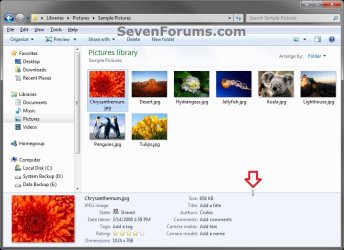
Details Pane - Change Size-option-2.jpg


OPTION TWO

To Select a Size for the Details Pane
1. Open Windows Explorer

2. Right click on a empty space in the details pane, select Size, then click on either Small, Medium, or Large to check it for the size you want for the details pane. (see screenshot below)
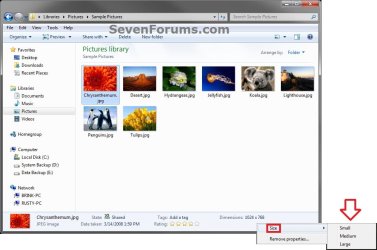
Details Pane - Change Size-option-1.jpg
That's it,
Shawn


Published by
Brink's Avatar
Administrator

Join Date: Oct 2008
Location: Texas
Posts: 37,304

Tutorial Tools
Comment

 Details Pane - Change Size problems?


Tutorial Tools


Similar Threads for: Details Pane - Change Size
Windows 7 Tutorial Category
Solved Windows Explorer Details Pane - include size property Music, Pictures & Video
Details pane Customization
Change Icon Size - Explorer Navigation Pane? Customization
Details pane customization Customization
Details Pane - Turn On or Off Tutorials


All times are GMT -5. The time now is 12:26 AM.


Windows 7 Forums is an independent web site and has not been authorized,
sponsored, or otherwise approved by Microsoft Corporation.
"Windows 7" and related materials are trademarks of Microsoft Corp.
© Designer Media Ltd
  

1 2 3 4 5 6 7 8 9 10 11 12 13 14 15 16 17 18 19 20 21 22 23 24 25 26 27 28 29 30