
How to Create Automated Task that Runs at Set Time in Windows 7
Information
A very handy feature within Vista, Windows Server 2008 & now Windows 7 is the Task Scheduler. This app will allow the automated running of files and programs at a user designated time.
Here's How:
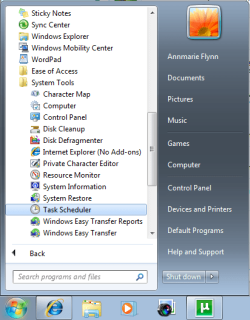
1. Open up Task Scheduler by either typing "task" into the Start Menu search bar, or by opening All Programs - Accesories - System Tools.
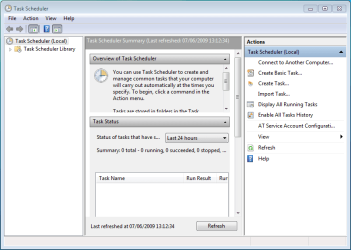
2. Select 'Create Basic Task' from the right hand pane and the 'Create Basic Task Wizard will open.
3. With the Wizard open, type a 'Name' and 'Description' for your new task and click Next.
NOTE: The Next button will only be accessible once a 'Name' has been entered.

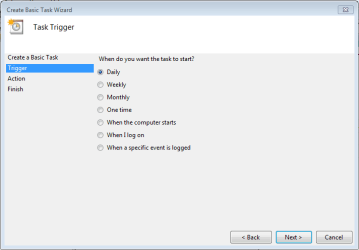
4. Select when you would like the event/task to run and click Next.
NOTE: For this tutorial i've selected 'Daily'.
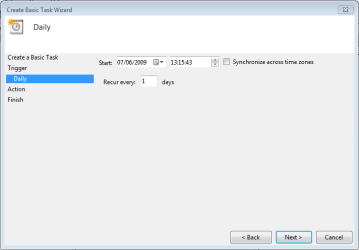
5. Select the exact time and date at which you wish the first task to start (each task afterward will run based on your selection in step 4) then click Next.
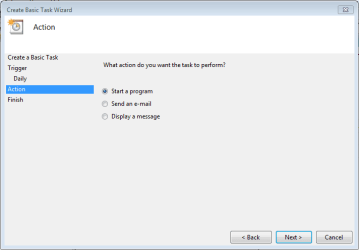
6. Choose the action you with the task to execute from the list then click Next.
NOTE: For this tutorial i've selected 'Start a program'.
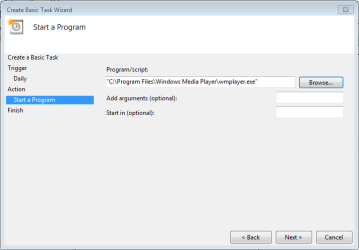
7. Click 'Browse' and navigate to the executable (exe) file of the program you wish to run then click Next.
NOTE: I've chosen to ignore 'Add arguments' and 'Start in'.
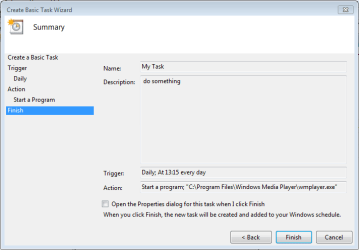
8. Review the task and make sure that you've set all your required information correctly. If satisfied click Finish.
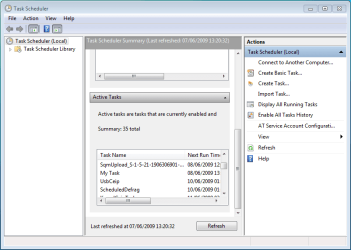
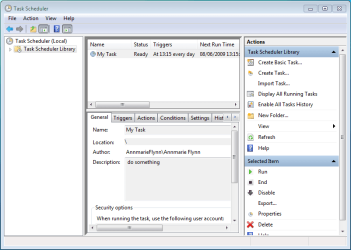
9. Your new task has been created and will run at the user specified time. Click 'Refresh' and scroll the list to see your new task (in this case 'My Task'.
Note
You can create a new task with the 'Create Task' option in the right hand pane, this will just open the 'Create New Task' windows without the Wizard

10. If you Created a Task to Wake Up the Computer and Run
A) You would need to change how long Windows 7 will wait to go back to sleep mode automatically after waking up unattended (no activity made by the actual user) and idle. The default time is only 120 seconds (2 minutes), so you would need to set this for how long it may take for the program or task to run instead. The tutorial below can help show you how to. It will be the same in Windows 7. For how, see:
Sleep Return Timeout for Unattended Wake Up - Vista Forums
Edit/Change Task:
1. You can change you task settings at any time, just double-click the new task.
OR
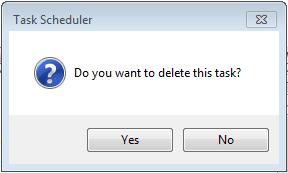
2. If you wish to delete the task you can just click the 'Delete' button in the right hand pane. You will get the confimation dialog upon clicking 'delete'
Related Tutorials
- How to Create a Task to Run a Program at Startup and Log On in Windows 7
- How to Fix Task Scheduler Error (Event ID 404)
- How to Create a Task that will Shut Down the PC Automatically
- How to Create a Task to Wake up the Computer to Run in Vista and Windows 7
- How to Change the Return to Sleep Timeout for a Unattended Wake Up in Windows 7
- How to Display a Message Reminder in Windows with Task Scheduler
Last edited by a moderator:


 rogram files\speccy\speccy.exe. You should select this file.


