
Join or Unjoin Customer Experience Improvement Program in Windows 7 and Windows 8
Information
The Windows Customer Experience Improvement Program helps Microsoft improve Windows. Without interrupting you, it collects information about your computer hardware and how you use Window. The program periodically downloads a file to collect information about problems you might have with Windows. The information collected is not used to identify or contact you.
Windows 7 Privacy Statement - Microsoft Windows
Windows 8.1 Preview and Windows Server 2012 R2 Preview privacy statement - Microsoft Windows
This will show you how to join or unjoin the Windows Customer Experience Improvement Program (CEIP) in Windows 7 and Windows 8.
You must be logged in as an administrator to be able to do the steps in this tutorial.
Windows 7 Privacy Statement - Microsoft Windows
Windows 8.1 Preview and Windows Server 2012 R2 Preview privacy statement - Microsoft Windows
This will show you how to join or unjoin the Windows Customer Experience Improvement Program (CEIP) in Windows 7 and Windows 8.
You must be logged in as an administrator to be able to do the steps in this tutorial.
Here's How: 1. Open the Control Panel (icons view) in Windows 7 or Windows 8, and click/tap on the Action Center icon.
2. Click/tap on the Change Action Center Settings link in the left pane. (see screenshot below)

3. Click/tap on the Change Customer Experience Improvement Program link. (see screenshot below)
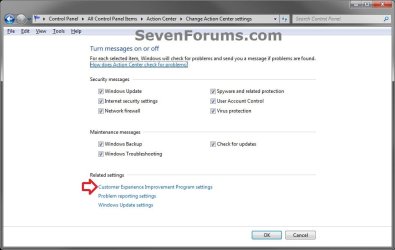
4. Close the Change Action Center Settings window, and do step 5 or 6 below for what you would like to do. (see screenshot below step 2A)
5. To Join the Customer Experience Improvement Program A) Select (dot) Yes, I want to participate in the program, click/tap on the Save Changes button, and go to step 7 below. (see screenshot below)
NOTE: This is the default setting.
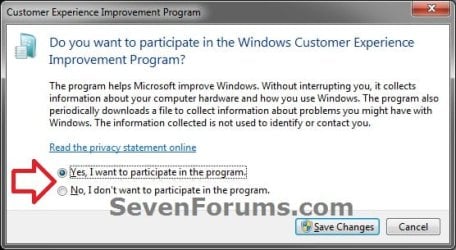
6. To Unjoin the Customer Experience Improvement Program A) Select (dot) No, I don't want to participate in the program, click/tap on the Save Changes button, and go to step 7 below. (see screenshot above)
7. If prompted by UAC, then click/tap on Yes.
That's it,
Shawn
Last edited:

