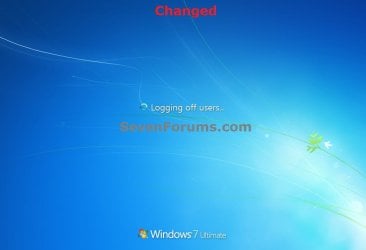
| Windows 7: Logging off... Text Message - Change Logging off... Text Message - Change How to Change the "Logging off..." Text Message at Shut Down in Windows 7 and Vista
Published 24 Nov 2010
|  Published by | | |
 Featured Tutorial | | | How to Change the "Logging off..." Text Message at Shut Down in Windows 7 and Vista  Information This will show you how to change the Logging off... text message you get after clicking on Log off or Shut Down in Windows 7 and Vista to any text message that you want it to say instead. You can only do this tutorial while logged on as an administrator.  Note If you run a sfc /scannow command, then you will lose all changes made to the system file in the tutorial below since it and all other system files will be restored back to default by the command. For Windows 7 Only:- This tutorial works with UAC turned on or off.
- This tutorial works in all 32-bit and 64-bit Windows 7 SP1 editions.
- For Windows 7 without SP1, you will need to turn off a Windows Feature (ex: Windows Gadget Platform), and restart the computer before this tutorial will work. Afterwards, you can turn back on the Windows Feature again.
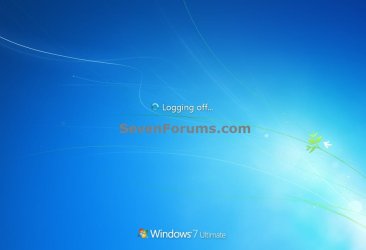
 Warning Making a mistake while modifying system files can render your Windows 7 installation unusable. To be safe, you should create a restore point before doing this tutorial in case you need to do a system restore at boot using the restore point to undo any mistakes that may be made. EXAMPLE: Default and Changed "Logging off..." Text Message at Shut Down NOTE: By default you get a Logging off... message right before the Shutting down... message after you shut down the computer. 
 OPTION ONE 
Change "Logging off..." Text Message at Log off or Shut Down
1. In Windows Explorer, navigate to C:\Windows\System32\en-US\winlogon.exe.mui. (see screenshot below)  Note The en-US folder is in English Windows 7 copies. If you have a non-English Windows 7 copy, then this folder will have a different name reflecting your language instead. The table below are a few of the most common ones. | Folder Name | Language |
|---|
| da-DK | Danish | | en-GB | English-Great Britian | | en-US | English-U.S. | | fi-FI | Finnish | | fr-FR | French | | de-DE | German | | el-GR | Greek | | it-IT | Italian | | no-NO | Norwegian | | es-ES | Spanish | | sv-SE | Swedish |
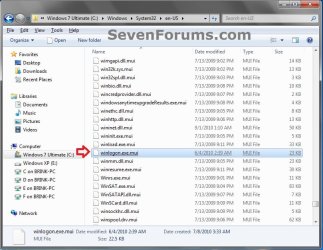
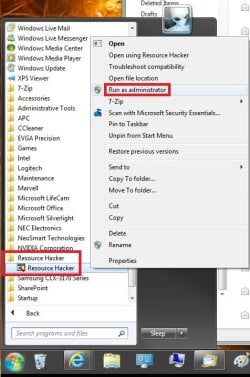
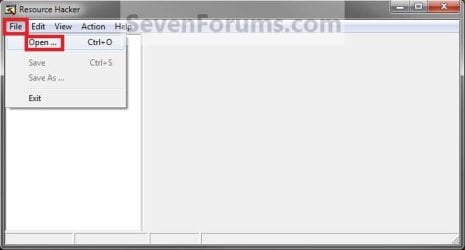
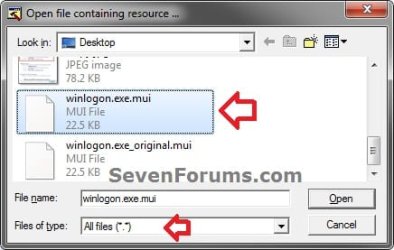
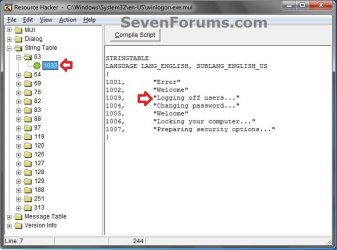
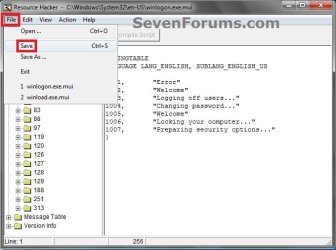
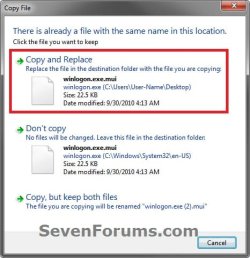
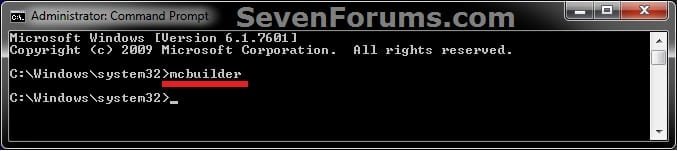
 2. Take ownership of the winlogon.exe.mui file with your user account, and set it's permissions to Allow your user account Full Control. Close Windows Explorer when finished. 3. Copy the winlogon.exe.mui file to your desktop. 4. If you have not already, then download and install the latest version of Resource Hacker. 5. Right click on the Resource Hacker shortcut in Start Menu - All Programs, then click on Run as administrator. (see screenshot below) 6. If prompted by UAC, then click on Yes. 7. In Resource Hacker, click on File and Open. (see screenshot below) 8. Navigate to your Desktop, select All Files (*.*) in the Files of type drop down box, select the winlogon.exe.mui file, then click on the Open button. (see screenshot below) 9. In the left pane of Resource Hacker, expand String Table, and 63, to 1033. (see screenshot below) 10. In the right pane of 1033, replace the Logging off... text in quotes at the 1003 location with the text you want instead (ex: Logging off users...) within quotes, then click on the Compile Script button. (see screenshot above and below) 11. Click on File and Save, then close Resource Hacker. (see screenshot below) 12. Copy the modified winlogon.exe.mui file on your Desktop, and Paste it into the C:\Windows\System32\en-US folder from step 1. (see screenshot below step 1) NOTE: The en-US folder is in English Windows 7 copies. If you have a non-English Windows 7 copy, then this folder will have a different name reflecting your language instead. 13. Click on Copy and Replace. (see screenshot below) 14. If prompted, click on Continue (UAC) and Yes to approve. 15. Open a elevated command prompt, type mcbuilder, press Enter, then close the command prompt. (see screenshot below) NOTE: Thanks to Fimble for pointing this out. 16. Restart the computer. 17. Open the Start Menu and click on either Log off or Shut Down in the arrow menu to see the changes made. WARNING: Be sure to save anything that you have open first. 18. You can delete the winlogon.exe_original.mui backup that ResHacker created on your desktop if you like since you can easily do OPTION TWO below to restore the default settings.
 OPTION TWO 
Restore Default "Logging off..." Text Message at Log off or Shut Down
1. Repeat OPTION ONE above, but type Logging off... in step 10 instead. That's it,
Shawn | | | Need more help? Try searching our extensive help and support site.
Loading | System Manufacturer/Model Number Dell OP760 OS Windows 7 Enterprise (x64); Windows Server 2008 R2 (x64) Memory 8GB Monitor(s) Displays 2 Dell 19" LCD Screen Resolution 1280x1024 Keyboard Dell Mouse Dell Optical Internet Speed 40meg |
24 Nov 2010
|
| | |
Thank you sir. | My System Specs | | Computer type PC/Desktop System Manufacturer/Model Number Self built custom OS 64-bit Windows 7 Ultimate SP1 & Windows 8 Enterprise CPU Intel i7-3930K 3.2 Ghz (O/C 4 Ghz) Motherboard ASRock X79 Extreme11 Memory 32 GB (8GBx4) G.SKILL DDR3 Quad PC3-19200 2400MHz Graphics Card Sapphire HD5870 Eyefinity 6 2GB Sound Card SB Recon 3Di Integrated Chip Monitor(s) Displays 3x 27" Asus VE278Q Screen Resolution 1920x1080 Keyboard Logitech Cordless Desktop MX 5500 Revolution Mouse Logitech Cordless Desktop MX 5500 Revolution PSU OCZ Series Gold OCZZ1000M 1000W Case Thermaltake Level 10 GT Snow Edition Cooling Corsair Hydro H100 Hard Drives 256GB OCZ Vector
160GB OCZ RevoDrive X2
2 x 1TB Samsung HDD HD154UI SATA Internet Speed 50 Mb/s Download and 2 Mb/s Upload Other Info Microsoft LifeCam Cinema
Lite-On iHBS212 12x BD Writer
Samsung CLX-3175FW Printer
Netgear WNDR3800 Router
Motorola SBG6580 Cable Modem
2x APC Back-UPS XS 1500 |
25 Nov 2010
|
| | |
Thank you Dew. | My System Specs | | Computer type PC/Desktop System Manufacturer/Model Number Self built custom OS 64-bit Windows 7 Ultimate SP1 & Windows 8 Enterprise CPU Intel i7-3930K 3.2 Ghz (O/C 4 Ghz) Motherboard ASRock X79 Extreme11 Memory 32 GB (8GBx4) G.SKILL DDR3 Quad PC3-19200 2400MHz Graphics Card Sapphire HD5870 Eyefinity 6 2GB Sound Card SB Recon 3Di Integrated Chip Monitor(s) Displays 3x 27" Asus VE278Q Screen Resolution 1920x1080 Keyboard Logitech Cordless Desktop MX 5500 Revolution Mouse Logitech Cordless Desktop MX 5500 Revolution PSU OCZ Series Gold OCZZ1000M 1000W Case Thermaltake Level 10 GT Snow Edition Cooling Corsair Hydro H100 Hard Drives 256GB OCZ Vector
160GB OCZ RevoDrive X2
2 x 1TB Samsung HDD HD154UI SATA Internet Speed 50 Mb/s Download and 2 Mb/s Upload Other Info Microsoft LifeCam Cinema
Lite-On iHBS212 12x BD Writer
Samsung CLX-3175FW Printer
Netgear WNDR3800 Router
Motorola SBG6580 Cable Modem
2x APC Back-UPS XS 1500 |
03 Dec 2010
|
| | |
my pc say can not save why i got it as admin | My System Specs | | System Manufacturer/Model Number DELL OS windows 7 CPU Intel® Core™ i3-330M (3M Cache, 2.13 GHz) Motherboard dell inc .03C6YH Memory 4Gb DDR3 Graphics Card ATI Mobility Radeon HD 5470 Sound Card onboard Monitor(s) Displays pnp moniter Hard Drives samsun 300gb Internet Speed 512kpbs |
03 Dec 2010
|
| | |
Hello Drifking,
Are you logged in as an administrator, and right clicked on Resource Hacker and clicked on "Run as administrator"?
If you did, then try this instead: - Copy the winlogon.exe.mui file to your desktop.
- Make the changes to this copy on your desktop using the tutorial instead of the actual System32\en-US\winlogon.exe.mui files.
- If you had not already from step 2, take ownership and set the permissions of the actual System32\en-US\winlogon.exe.mui file to "Allow" your user account "Full Control".
- Copy the winlogon.exe.mui file from your desktop and "Paste" it into the System32\en-US folder to replace the System32\en-US\winlogon.exe.mui file with the modified one on your desktop.
- Restart the computer to apply.
Hope this helps,
Shawn
Last edited by Brink; 04 Dec 2010 at 10:28 AM..
| My System Specs | | Computer type PC/Desktop System Manufacturer/Model Number Self built custom OS 64-bit Windows 7 Ultimate SP1 & Windows 8 Enterprise CPU Intel i7-3930K 3.2 Ghz (O/C 4 Ghz) Motherboard ASRock X79 Extreme11 Memory 32 GB (8GBx4) G.SKILL DDR3 Quad PC3-19200 2400MHz Graphics Card Sapphire HD5870 Eyefinity 6 2GB Sound Card SB Recon 3Di Integrated Chip Monitor(s) Displays 3x 27" Asus VE278Q Screen Resolution 1920x1080 Keyboard Logitech Cordless Desktop MX 5500 Revolution Mouse Logitech Cordless Desktop MX 5500 Revolution PSU OCZ Series Gold OCZZ1000M 1000W Case Thermaltake Level 10 GT Snow Edition Cooling Corsair Hydro H100 Hard Drives 256GB OCZ Vector
160GB OCZ RevoDrive X2
2 x 1TB Samsung HDD HD154UI SATA Internet Speed 50 Mb/s Download and 2 Mb/s Upload Other Info Microsoft LifeCam Cinema
Lite-On iHBS212 12x BD Writer
Samsung CLX-3175FW Printer
Netgear WNDR3800 Router
Motorola SBG6580 Cable Modem
2x APC Back-UPS XS 1500 |
04 Dec 2010
|
| | |
thanks i will try
thanks again..... | My System Specs | | System Manufacturer/Model Number DELL OS windows 7 CPU Intel® Core™ i3-330M (3M Cache, 2.13 GHz) Motherboard dell inc .03C6YH Memory 4Gb DDR3 Graphics Card ATI Mobility Radeon HD 5470 Sound Card onboard Monitor(s) Displays pnp moniter Hard Drives samsun 300gb Internet Speed 512kpbs |
29 Dec 2010
|
| | |
hello brink,
i got problem for this,i already did everything,but nothing happen...
can u help solve the problem...?
thanks... | My System Specs | | System Manufacturer/Model Number Lenovo U350 OS Windows 7 Home Premium 32Bit CPU Intel Core 2 Solo Memory Kingston 4GB DDR3 1066MHz Graphics Card Intel GMA X4500 Hard Drives WD 320GB 5400RPM |
29 Dec 2010
|
| | |
Hello Huato, and welcome to Seven Forums.
Double check through each step to make sure that you didn't miss anything by mistake, If you are having any problems/errors with a step, please just let me know. | My System Specs | | Computer type PC/Desktop System Manufacturer/Model Number Self built custom OS 64-bit Windows 7 Ultimate SP1 & Windows 8 Enterprise CPU Intel i7-3930K 3.2 Ghz (O/C 4 Ghz) Motherboard ASRock X79 Extreme11 Memory 32 GB (8GBx4) G.SKILL DDR3 Quad PC3-19200 2400MHz Graphics Card Sapphire HD5870 Eyefinity 6 2GB Sound Card SB Recon 3Di Integrated Chip Monitor(s) Displays 3x 27" Asus VE278Q Screen Resolution 1920x1080 Keyboard Logitech Cordless Desktop MX 5500 Revolution Mouse Logitech Cordless Desktop MX 5500 Revolution PSU OCZ Series Gold OCZZ1000M 1000W Case Thermaltake Level 10 GT Snow Edition Cooling Corsair Hydro H100 Hard Drives 256GB OCZ Vector
160GB OCZ RevoDrive X2
2 x 1TB Samsung HDD HD154UI SATA Internet Speed 50 Mb/s Download and 2 Mb/s Upload Other Info Microsoft LifeCam Cinema
Lite-On iHBS212 12x BD Writer
Samsung CLX-3175FW Printer
Netgear WNDR3800 Router
Motorola SBG6580 Cable Modem
2x APC Back-UPS XS 1500 Logging off... Text Message - Change problems? All times are GMT -5. The time now is 06:07 AM. | |