Windows 7 Forums


Windows 7: Visual Styles on Windows and Buttons - Turn On or Off


Visual Styles on Windows and Buttons - Turn On or Off

How to Turn "Use visual styles on windows and buttons" On or Off
Published 27 Nov 2010
Published by

Featured Tutorial

Clean Reinstall - Factory OEM Windows 7

How to Clean Reinstall a Factory OEM Windows 7

Microsoft Account "Two-step Verification" - Turn On or Off

How to Turn "Two-step Verification" On or Off for your Microsoft Account

Search - Find More with Filters and Operators

How to Use Windows Search Filters and Operators to get better Search Results in Windows 7

Secunia ONLINE Software Inspector

How to Scan for Common Software Vulnerabilities

Microsoft Account Display Name - Change

How to Change your Microsoft Account Display Name

Microsoft Accounts - Link

How to Link your Microsoft Accounts
How to Turn "Use visual styles on windows and buttons" On or Off

information   Information
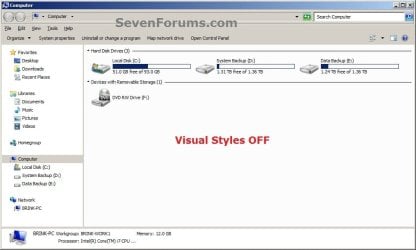
This will show you how to turn Use visual styles on windows and buttons on or off using different options in Windows 7 and Vista.

EXAMPLE: Visual Styles on Windows and Buttons Turned On and Off
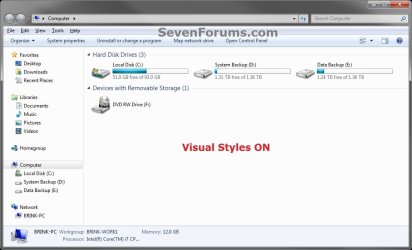
Visual Styles on Windows and Buttons - Turn On or Off-.jpgVisual Styles on Windows and Buttons - Turn On or Off-off.jpg


OPTION ONE
Through Visual Effects Settings
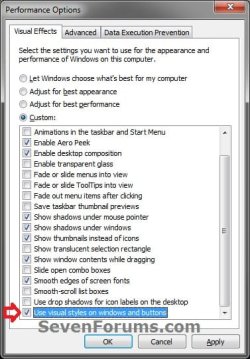
1. Open the Visual Effects settings window in Performance Options.

2. To "Use visual styles on windows and buttons"
A) Check the Use visual styles on windows and buttons box, and click on OK. (see screenshot below)
NOTE: This is the default setting.
Visual Styles on Windows and Buttons - Turn On or Off-visual_effects.jpg
3. To Not "Use visual styles on windows and buttons"
A) Uncheck the Use visual styles on windows and buttons box, and click on OK. (see screenshot above)


OPTION TWO
Using a REG File Download
1. To "Use visual styles on windows and buttons"
NOTE: This is the default setting.
A) Click on the download button below to download the file below.
Use_Visual_Styles_on_Window_ and_Buttons.reg
download
B) Go to step 3.
2. To Not "Use visual styles on windows and buttons"
A) Click on the download button below to download the file below.
Not_Use_Visual_Styles_on_Window_ and_Buttons.reg
download
3. Click on Save, and save the .reg file to the Desktop.

4. Right click on the downloaded .reg file and click on Merge.

5. Click on Run, Yes (Windows 7) or Continue (Vista), Yes, and OK when prompted.

6. Log off and log on, or restart the computer to apply the changes.

7. When done, you can delete the downloaded .reg file if you like.


OPTION THREE
Manually Through Registry Editor
1. Open the Start Menu, then type regedit in the search boxand press Enter.

2. If prompted by UAC, then click on Yes (Windows 7) or Continue (Vista).

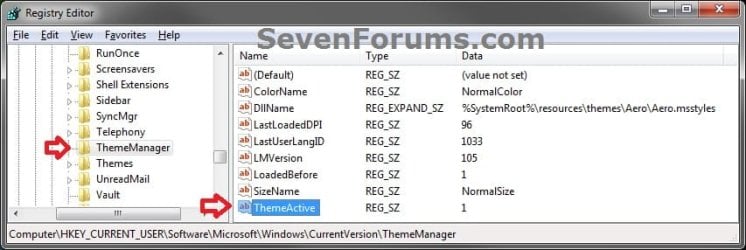
3. In regedit, navigate to the location below. (see screenshot below)
Code:
HKEY_CURRENT_USER\Software\Microsoft\Windows\CurrentVersion\ThemeManager
Visual Styles on Windows and Buttons - Turn On or Off-reg-1.jpg
4. In the right pane, double click on ThemeActive. (see screenshot above)

5. To "Use visual styles on windows and buttons"
A) Type in 1, and click on OK. (see screenshot below)
NOTE: This is the default setting.
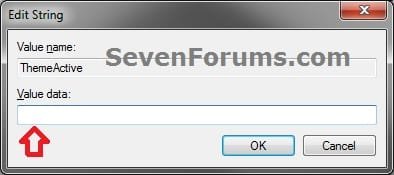
Visual Styles on Windows and Buttons - Turn On or Off-reg-2.jpg
B) Go to step 7.
6. To Not "Use visual styles on windows and buttons"
A) Type in 0, and click on OK. (see screenshot above)
7. Close regedit.

8. Log off and log on, or restart the computer to apply the changes.
That's it,
Shawn


Need more help? Try searching our extensive help and support site.
Loading
11 Mar 2012   #1
raytech70

Windows 7 64-Bit


Question for you: when I use these registry modifications, the effects are changed but if I review the settings using the GUI they do not appear... any way to fix that?

My System SpecsSystem Spec

12 Mar 2012   #2
Brink

64-bit Windows 7 Ultimate SP1 & Windows 8 Enterprise
Texas


Hello Raytech, and welcome to Seven Forums.

I'm afraid not. It's one of those rare quirks that the applied REG settings do not change the same GUI settings. It doesn't seem to do this for anything else other that Visual Effects.
My System SpecsSystem Spec
Comment

 Visual Styles on Windows and Buttons - Turn On or Off problems?


Tutorial Tools


Similar help and support threads for: Visual Styles on Windows and Buttons - Turn On or Off
Windows 7 Tutorial Category
Combining two visual styles into one Customization
What Windows 7 custom visual styles look good? Themes and Styles
Visual Styles Customization
Best Visual Styles/Themes? Themes and Styles
windows 7 visual styles Customization


All times are GMT -5. The time now is 06:46 PM.


Seven Forums Android App Seven Forums IOS App Follow us on Facebook

Windows 7 Forums is an independent web site and has not been authorized,
sponsored, or otherwise approved by Microsoft Corporation.
"Windows 7" and related materials are trademarks of Microsoft Corp.
© Designer Media Ltd
  

1 2 3 4 5 6 7 8 9 10 11 12 13 14 15 16 17 18 19 20 21 22 23 24 25 26 27 28 29 30 31 32