Windows 7 Forums


Windows 7: Windows Live Mail 2011 - Hide or Show Ribbon Toolbar


Windows Live Mail 2011 - Hide or Show Ribbon Toolbar

How to Hide or Show the Ribbon Toolbar in Windows Live Mail 2011
Published 11 Dec 2010
Published by

Featured Tutorial

Microsoft Account Display Name - Change

How to Change your Microsoft Account Display Name

Clean Up Factory Bloatware


Peppermint3 - Create Live CD/DVD/USB To Use For Emergency Backup

How to Perform an Emergency Data Backup When Windows 7 Will Not Boot

System Preparation Tool - Use to Customize Windows

How to Use Sysprep to Customize Windows 7 and Windows 8

Online Scanners - Scan Suspicious Files on your PC

How to Scan Suspicious Files using Online Scanners

Microsoft Accounts - Link

How to Link your Microsoft Accounts
How to Hide or Show the Ribbon Toolbar in Windows Live Mail 2011

information   Information
This will show you how to hide or show the new ribbon toolbar in Windows Live Mail 2011.


Here's How:
1. Open Windows Live Mail 2011.

2. To Hide the Ribbon Toolbar
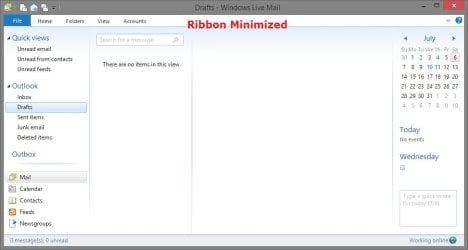
A) Right click on the top menu bar, and click on Minimize the Ribbon to check it. (see screenshot below)
Windows Live Mail 2011 - Hide or Show Ribbon Toolbar-displayed.jpg
3. To Show the Ribbon Toolbar
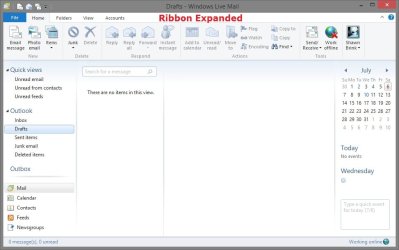
A) Right click on the top menu bar, and click on Minimize the Ribbon to uncheck it. (see screenshot below)
NOTE: This is the default setting.
Windows Live Mail 2011 - Hide or Show Ribbon Toolbar-hidden.jpg
That's it,
Shawn


Need more help? Try searching our extensive help and support site.
Loading
01 Jul 2012   #1
nottaclue9

Windows 7 Home 64-bit
San Antonio, TX


That's not an option for me as when I right-click in the menu bar, all I get is "customize," NOT a choice about the now-totally-missing ribbon (the one with all of the icons, emoticons, etc.) It has simply vanished.

My System SpecsSystem Spec

01 Jul 2012   #2
Brink

64-bit Windows 7 Ultimate SP1 & Windows 8 Enterprise
Texas


Hello Nottaclue,

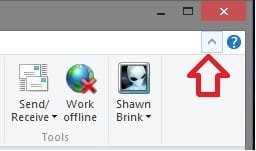
It's still there for me in the Windows Live Mail 2011 email client program. Are you sure that you are right clicking in the same area that I have the red dot at in my screenshots in the tutorial? Could you also post a screenshot showing what you are seeing to see if it may help ID what the problem may be?
My System SpecsSystem Spec
01 Jul 2012   #3
nottaclue9

Windows 7 Home 64-bit
San Antonio, TX


What you are showing in your tutorial doesn't even look familiar to me, Brink! I have no idea what you have. It looks nothing like my screen. You are dealing with someone who really, really has no clue... I will have to study the screenshot steps before I can attempt to show you what I am seeing. It looks pretty overwhelming to me right now.

What I've got at the top of my WLM is two very skinny bars with nothing but text -- no big, shiny icons. One starts with "File," and the other starts with "New."
My System SpecsSystem Spec
.


01 Jul 2012   #4
Brink

64-bit Windows 7 Ultimate SP1 & Windows 8 Enterprise
Texas


That's ok. We'll figure it out together when you are able to get the screenshots posted. If you have questions about doing so, please just let me know. In the mean time, click on File in your menu bar, and see if there is an About option under File. If so, click on About to see the version information of WLM and post back with it.
My System SpecsSystem Spec
Comment

 Windows Live Mail 2011 - Hide or Show Ribbon Toolbar problems?


Tutorial Tools


Similar help and support threads for: Windows Live Mail 2011 - Hide or Show Ribbon Toolbar
Windows 7 Tutorial Category
Windows Live Mail 2011 Browsers & Mail
Deleting mail in Windows Live Mail 2011 Browsers & Mail
Windows Live Mail 2011 Browsers & Mail
Solved windows live mail toolbar Browsers & Mail
Windows Live toolbar won't show my picture or drop downs for Mail etc. Browsers & Mail


All times are GMT -5. The time now is 01:03 AM.


Seven Forums Android App Seven Forums IOS App Follow us on Facebook

Windows 7 Forums is an independent web site and has not been authorized,
sponsored, or otherwise approved by Microsoft Corporation.
"Windows 7" and related materials are trademarks of Microsoft Corp.
© Designer Media Ltd
  

1 2 3 4 5 6 7 8 9 10 11 12 13 14 15 16 17 18 19 20 21 22 23 24 25 26 27 28 29 30 31 32