
How to Disable Auto System Sounds Leveling in Windows 7
Information
Windows can automatically adjust the volume level of different sounds when it detect communications activity.
Note
It took me a while to find this maybe it will help some one else.
Basicaly my system volume kept changing on me. I would put it up, and it would go back down. It was making me mad so I started looking to find out why, and this is what i came up with.
Basicaly my system volume kept changing on me. I would put it up, and it would go back down. It was making me mad so I started looking to find out why, and this is what i came up with.
Here's How:
1. Right click on the Volume icon in the notification area, and click on Sounds.
A) Go to step 3.
OR
2. Go to the sound icon on you desktop and click it you should get a pop up like this below.
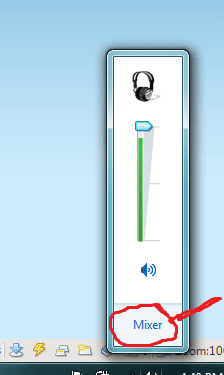
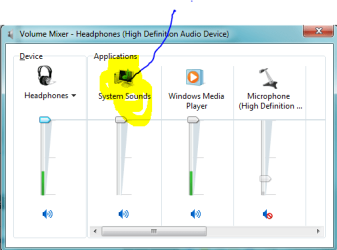
A) Click on Mixer and you should get some thing like this, then click on the System Sounds icon.
3. Click on the Communications tab, and select (dot) Do nothing.
NOTE: The default setting is Reduce the volume of other sounds by 80%.
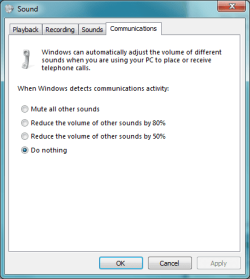
4. Click on OK.
5. Now Windows 7 should not be auto leveling your sound anymore.
Last edited by a moderator:
