
Windows 7 Forums Search
Welcome to Windows 7 Forums. Our forum is dedicated to helping you find solutions with any problems, errors or issues you are experiencing with Windows 7. The Windows 7 forum also covers news and updates and has an extensive Windows 7 tutorial section that covers a wide range of tips and tricks.


Windows 7 - Internet Explorer 9 - Open Recently Closed Tabs


Internet Explorer 9 - Open Recently Closed Tabs

How to Open Recently Closed Tabs in Internet Explorer 9
Published by Brink
12-24-2010
Default Internet Explorer 9 - Open Recently Closed Tabs

How to Open Recently Closed Tabs in Internet Explorer 9

information   Information
This will show you how to open recently closed tabs again in Internet Explorer 9 (IE9) in Windows 7 and Vista.


Here's How:
1. While in Internet Explorer 9, right click on a open tab, and select Recently closed tabs. (see screenshot below)
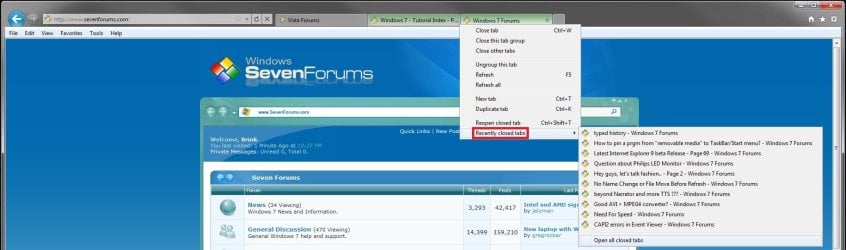
Internet Explorer 9 - Open Recently Closed Tabs-example.jpg
2. To Open a Specific Recently Closed Tab
A) Click on the link of a recently closed tab that you want to open in a new tab again. (see screenshot above)
3. To Open All Recently Closed Tabs
A) Click on the Open all closed tabs option. (see screenshot above)
NOTE: This will open all of the listed links for recently closed tabs above this option in new tabs.
That's it,
Shawn


Published by
Brink's Avatar
Administrator

Join Date: Oct 2008
Location: Texas
Posts: 37,304

Tutorial Tools
Comment

 Internet Explorer 9 - Open Recently Closed Tabs problems?


Tutorial Tools


Similar Threads for: Internet Explorer 9 - Open Recently Closed Tabs
Windows 7 Tutorial Category
Internet Explorer - Empty Temporary Internet Files folder when closed Tutorials
about internet explorer closed unexpectedly Browsers & Mail
Internet Explorer 9 "Show tabs on a separate row" - Turn On or Off Tutorials
Internet Explorer 9 - Drag and Drop Tabs Tutorials
Internet Explorer 9 (IE9) Navigation on Steroids, from the UI to Tabs News


All times are GMT -5. The time now is 12:30 AM.


Windows 7 Forums is an independent web site and has not been authorized,
sponsored, or otherwise approved by Microsoft Corporation.
"Windows 7" and related materials are trademarks of Microsoft Corp.
© Designer Media Ltd
  

1 2 3 4 5 6 7 8 9 10 11 12 13 14 15 16 17 18 19 20 21 22 23 24 25 26 27 28 29 30