
Information
The Enhanced Mitigation Experience Toolkit(EMET) is a utility that helps prevent vulnerabilities in software from being successfully exploited. EMET achieves this goal by using security mitigation technologies. These technologies function as special protections and obstacles that an exploit author must defeat to exploit software vulnerabilities. These security mitigation technologies do not guarantee that vulnerabilities cannot be exploited. However, they work to make exploitation as difficult as possible to perform.
EMET 4.0 and newer versions also provide a configurable SSL/TLS certificate pinning feature that is called Certificate Trust. This feature is intended to detect man-in-the-middle attacks that are leveraging the public key infrastructure (PKI).
Software vulnerabilities and exploits have become an everyday part of life. Virtually every product has to deal with them and consequently, users are faced with a stream of security updates. For users who get attacked before the latest updates have been applied or who get attacked before an update is even available, the results can be devastating: malware, loss of PII, etc.
Security mitigation technologies are designed to make it more difficult for an attacker to exploit vulnerabilities in a given piece of software. EMET allows users to manage these technologies on their system and provides several unique benefits:
1. No source code needed: Until now, several of the available mitigations (such as Data Execution Prevention) have required for an application to be manually opted in and recompiled. EMET changes this by allowing a user to opt in applications without recompilation. This is especially handy for deploying mitigations on software that was written before the mitigations were available and when source code is not available.
2. Highly configurable: EMET provides a higher degree of granularity by allowing mitigations to be individually applied on a per process basis. There is no need to enable an entire product or suite of applications. This is helpful in situations where a process is not compatible with a particular mitigation technology. When that happens, a user can simply turn that mitigation off for that process.
3. Helps harden legacy applications: It’s not uncommon to have a hard dependency on old legacy software that cannot easily be rewritten and needs to be phased out slowly. Unfortunately, this can easily pose a security risk as legacy software is notorious for having security vulnerabilities. While the real solution to this is migrating away from the legacy software, EMET can help manage the risk while this is occurring by making it harder to hackers to exploit vulnerabilities in the legacy software.
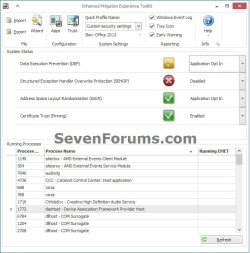
4. Ease of use: The policy for system wide mitigations can be seen and configured with EMET's graphical user interface. There is no need to locate up and decipher registry keys or run platform dependent utilities. With EMET you can adjust setting with a single consistent interface regardless of the underlying platform.
5. Ease of deploy: EMET comes with built-in support for enterprise deployment and configuration technologies. This enables administrators to use Group Policy or System Center Configuration Manager to deploy, configure and monitor EMET installations across the enterprise environment.
6. Ongoing improvement: EMET is a living tool designed to be updated as new mitigation technologies become available. This provides a chance for users to try out and benefit from cutting edge mitigations. The release cycle for EMET is also not tied to any product. EMET updates can be made dynamically as soon as new mitigations are ready
The toolkit includes several pseudo mitigation technologies aimed at disrupting current exploit techniques. These pseudo mitigations are not robust enough to stop future exploit techniques, but can help prevent users from being compromised by many of the exploits currently in use. The mitigations are also designed so that they can be easily updated as attackers start using new exploit techniques.
For more information about EMET, see:
EMET 4.0 and newer versions also provide a configurable SSL/TLS certificate pinning feature that is called Certificate Trust. This feature is intended to detect man-in-the-middle attacks that are leveraging the public key infrastructure (PKI).
Software vulnerabilities and exploits have become an everyday part of life. Virtually every product has to deal with them and consequently, users are faced with a stream of security updates. For users who get attacked before the latest updates have been applied or who get attacked before an update is even available, the results can be devastating: malware, loss of PII, etc.
Security mitigation technologies are designed to make it more difficult for an attacker to exploit vulnerabilities in a given piece of software. EMET allows users to manage these technologies on their system and provides several unique benefits:
1. No source code needed: Until now, several of the available mitigations (such as Data Execution Prevention) have required for an application to be manually opted in and recompiled. EMET changes this by allowing a user to opt in applications without recompilation. This is especially handy for deploying mitigations on software that was written before the mitigations were available and when source code is not available.
2. Highly configurable: EMET provides a higher degree of granularity by allowing mitigations to be individually applied on a per process basis. There is no need to enable an entire product or suite of applications. This is helpful in situations where a process is not compatible with a particular mitigation technology. When that happens, a user can simply turn that mitigation off for that process.
3. Helps harden legacy applications: It’s not uncommon to have a hard dependency on old legacy software that cannot easily be rewritten and needs to be phased out slowly. Unfortunately, this can easily pose a security risk as legacy software is notorious for having security vulnerabilities. While the real solution to this is migrating away from the legacy software, EMET can help manage the risk while this is occurring by making it harder to hackers to exploit vulnerabilities in the legacy software.
4. Ease of use: The policy for system wide mitigations can be seen and configured with EMET's graphical user interface. There is no need to locate up and decipher registry keys or run platform dependent utilities. With EMET you can adjust setting with a single consistent interface regardless of the underlying platform.
5. Ease of deploy: EMET comes with built-in support for enterprise deployment and configuration technologies. This enables administrators to use Group Policy or System Center Configuration Manager to deploy, configure and monitor EMET installations across the enterprise environment.
6. Ongoing improvement: EMET is a living tool designed to be updated as new mitigation technologies become available. This provides a chance for users to try out and benefit from cutting edge mitigations. The release cycle for EMET is also not tied to any product. EMET updates can be made dynamically as soon as new mitigations are ready
The toolkit includes several pseudo mitigation technologies aimed at disrupting current exploit techniques. These pseudo mitigations are not robust enough to stop future exploit techniques, but can help prevent users from being compromised by many of the exploits currently in use. The mitigations are also designed so that they can be easily updated as attackers start using new exploit techniques.
For more information about EMET, see:
Note
If you install EMET and do not "Configure System" settings, it doesn't do anything to the Windows Data Execution Prevention (DEP) settings.
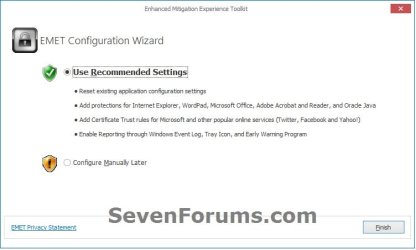
If you install EMET and "Configure System" settings to Recommended, it will change the DEP to Turn on for essential Windows programs and services only, if you already have it set to everything.
If you install EMET and "Configure System" settings to Maximum, it will gray out the default DEP settings since EMET will be used instead.
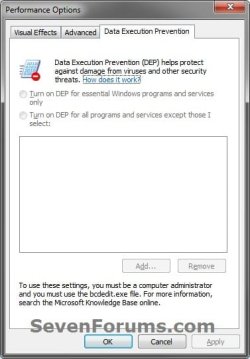
If you install EMET and "Configure System" settings to Recommended, it will change the DEP to Turn on for essential Windows programs and services only, if you already have it set to everything.
If you install EMET and "Configure System" settings to Maximum, it will gray out the default DEP settings since EMET will be used instead.
Warning
Updated Support End Date for EMET 5.5x
Finally, we have listened to customers’ feedback regarding the January 27, 2017 end of life date for EMET and we are pleased to announce that the end of life date is being extended 18 months. The new end of life date is July 31, 2018. There are no plans to offer support or security patching for EMET after July 31, 2018. For improved security, our recommendation is for customers to migrate to Windows 10.
See: Windows: Moving Beyond Enhanced Mitigation Experience Toolkit (EMET)
Finally, we have listened to customers’ feedback regarding the January 27, 2017 end of life date for EMET and we are pleased to announce that the end of life date is being extended 18 months. The new end of life date is July 31, 2018. There are no plans to offer support or security patching for EMET after July 31, 2018. For improved security, our recommendation is for customers to migrate to Windows 10.
See: Windows: Moving Beyond Enhanced Mitigation Experience Toolkit (EMET)
Enhanced Mitigation Experience Toolkit (EMET) 5.5.2
Release date: November 14th 2016
Supported Client Operating Systems: Windows 10 , Windows 7 Service Pack 1, Windows 8.1, Windows Server 2008 R2 SP1, Windows Server 2008 Service Pack 2, Windows Server 2012, Windows Server 2012 R2, Windows Vista Service Pack 2
- EMET 5.52 requires .NET Framework 4.5.
- For Internet Explorer 10 on Windows 8 you need to install KB2790907 – a mandatory Application Compatibility update that has been released on March 12th, 2013 or any other Application Compatibility updates for Windows 8 after that.
User Guide: User Guide for EMET 5.52
Download
Related Tutorials
- How to Use the Malicious Software Removal Tool in Windows 7
- How to Install and Use Microsoft Security Essentials
- How to Use the Microsoft Safety Scanner
- How to Use Windows Defender Offline
- How to Enable or Disable DEP in Vista and Windows 7
- How Turn DEP On or Off for a Program in Vista and Windows 7
Last edited:


