Windows 7 Forums


Windows 7: Open Command Window Here - Add or Remove Shift + Right Click


Open Command Window Here - Add or Remove Shift + Right Click

How to Use "Open Command Window Here" Context Menu Item without Shift+ Right Click
Published 01 Jan 2011
Published by

Featured Tutorial

Microsoft Outlook Desktop Shortcut - Create

How to Create a Special Outlook Desktop (Office XP style) Shortcut

Clean Up Factory Bloatware


Microsoft Account "Two-step Verification" - Turn On or Off

How to Turn "Two-step Verification" On or Off for your Microsoft Account

Chrome GPU Hardware Acceleration - Turn On or Off

How to Turn GPU "Hardware Acceleration" On or Off in Chrome

Peppermint3 - Create Live CD/DVD/USB To Use For Emergency Backup

How to Perform an Emergency Data Backup When Windows 7 Will Not Boot

User Profile - Customize During Installation

How to Customize Default User Profile in Audit Mode
How to Use "Open Command Window Here" Context Menu Item without Shift+ Right Click

information   Information
This will show you how to add or remove having to press Shift and right clicking on a folder or drive to use the Open Command Window Here from the context menu item for all users in Vista, Windows 7, and Windows 8.

You must me logged in as an administrator to be able to do the steps in this tutorial.


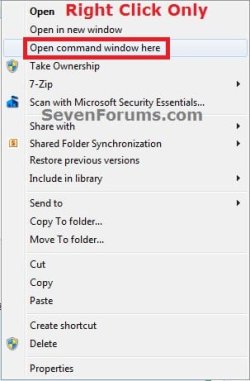
EXAMPLE: Open Command Window Here
NOTE: By default you have to press and hold the Shift key and right click on a folder or drive to click on Open Command Window Here to open a command prompt with the focus at the folder or drive.
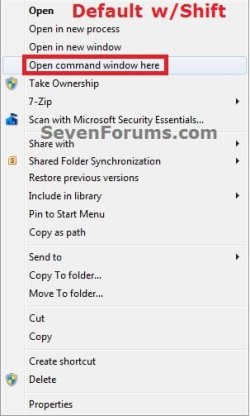
Open Command Window Here - Add or Remove Shift + Right Click-default.jpgOpen Command Window Here - Add or Remove Shift + Right Click-right_click.jpg


Here's How:
1. Shift + Right Click to use "Open Command Window Here"
NOTE: This is the default setting.
A) Click/tap on the download button below to download the file below, and go to step 3 below.
Shift+Right_Click_with_Open_Command_Window_Here.reg
download
2. Right Click Only to use "Open Command Window Here"
A) Click/tap on the download button below to download the file below, and go to step 3 below.
Right_Click_Only_with_Open_Command_Window_Here.reg
download
3. Save the .reg file to the desktop.

4. Double click/tap on the downloaded .reg file to merge it.

5. When prompted, click/tap on Run, Yes (UAC-Windows 7/8) or Continue (UAC-Vista), Yes, and OK to approve merging the .reg file.

6. You can now delete the downloaded .reg file if you like.
That's it
Shawn


Need more help? Try searching our extensive help and support site.
Loading
11 Mar 2011   #1
Magikill

Windows 7 Ultimate x64 SP1
UK


Dude that is just awesome Thnx again.

My System SpecsSystem Spec

30 May 2012   #2
RpD

Windows 7 Home Premium 64bit
 
 
Right-clicking on a folder, not within it

One should be aware that 'Open command window here' is available when you right-click -ON- a folder name... and not by right-clicking within it. In other words, you cannot be inside a folder and right-click on the window background to get the 'Open command window here' menu item.

However, you -can- do so with the Open Command Windows Here as Administrator registry edit. When you have a folder open, you can right-click on the window background (not on a file), and the pop-up menu will have the 'Open Command Window Here as Administrator' option.

Last edited by Brink; 30 May 2012 at 11:38 AM.. Reason: added link for reference
My System SpecsSystem Spec
30 May 2012   #3
Brink

64-bit Windows 7 Ultimate SP1 & Windows 8 Enterprise
Texas


Hello RpD,

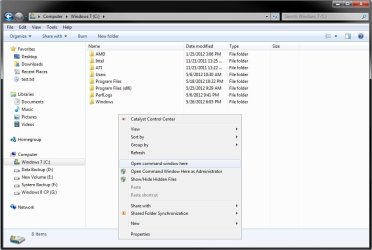
When I right click on a empty area within the main folder window, I have a Open command window here option in the context menu.

Open Command Window Here - Add or Remove Shift + Right Click-folder-window.jpg
My System SpecsSystem Spec
.


30 May 2012   #4
karlsnooks

MS Windows 7 Ultimate SP1 64-bit
Austin, Texas


Shawn,
Thanks.

Karl
My System SpecsSystem Spec
30 May 2012   #5
Brink

64-bit Windows 7 Ultimate SP1 & Windows 8 Enterprise
Texas


You're welcome Karl.
My System SpecsSystem Spec
30 May 2012   #6
RpD

Windows 7 Home Premium 64bit
 
 
Odd

Odd, because I'm not getting that.
I have a new laptop and it seems like that worked on my old one, but the new one won't give me an 'Open command window here' if I right-click a folder background. Old was 32bit, new is 64bit.
My System SpecsSystem Spec
30 May 2012   #7
Brink

64-bit Windows 7 Ultimate SP1 & Windows 8 Enterprise
Texas


Try with shift (hold) + right click to see if it does then.

It will not do this in the "Computer" window, or in a library window. Only in a opened folder's window.
My System SpecsSystem Spec
30 May 2012   #8
RpD

Windows 7 Home Premium 64bit


Yes, it will show up with a Shift-hold right-click... on folder window backgrounds, but Shift is not necessary if right-clicking on a folder name. Seems like there must be two different places to set the Shift mode. I don't have to Shift-hold for right-clicking on a folder name... (unless I return the functionality to default behavior).
My System SpecsSystem Spec
30 May 2012   #9
Brink

64-bit Windows 7 Ultimate SP1 & Windows 8 Enterprise
Texas


I updated the REG files in the tutorial. They include those locations as well now. Please give the updated REG files a try to see how they work for you for this now.
My System SpecsSystem Spec
Comment

 Open Command Window Here - Add or Remove Shift + Right Click problems?


Tutorial Tools


Similar help and support threads for: Open Command Window Here - Add or Remove Shift + Right Click
Windows 7 Tutorial Category
Open Command Window Here - Add or Remove Tutorials
Solved Problems about windows 7 "open command window here" shift-right click General Discussion
Open Command Window Here Tutorials
Open in New Process - With or Without Shift+Right Click Context Menu Tutorials
Open Command Window Here General Discussion


All times are GMT -5. The time now is 05:25 AM.


Seven Forums Android App Seven Forums IOS App Follow us on Facebook

Windows 7 Forums is an independent web site and has not been authorized,
sponsored, or otherwise approved by Microsoft Corporation.
"Windows 7" and related materials are trademarks of Microsoft Corp.
© Designer Media Ltd
  

1 2 3 4 5 6 7 8 9 10 11 12 13 14 15 16 17 18 19 20 21 22 23 24 25 26 27 28 29 30 31 32