Windows 7 Installation - Transfer to a New Computer

How to Transfer your Complete Windows 7 Installation to New Computer

To start, a warning from Microsoft:

   Note
Important

You must use the Sysprep /generalize command to generalize a complete Windows installation before you can use the installation for deployment to a new computer, whether you use imaging, hard disk duplication, or another method. Moving or copying a Windows image to a different computer without running the Sysprep /generalize command is not supported.

This tutorial will show you how to do the transfer.

   Information
Windows 7 System Preparation Tool is a powerful, native Windows tool. When for instance used in so called Audit Mode, it let's you to freely configure Windows 7 to be then deployed to other computers as hardware independent image.

In this tutorial we use System Preparation Tool (sysprep) to prepare your Windows 7 installation to be moved to a new computer, keeping all your installed applications, program settings and user profiles. You can use this method for instance when you have bought a new PC and want to transfer your existing setup completely, without need to reinstall everything, or when you want to make major hardware changes like change the motherboard or GPU, which would usually cause Windows to stop booting normally.

   Warning
Using this method causes Windows 7 to lose all activation information, and it needs to be reactivated afterwards. If your Windows 7 is an OEM version, you might not be able to reactivate it, at least not without phone activation option.

I do not recommend to use this method on RAID systems. All experiments on RAID I know have failed.

With the speed of today's hardware evolution, most of us geeks are upgrading the hardware more often than operating system. Upgrading hardware can be painfully slow process if we need to reinstall the operating system and all our installed applications, plus transfer program settings and user profiles.

Using sysprep makes this easy. Changing the motherboard, or for instance an old ATI GPU to a new nVidia GPU quite often causes Windows 7 not to be able to boot anymore. This fact is usually accepted by the user, who then reinstalls the OS and all applications and transfers user profiles from a backup location.

Same thing when buying a new computer with completely different hardware setup compared to the old one, or trying to restore a system image to different hardware setup. Normally this would include a complete reinstallation of Windows 7 and all applications.

Why not use sysprep to avoid reinstalling? Here are the different scenarios where you can use it.


   Warning

An upgraded Windows cannot be sysprepped. As this method is based in sysprepping, this tutorial is valid only for Windows setups which have not been upgraded.

This means that if you have for instance in-place upgraded Vista to Seven, or using Anytime Upgrade upgraded for instance a Home Premium to Ultimate, you cannot sysprep and this tutorial cannot be used in your case.

Notice that a repair install is also an upgrade install, so if you have ever done a repair install (= in-place upgrade to same edition), you cannot sysprep.


PLEASE DO NOT FORGET TO CREATE A SYSTEM IMAGE BEFORE PROCEEDING!​


As you can read on this thread, on rare occasions this method does not work. If this happens, you can always restore your system using your backup image.

Backup Complete Computer - Create an Image Backup
System Image Recovery

IE10 Users: Please read this article first: Sysprep Fatal Error With IE 10 (FIX) | System Administration


METHOD ONE

Changing hardware components but keeping old hard disk(s)


Use this method if you:
- Change other hardware components but keep your old HD containing Windows 7
- Move the HD containing Windows 7 to another computer
  1. Before installing new hardware, boot Windows 7 normally
  2. Disconnect all external hardware except mouse, keyboard and main display. If your system folders are located only on C: drive, disconnect all other hard disks except that containing the C:. In case of relocated system folders, for instance the profile folder Users located in another drive and other system folders on C:, first move the relocated system folders back to C: then disconnect all other drives. Reboot after this
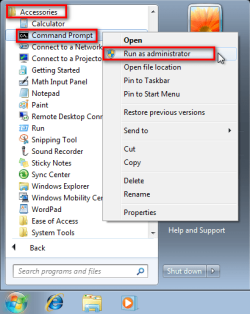
  3. Run Command Prompt as administrator
    .
    Audit_1.png
    .
  4. Type to Command Prompt: %windir%\System32\Sysprep\Sysprep.exe, and hit Enter
    .

    sysprep_start.png
    .
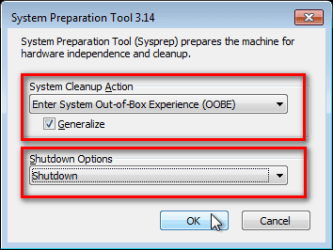
  5. In sysprep dialog that opens, choose System Cleanup Action as Enter System Out-of-Box-Experience (OOBE), select Generalize, select Shutdown Options Shutdown. Click OK
    .
    Sysprep_Run_and_generalize.png
    .
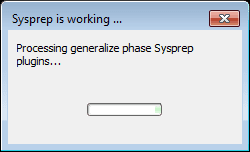
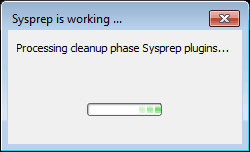
  6. Sysprep generalizes now your Windows 7 setup and shuts down your computer. Do not run any other programs during this phase!
    .
    Sysprep_Run_and_generalize_2.png
    .
    Sysprep_Run_and_generalize_3.png
    .
  7. Switch the main power of your PC off and install the new hardware OR dismount the hard disk(s) and mount it (them) to a new computer
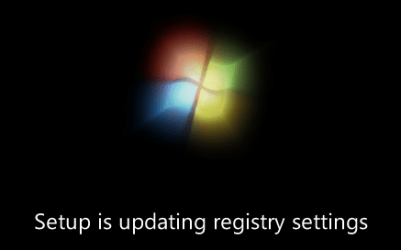
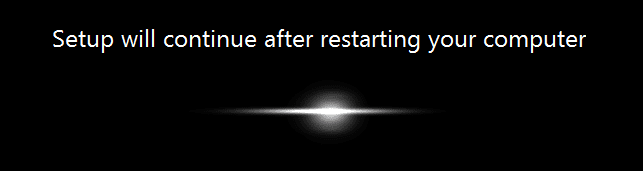
  8. Boot the PC from sysprep generalized hard disk. You will notice Windows booting as if it was the first boot after installation, installing default drivers and updating registry. One or two reboots are needed, depending on your system specifications
    .

    Sysprep_Reinstalling_devices.png
    .
    Sysprep_Registry_settings.png
    .
    Sysprep_Reboot_needed.png
    .
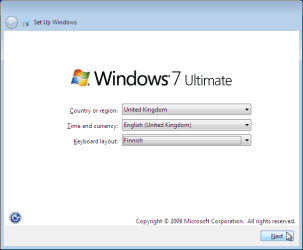
  9. When Windows finally boots up, you will need to enter all information as if this really was a new, fresh installation
    .
    Sysprep_First_boot_2.png
    .
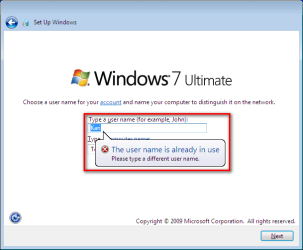
  10. Because your old user profiles already exist, Windows does not accept your normal username, but instead you have to create a new temporary user. I use username Test for this purpose
    .
    Sysprep_First_boot_3.png
    .
  11. When login screen appears, choose your old user account to login
    .

    Sysprep_First_boot_5.png
    .
  12. Windows boots now to default OOBE first boot desktop, with default 800*600 resolution and default theme. All your installed applications are there, as well as your old user profiles and folders. Windows has installed the default drivers for your setup, you can update them if needed
    .
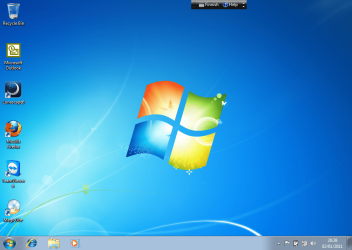
    Sysprep_First_boot_6.png
    .
  13. Go to Control Panel > User Accounts and delete the temporary user account (in this case Test) that you just created


METHOD TWO

Change the hard disk(s) or move Windows 7 setup to a new computer using third party imaging software

Use this method if you:
- Replace the HD containing Windows 7 on your old computer
- Move Windows 7 to a new HD on another computer
  1. Follow steps 1 through 5 above (method 1)
  2. Boot PC with an imaging CD/DVD (Paragon, Macrium etc.). See Macrium Reflect Free:at our sister site TenForums.com: Backup and Restore with Macrium Reflect Windows 10 Backup Restore Tutorials . Also see this post for a practical tip to create a Macrium system image.
  3. Create an image of your system
  4. Turn PC off, change the hard disk(s) and reboot with imaging application, restoring the image OR boot the new computer with imaging software and restore the image
  5. Continue from step 7 above (method 1)

This procedure is failsafe, and works every time. There is nothing to worry, but of course it is recommended to make a backup before trying this. I have even used this method when some serious driver issues caused the PC to constantly crash (BSOD), to reset all drivers to Windows defaults and then reinstalling them one by one to find the culprit.

   Note
What does Sysprep generalizing do to my Windows 7 setup?
  • All system specific information is removed or uninstalled
  • Security ID (SID) of your hardware setup is reseted
  • All system restore points are deleted
  • All event logs are deleted
  • All personalization is removed (taskbar, toolbars, folder options, start orb etc.)
  • Built-in administrator account is disabled (if it was enabled) and needs to be re-enabled after the transfer if needed

What happens when booting first time after sysprep generalizing?
  • First boot configuration is run
  • New SID is created
  • Re-arm counter is reseted if not already re-armed three times
  • Windows 7 is booted using first boot default drivers and settings


I have tested all above mentioned methods with all versions of Windows 7, from Starter to Enterprise. It works every time, with one exception: for reasons unknown to me, sysprep seems sometimes dislike Windows Media Player networking service, which is by default started every time Windows 7 starts. In about every third time I've done this, I've got an error message when trying to generalize:
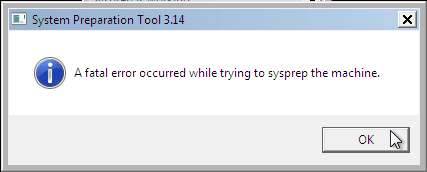
Sysprep_Fatal_Error.png

However, this is not a big problem. You just need to stop the WMP networking service, and run sysprep with generalize option again. You can stop the service in question by typing net stop WMPNetworkSvc to command prompt, and hitting Enter:

Sysprep_Stop_WMP_service.png

If you have any questions, do not hesitate to ask.

Happy computing!

Kari

EDIT: A Useful tip from xxxwea, as later confirmed by Victor:
Kari, just a suggestion.

You might note in the tutorial that if on first booting Windows can't finish configuring, a reboot into safe mode, then a normal reboot will allow it to finish successfully.

This has happened to me both times I used a sysprepped system drive in a new computer. I found the answer to this problem buried deep in this thread the first time I ran into it, and the same thing happened yesterday on a different computer.

It's a seemingly very silly solution, but it works. I do believe many people have abandoned their sysprep work when they encounter the problem.

I think the solution deserves more visibility.
 
Last edited:
I still have one question after reading this tutorial. I have a laptop wit windows 7 Home Premium on it can I completly romove windows 7 off it and put it on my desktop? My laptop right now I about to bite the dust, and I built my desktop from scratch. Right now my desktop has windows xp and i was looking to upgrade it.
Hiyya and welcome Isyther as ignaztsonic says - slightly different though is that I had an OEM on a refurbished machine in which the motherboard died and a phone call to Microsoft and they let me transfer the OEM to another machine that had previously been Vista (the other machine I had slipped in a SSD of course).

My point is for the cost of a local phone call what have you got to lose :cool:?

I think the key points here are yours originally came with Vista, so your OEM was a separate purchase.

The OEM ignatzasonic is speaking about is the one that originally came with Isyther's laptop.

So, if it is like yours, sure it's worth a call.

If it's what ignatzasonic is referring to, it is indeed tied to the motherboard.

If it is a separate retail license, none of the above matters, it can be freely moved to another computer.
Oops yeah you're right mate I had forgotten I had started with Vista :o
 

My Computer

Computer type
PC/Desktop
Computer Manufacturer/Model Number
Own build (new) Desk1 / Asus ROG Win 7 / Desk2 1st build
OS
Desk1 7 Home Prem / Desk2 10 Pro / Main lap Asus ROG 10 Pro 2 laptop Toshiba 7 Pro Asus P2520 7 & 10
CPU
Desk1 i5 3750K / Laptop i7 GTX 860M / Desk2 i5 2500
Motherboard
Desk1 Asus P877-V / Desk2 Gigabyte H67 UD3H / Laptop ?
Memory
Desk1 8GB (1866) / Desk2 16GB (1333) / Laptop 8Gb DDR3
Graphics Card(s)
Desk 1& 2NVidia GTX 650 & Laptops on board Intel
Sound Card
Desk 1 & 2 -XONAR DG Realtek High Def audio Laptop
Monitor(s) Displays
Desk 1 Benq HD 2450 / Desk2 Philips 24" / Laptop 17.5"
Screen Resolution
1920x1080 D1 & D2 & Laptop 1
Hard Drives
Desk1 Samsung 120GB 830 SSD
Asus ROG 256GB 850 Pro SSD
Desk2 Samsung 840 256 SSD
Toshiba 120GB EVO
PSU
Desk 1 Corsair HX 1050/ Laptop ? / Desk 2 Corsair HX 650
Case
Desk 1 Cooler HAF XM ? Toshiba laptop / Desk2 Coolermaster
Cooling
Fans on all Desk1 -2 Desk2 - all Coolermasters 5 Laptop ?
Keyboard
Desk 1 MS Sidewinder X6 Desk 2 MS Sidewinder X 4
Mouse
Desk 1&2 - Gigabyte MS 900 gamer - laptop - Logitec wireless
Internet Speed
ADSL2+
Other Info
One other Desktop (tester) and spare Toshba laptop both with SSD's
Running Kaspersky 2016 ISS on all machines config'd identically
Logitec audio stereo systems on each machine (x3)
Canon MG5250MFC
Router/modem TP-Link running WPA2SK
Hello unifex,

I would recommend to move them back to their default locations on the SSD first to help make sure that would be one less possible issue during the transfer. :)


Hi Brink, thanks a lot for the advice!
 

My Computer

Computer Manufacturer/Model Number
Dell Inspiron 530
OS
Windows 7 Ultimate (x64)
CPU
Q6600
Memory
8 GB
Graphics Card(s)
ATI Radeon HD 2600 XT
Monitor(s) Displays
Samsung Syncmaster P2450
Screen Resolution
1920x1080
Hard Drives
Samsung HD103UJ
Samsung HD501LJ
Internet Speed
25 Mb/s
Anytime. :)
 

My Computer

Computer type
PC/Desktop
Computer Manufacturer/Model Number
Self built custom
OS
64-bit Windows 11 Pro for Workstations
CPU
Intel i7-8700K OC'd to 5 GHz
Motherboard
ASUS ROG Maximus XI Formula Z390
Memory
64 GB (4x16GB) G.SKILL TridentZ RGB DDR4 3600 MHz
Graphics Card(s)
ASUS ROG-STRIX-GTX1080TI-O11G-GAMING
Sound Card
Integrated
Monitor(s) Displays
2 x Samsung Odyssey G7 27"
Screen Resolution
2560x1440
Hard Drives
1TB Samsung 990 PRO M.2,
4TB Samsung 990 PRO PRO M.2,
TerraMaster F8 SSD Plus NAS
PSU
Seasonic Prime Titanium 850W
Case
Thermaltake Core P3
Cooling
Corsair Hydro H115i
Keyboard
Logitech wireless K800
Mouse
Logitech MX Master 4
Internet Speed
2 Gb/s Download and 100 Mb/s Upload
Antivirus
Malwarebyte Anti-Malware Premium
Browser
Google Chrome
Other Info
Logitech Z625 speaker system,
Logitech BRIO 4K Pro webcam,
HP Color LaserJet Pro MFP M477fdn,
APC SMART-UPS RT 1000 XL - SURT1000XLI,
Galaxy S23 Plus phone
WINDOWS 7-TRANSFER TO NEW COMUTER

Dear Kari,

I wish to thank you for an excellent Tutorial.I just now purchased a new Computer except for the original Hard Drive which had had windows 7.I followed your instructions and in just 10 minutes I was working on the new Computer with no problems whatsoever. And it would have taken me at least 3 to 4 days and that too with many a other problems if I had gone in for a fresh installation.

I am really grateful.

Manju
 

My Computer

OS
Windows 7 Ultimate 32 bit
Thanks, Manju :)
 

My Computer

Computer type
Laptop
Computer Manufacturer/Model Number
HP ENVY 17-1150eg
OS
Windows 10 Pro x64 EN-GB
CPU
1.6 GHz Intel Core i7-720QM Processor
Memory
6 GB
Graphics Card(s)
ATI Mobility Radeon HD 5850 Graphics
Sound Card
Beats sound system with integrated subwoofer
Monitor(s) Displays
17" laptop display, 22" LED and 32" Full HD TV through HDMI
Screen Resolution
1600*900 (1), 1920*1080 (2&3)
Hard Drives
Internal: 2 x 500 GB SATA Hard Disk Drive 7200 rpm
External: 2TB for backups, 3TB USB3 network drive for media
Cooling
As Envy runs a bit warm, I have it on a Cooler Master pad
Keyboard
Logitech diNovo Media Desktop Laser (bluetooth)
Mouse
Logitech Performance Mouse MX
Internet Speed
50/10 Mbps VDSL
Antivirus
Windows Defender 4.3.9431.0
Browser
Maxthon 3.5.2., IE11
Here is my experience using sysprep to do a mobo/cpu swap. I am 1 for 2.

First scenario was with my older W7 pc, so lots of data and apps on it. It has a retail OEM license. Went from an Intel setup to an AMD without a hitch. Windows even re-activated all by itself. Yay!

Second scenario was going from an AMD CPU/VGA to a new AMD APU. This PC has an UPGRADE license. After getting around the "can't do sysprep on an upgrade version", I thought I'd be cruising to success. No such luck. Windows refused to start, and was even unable to repair itself. Luckily there weren't any important files, so I just did a fresh install. I'm sure I'll have to call to activate, as I've already used the key for a fourth time. Have no clue what went so wrong here, but I'm suspecting the major change to an APU. It's interesting to note that vga was still low-res after the re-install, which it's never been with any other of my many setups. Either that, or sysprep on an Upgrade install doesn't clean up as well as the other versions.

EDIT: I just realized that the new motherboard came with UEFI BIOS, not sure if it was enabled in that mode but I assume so. Maybe that's what caused the major snafu?

Just my story, for those of you scoring at home. :)
 
Last edited:

My Computer

Computer Manufacturer/Model Number
BYO
OS
Windows 7 Home Premium *upgrade*
CPU
AMD A6-3670K
Motherboard
MSI A55M-P33
Memory
4GB DDR3-1333
Graphics Card(s)
Onboard AMD Radeon HD6530D
Sound Card
none
Monitor(s) Displays
Spectre 23"
Screen Resolution
1080p
Hard Drives
500GB W/D
PSU
Ultra 450W
Case
Ultra ULT40278 XT MicroATX Tower
Cooling
1 120mm front, 1 92mm rear
Keyboard
generic ps/2
Mouse
generic ps/2
Internet Speed
DSL 768kbps
Kari, just a suggestion.
You might note in the tutorial that if on first booting Windows can't finish configuring, a reboot into safe mode, then a normal reboot will allow it to finish successfully.
This has happened to me both times I used a sysprepped system drive in a new computer. I found the answer to this problem buried deep in this thread the first time I ran into it, and the same thing happened yesterday on a different computer.
It's a seemingly very silly solution, but it works. I do believe many people have abandoned their sysprep work when they encounter the problem.
I think the solution deserves more visibility.
 

My Computer

Computer Manufacturer/Model Number
Home Built
OS
Windows 7 Ultimate x64
CPU
QuadCore Intel Core i7 920, 2666 MHz (20 x 133)
Motherboard
Asus P6T
Memory
6134 MB (DDR3-1333 DDR3 SDRAM)
Graphics Card(s)
(2 - SLI) NVIDIA GeForce GTS 250 (1024 MB)
Sound Card
Onboard Realtek ALC888/1200 @ Intel 82801JB IC
Monitor(s) Displays
HDMII
Screen Resolution
1280 x 800
Hard Drives
Crucial M4 (64 GB SSD)
WD Caviar Blacks
WD5001AALS-00J7B1 ATA Device (465 GB)
WD5001AALS-00L3B2 ATA Device (465 GB)
WD Elements USB External (250 GB)
PSU
Corsair 550
Case
iStarUSA S-10000BL Black
Thanks for the tip, Victor. Added.

Kari
 

My Computer

Computer type
Laptop
Computer Manufacturer/Model Number
HP ENVY 17-1150eg
OS
Windows 10 Pro x64 EN-GB
CPU
1.6 GHz Intel Core i7-720QM Processor
Memory
6 GB
Graphics Card(s)
ATI Mobility Radeon HD 5850 Graphics
Sound Card
Beats sound system with integrated subwoofer
Monitor(s) Displays
17" laptop display, 22" LED and 32" Full HD TV through HDMI
Screen Resolution
1600*900 (1), 1920*1080 (2&3)
Hard Drives
Internal: 2 x 500 GB SATA Hard Disk Drive 7200 rpm
External: 2TB for backups, 3TB USB3 network drive for media
Cooling
As Envy runs a bit warm, I have it on a Cooler Master pad
Keyboard
Logitech diNovo Media Desktop Laser (bluetooth)
Mouse
Logitech Performance Mouse MX
Internet Speed
50/10 Mbps VDSL
Antivirus
Windows Defender 4.3.9431.0
Browser
Maxthon 3.5.2., IE11
Victor, what messages did you get when Windows failed to start?
 

My Computer

Computer Manufacturer/Model Number
BYO
OS
Windows 7 Home Premium *upgrade*
CPU
AMD A6-3670K
Motherboard
MSI A55M-P33
Memory
4GB DDR3-1333
Graphics Card(s)
Onboard AMD Radeon HD6530D
Sound Card
none
Monitor(s) Displays
Spectre 23"
Screen Resolution
1080p
Hard Drives
500GB W/D
PSU
Ultra 450W
Case
Ultra ULT40278 XT MicroATX Tower
Cooling
1 120mm front, 1 92mm rear
Keyboard
generic ps/2
Mouse
generic ps/2
Internet Speed
DSL 768kbps
Victor, what messages did you get when Windows failed to start?

Something like "Windows can't finish configuring the system."
Sorry I don't remember the exact wording. It's basically a dead end loop and if you reboot normally it just repeats itself.
If you then boot into safe mode it just stops loading drivers at some point that makes no real sense. Doesn't take long at all.
Then if you reboot into normal mode it flawlessly configures, and you see a percentage sign progress.
This is where I first saw the solution.
http://www.sevenforums.com/tutorial...t1524322.html?highlight=safe+mode#post1524322

But as I recall from last night there was no message in safe mode. It just stalled.
 

My Computer

Computer Manufacturer/Model Number
Home Built
OS
Windows 7 Ultimate x64
CPU
QuadCore Intel Core i7 920, 2666 MHz (20 x 133)
Motherboard
Asus P6T
Memory
6134 MB (DDR3-1333 DDR3 SDRAM)
Graphics Card(s)
(2 - SLI) NVIDIA GeForce GTS 250 (1024 MB)
Sound Card
Onboard Realtek ALC888/1200 @ Intel 82801JB IC
Monitor(s) Displays
HDMII
Screen Resolution
1280 x 800
Hard Drives
Crucial M4 (64 GB SSD)
WD Caviar Blacks
WD5001AALS-00J7B1 ATA Device (465 GB)
WD5001AALS-00L3B2 ATA Device (465 GB)
WD Elements USB External (250 GB)
PSU
Corsair 550
Case
iStarUSA S-10000BL Black
That sounds like the problem I encountered in my last sysprep transfer. It also suggested I use the install disk and try to repair the installation. I wish I could have known of this little trick, as I would have liked to try it. The repair found and repaired a problem with the boot, but even after that it was unable to repair whatever was wrong and it actually gave up. So did I, so I just re-installed. No big deal in this case, as the pc is secondary and gets very limited use. But I hate having to go through all those updates again!

I'll keep this tip handy in case I need it in the future. Funny, I expected problems when going from an Intel combo to an AMD, but that transfer worked without a single problem. Didn't even have to re-activate...with an OEM retail version!
 

My Computer

Computer Manufacturer/Model Number
BYO
OS
Windows 7 Home Premium *upgrade*
CPU
AMD A6-3670K
Motherboard
MSI A55M-P33
Memory
4GB DDR3-1333
Graphics Card(s)
Onboard AMD Radeon HD6530D
Sound Card
none
Monitor(s) Displays
Spectre 23"
Screen Resolution
1080p
Hard Drives
500GB W/D
PSU
Ultra 450W
Case
Ultra ULT40278 XT MicroATX Tower
Cooling
1 120mm front, 1 92mm rear
Keyboard
generic ps/2
Mouse
generic ps/2
Internet Speed
DSL 768kbps
Just found this tutorial and was excited, since I'll be installing a Win7 Pro x64 upgrade OS this week on my home PC (upgrading from XP by doing a fresh install), but then in the near future will be doing major hardware upgrades. Thought this might make that future process a little easier, but then I read on the previous page about sysprep not working with upgrade OS versions. Is that true and confirmed? If so then it should be added as a note to the tutorial I think.
 

My Computer

Computer type
PC/Desktop
Computer Manufacturer/Model Number
Custom-built PC workstation
OS
Windows 7 Professional x64
CPU
Core i7-4790K Devil's Canyon Quad Core 4.0 GHz
Motherboard
ASUS Z97-E/USB3.1 ATX
Memory
G.SKILL Ripjaws X Series 32 GB DDR3-1866 (4x 8GB)
Graphics Card(s)
EVGA (nVIDIA) GTX 960 4 GB GDDR5
Sound Card
on-board
Monitor(s) Displays
2x Dell Ultrasharp 24" U2415
Screen Resolution
2x 1920x1200
Hard Drives
Crucial MX200 500GB 2.5" SSD SATA III 6 GB/sec
PSU
Rosewill Glacier 700M 700-watt
Case
Fractal Design Define R4 Silent PC mid-tower
Cooling
OEM PSU cooler, 3x 140mm case fans (2 intake, 1 exhaust)
Keyboard
Logitech
Mouse
Logitech
Internet Speed
100+ Mbps
Antivirus
BitDefender
Browser
Firefox/Chrome
Sysprep does work with an upgrade version, but it requires a minor mod in the registry. It's a simple process, even I did it. I believe my failure of upgrading hardware (on a system that was upgraded from XP) had to do with the drastic change from a normal cpu/gpu chipset to an apu setup. I probably could have gotten past the problems I encountered had I read more tips on this forum, but this particular pc didn't have anything worth saving at that point. I had already backed up my files (back when I did the upgrade), so it was just easier to move on to a clean install. I missed an opportunity to learn more about sysprep workarounds, but I was eager to see how the APU performed.
 

My Computer

Computer Manufacturer/Model Number
BYO
OS
Windows 7 Home Premium *upgrade*
CPU
AMD A6-3670K
Motherboard
MSI A55M-P33
Memory
4GB DDR3-1333
Graphics Card(s)
Onboard AMD Radeon HD6530D
Sound Card
none
Monitor(s) Displays
Spectre 23"
Screen Resolution
1080p
Hard Drives
500GB W/D
PSU
Ultra 450W
Case
Ultra ULT40278 XT MicroATX Tower
Cooling
1 120mm front, 1 92mm rear
Keyboard
generic ps/2
Mouse
generic ps/2
Internet Speed
DSL 768kbps
Hi all. I've registered on this forum simply to say "thank you" to Kari for such a useful post. I used the first method in order to change my motherboard and it worked beautifully: I saved all the hassle of re-installing windows. Brilliant. I did need to use the "Safe Mode" trick though as it just kept re-booting. )It actually said it couldn't finish the installation in Safe Mode, re-booted and then.. worked!) Great stuff.
 

My Computer

OS
Windows 7 Enterprise 32bit
Great work and welcome wildski :geek:
 

My Computer

Computer type
PC/Desktop
Computer Manufacturer/Model Number
Golden Mk. I.4
OS
Windows 10 Pro x64 ; Xubuntu x64
CPU
Intel i7 860 @ 2.80 GHz O/C'ed to 4.0GHz
Motherboard
Gigabyte P55A-UD3R Rev.1. Award BIOS F13
Memory
16GB Corsair Vengance DDR3 @ 661 MHz Dual Channel (9-9-9-24)
Graphics Card(s)
EVGA NVidia GTX 560 1024MB
Sound Card
Realtek Integrated
Monitor(s) Displays
Dual Samsung SyncMaster 2494HS
Screen Resolution
1920*1080 and 1920*1080
Hard Drives
1*Samsung 840 EVO 120GB SSD;
1*OCZ Vertex 2 60GB SSD;
2*Samsung F3 SpinPoint 1TB in RAID0;
1*Samsung F1 SpinPoint 1TB;
2*Western Digital 1TB External USB 3.0
1*Western Digital 500GB External USB 3.0
1*Seagate 500GB External USB 2.0
PSU
Thermaltake ToughPower QFan 750W
Case
Thermaltake Element S VK60001W2Z
Cooling
Corsair H60 Water Cooling, 2*230mm and 2*80mm case fans
Keyboard
Logitech G110
Mouse
Logitech MX518
Hi all. I've registered on this forum simply to say "thank you" to Kari for such a useful post. I used the first method in order to change my motherboard and it worked beautifully: I saved all the hassle of re-installing windows. Brilliant. I did need to use the "Safe Mode" trick though as it just kept re-booting. )It actually said it couldn't finish the installation in Safe Mode, re-booted and then.. worked!) Great stuff.
Well done and welcome wildski.

Now you have to read the Bible -

http://www.sevenforums.com/tutorials/11728-optimize-windows-7-a.html?filter[2]=Performance Maintenance > chapter and verse and I want it done by tomorrow :roflmao:
 

My Computer

Computer type
PC/Desktop
Computer Manufacturer/Model Number
Own build (new) Desk1 / Asus ROG Win 7 / Desk2 1st build
OS
Desk1 7 Home Prem / Desk2 10 Pro / Main lap Asus ROG 10 Pro 2 laptop Toshiba 7 Pro Asus P2520 7 & 10
CPU
Desk1 i5 3750K / Laptop i7 GTX 860M / Desk2 i5 2500
Motherboard
Desk1 Asus P877-V / Desk2 Gigabyte H67 UD3H / Laptop ?
Memory
Desk1 8GB (1866) / Desk2 16GB (1333) / Laptop 8Gb DDR3
Graphics Card(s)
Desk 1& 2NVidia GTX 650 & Laptops on board Intel
Sound Card
Desk 1 & 2 -XONAR DG Realtek High Def audio Laptop
Monitor(s) Displays
Desk 1 Benq HD 2450 / Desk2 Philips 24" / Laptop 17.5"
Screen Resolution
1920x1080 D1 & D2 & Laptop 1
Hard Drives
Desk1 Samsung 120GB 830 SSD
Asus ROG 256GB 850 Pro SSD
Desk2 Samsung 840 256 SSD
Toshiba 120GB EVO
PSU
Desk 1 Corsair HX 1050/ Laptop ? / Desk 2 Corsair HX 650
Case
Desk 1 Cooler HAF XM ? Toshiba laptop / Desk2 Coolermaster
Cooling
Fans on all Desk1 -2 Desk2 - all Coolermasters 5 Laptop ?
Keyboard
Desk 1 MS Sidewinder X6 Desk 2 MS Sidewinder X 4
Mouse
Desk 1&2 - Gigabyte MS 900 gamer - laptop - Logitec wireless
Internet Speed
ADSL2+
Other Info
One other Desktop (tester) and spare Toshba laptop both with SSD's
Running Kaspersky 2016 ISS on all machines config'd identically
Logitec audio stereo systems on each machine (x3)
Canon MG5250MFC
Router/modem TP-Link running WPA2SK
Hi all. I've registered on this forum simply to say "thank you" to Kari for such a useful post. I used the first method in order to change my motherboard and it worked beautifully: I saved all the hassle of re-installing windows. Brilliant. I did need to use the "Safe Mode" trick though as it just kept re-booting. )It actually said it couldn't finish the installation in Safe Mode, re-booted and then.. worked!) Great stuff.

Would you mind sharing the details about the hardware changes you made? And also, if you can remember exactly what happened after changing your hardware and powering up for the first time?
 

My Computer

Computer Manufacturer/Model Number
BYO
OS
Windows 7 Home Premium *upgrade*
CPU
AMD A6-3670K
Motherboard
MSI A55M-P33
Memory
4GB DDR3-1333
Graphics Card(s)
Onboard AMD Radeon HD6530D
Sound Card
none
Monitor(s) Displays
Spectre 23"
Screen Resolution
1080p
Hard Drives
500GB W/D
PSU
Ultra 450W
Case
Ultra ULT40278 XT MicroATX Tower
Cooling
1 120mm front, 1 92mm rear
Keyboard
generic ps/2
Mouse
generic ps/2
Internet Speed
DSL 768kbps
Actually now that I think about it, I will be moving from 32-bit to 64-bit OS when I change out all the hardware, so I don't think sysprep would work for me anyway.
 

My Computer

Computer type
PC/Desktop
Computer Manufacturer/Model Number
Custom-built PC workstation
OS
Windows 7 Professional x64
CPU
Core i7-4790K Devil's Canyon Quad Core 4.0 GHz
Motherboard
ASUS Z97-E/USB3.1 ATX
Memory
G.SKILL Ripjaws X Series 32 GB DDR3-1866 (4x 8GB)
Graphics Card(s)
EVGA (nVIDIA) GTX 960 4 GB GDDR5
Sound Card
on-board
Monitor(s) Displays
2x Dell Ultrasharp 24" U2415
Screen Resolution
2x 1920x1200
Hard Drives
Crucial MX200 500GB 2.5" SSD SATA III 6 GB/sec
PSU
Rosewill Glacier 700M 700-watt
Case
Fractal Design Define R4 Silent PC mid-tower
Cooling
OEM PSU cooler, 3x 140mm case fans (2 intake, 1 exhaust)
Keyboard
Logitech
Mouse
Logitech
Internet Speed
100+ Mbps
Antivirus
BitDefender
Browser
Firefox/Chrome
I just wanted to say that I did this going from an optiplex 960 to an optiplex 7010, running win 7 x64 pro sp1...worked great. Just needed to get the latest chipset/video/NIC drivers!
 

My Computer

OS
Windows 7 PRO 64bit
I think I am in Love

Thanks Kari

This worked out so well for me after a MB and Processor swap, including the Fatal Error tip durring sysprep. Straight easy to follow and to the point.

Great Job with this

Z
 

My Computer

OS
Win 7 Ultimate 64 bit
CPU
Intel 3570K
Motherboard
MSI Z77A-G45
Memory
16g
Back
Top