
How to Have Firefox with Glass Transparency in Windows 7
Information
In this tutorial I will show you how to make your Firefox have the Aero Glass Transparency look.
Note
•I do not take credit for any of the scripts uploaded within this tutorial, apparently I don't even have any knowledge about CSS scripts before but learning it bit by bit was fun. I am not that good with CSS so I borrowed the scripts used in this tutorial. The scripts were made by YupYup and 12eason from this thread, you can view the thread for reference and questions. What I did in this tutorial is I merged their methods to achieve a much more flexible solution in glassing Mozilla Firefox. Slight modifications were made by me from their script for my own personal liking but you can tweak the style to your own liking as well  .
.
• Okay then, let's begin....
. • Okay then, let's begin....
Warning
•Remember to always backup your files before proceeding
•This method only works for the latest version of Firefox (Mozilla Firefox 3.5.1)
•This method only works with Glasser and NOT with All-Glass
•This method only works for the latest version of Firefox (Mozilla Firefox 3.5.1)
•This method only works with Glasser and NOT with All-Glass
Here's How:
Step 1: Install Nightly Tester Tools to get Glasser Extension to work (in case you don't have it yet), if you already have Nightly Tester Tools then proceed to Step 2.
Step 2: Download Glasser 1.1.1 here - Glasser 1.1.1 and use force install to make it work with Firefox.
Step 3: On your windows explorer type %appdata%\Mozilla and browse inside your Firefox Profile then go through the following folders: extensions > [email protected] > chrome > content
Replace the 'dwm-overlay.js' in your Firefox Profile with this one -View attachment dwm-overlay.js.txt
Tip
» Copy the content of the text document and save it as "dwm-overlay.js" without quotations.
Information
You could add more websites onto the whitelist if you would like to apply your own 'Glass Style' on that certain website..
Step 4: On your windows explorer type %appdata%\Mozilla and browse inside your Firefox Profile then go through the following folders: extensions > [email protected] > chrome > skin > classic
Replace the 'overlay.css' in your Firefox Profile with this one - View attachment overlay.css.txt
Tip
» Copy the content of the text document and save it as "overlay.css" without quotations.
Step 5: Install Stylish (in case you don't have it yet- then restart firefox if needed), if you already have Stylish then proceed to Step 6.
Step 6: Choose and download the appropriate updated style for you from the files I attached below:
View attachment Aero Fox 7 - Glassed for Default Sidebar.txt
View attachment Aero Fox 7 - Glassed for All-in-One Sidebar.txt
Information
I managed to somehow make the styles work with other themes but I'm not sure if it works on all themes
Step 7:
- Open the style you just downloaded with notepad or word pad or whichever you prefer, and copy the entire contents.
- Now in Firefox click on Tools > Add-ons > User styles and click the write new style button at the top right corner.
- At the top of new style window give it a name and paste what you just copied in step into the main area and click save. The style will automatically be enabled.
Information
There are still bugs and some fixes that needs to be done.. like the scroll bars appearing black on websites and some tooltips
Tip
Just switch tabs to gain normal view when the page seems illegible, this usually happens after switching from a Glassed tab to a non-Glassed tab
Information
Here's the glass theme for "Windows 7 v2 b" for sevenforums made by 12eason
-View attachment Seven Forums - Aero Effect Win v2 b theme.css.txt
-View attachment Seven Forums - Aero Effect Win v2 b theme.css.txt
For the Google and about:blank page you could use YupYup's code here in this thread.
The Google and about:blank page on the screenshots below are what I'm currently using, if you like them I'll upload them for you
Screenshots:
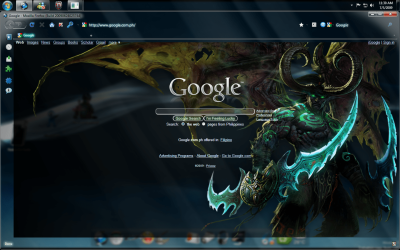
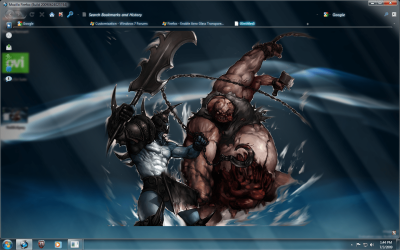

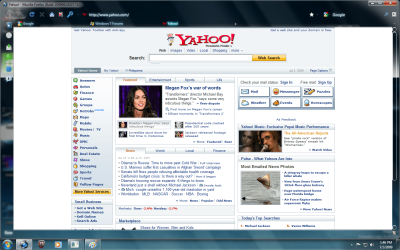
Information
The Screenshots above show that "google.com" and "sevenforums.com" are glassed. Those webpages were glassed because i have a Stylish code for those websites to make them look glass, but in order to achieve the full glass effect, you would still have to put the domain of those websites on your whitelist. On the other hand "yahoo.com" is not glassed since i don't have a Stylish code for that website and it looks normal because I did not put its domain on my white list. Even though the webpage looks normal as it should, I still have the transparency on my browser.
Last edited by a moderator:


