
How to Recover from an Infinitely Looping Startup Repair Loop without Reinstalling Windows
If you've ever experienced a Startup Repair that continously loops and fails to fix the problem of not being able to load windows, even in safe mode, then you'll know that usually the only way to recover from this when System Restore does not work is to do a clean install of Windows.
Until now.
This tutorial will show you how to use the System Recovery Options provided by Windows to recover your system to a working state so that you don't have to risk losing data by performing a clean install.
Warning
The instructions presented withing this tutorial must be followed correctly, or you can damage your Windows 7 installation even further. This tutorial is designed to help recover from a bad registry that is causing the startup repair loop. You should note that there may still be some issues remaining that cannot be fixed by manually restoring the registry.
Recovering Your System
- Boot to the System Recovery Options screen.
- If Windows automatically opens Startup Repair, and subsequently fails to fix a problem, you can skip ahead to step 4 below.
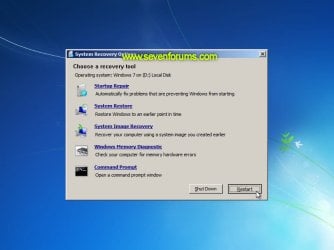
- In the System Recovery Options screen, click Startup Repair:
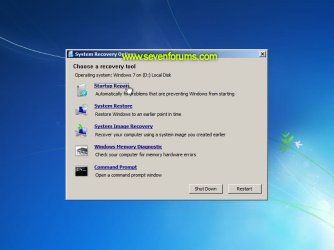
- Windows will search for an attempt to repair startup problems:

- If startup problems could not be repaired, you will receive the message Windows cannot repair this computer automatically. Click View advanced options for system recovery and support:
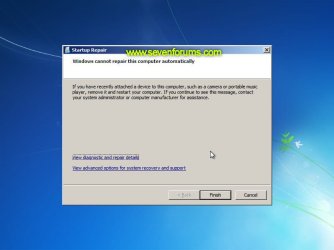
- Click View advanced options for system recovery and support, which which bring you back to the main System Recovery Options screen.
- Click Command Prompt:
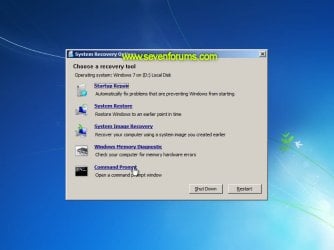
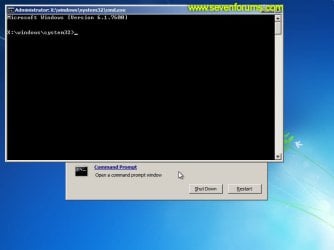
- Command Prompt should open to X:, which is an internal ram disk use by System Repair:
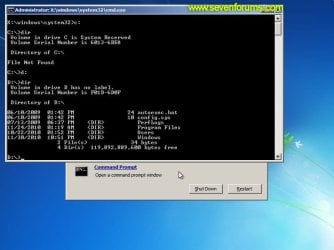
- Now you need to find your system drive. Depending on how your system is setup, this could be either C: or D:.
- Type C: and press <ENTER>.
- Verify that this is your system drive by typing DIR and pressing <ENTER>. If you see the Program Files, Users and Windows folders, then you have found your system drive, and can continue to step 9 below.
- If the drive is not your system drive, repeat steps I and II above, changing the drive letter to D, E or some other letter until the system drive is located.
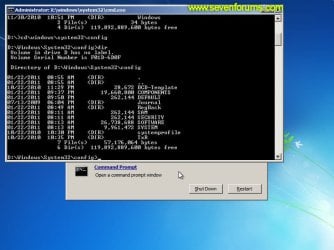
- When you have located your Windows system drive, type CD \windows\system32\config and press <ENTER>:
- Type DIR and press <ENTER>, and verify that the following files and folders exist in the config folder:
- RegBack (which is a folder)
- DEFAULT
- SAM
- SECURITY
- SOFTWARE
- SYSTEM
- Type MD mybackup and press <ENTER> to create a backup folder that you can use incase this procedure does not work as expected.
- Type copy *.* mybackup and press <ENTER>.
- If you are prompted to overwrite existing files, press A to allow all backups to be overwritten.
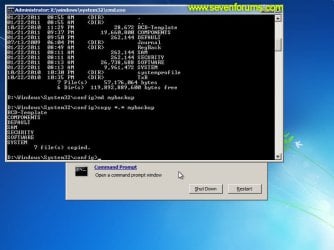
- If you are prompted to overwrite existing files, press A to allow all backups to be overwritten.
- Now you need to check if you can use the automatic Windows backups to restore your registry:
- Type CD RegBack and press <ENTER> to go to the RegBack folder.
- Type DIR and press <ENTER> to view the contents of the folder. All the following files must exist:
- The DEFAULT, SAM and SECURITY files should each be about 262,000 bytes in size.
- The SOFTWARE file should be about 26,000,000 bytes.
- The SYSTEM file should be about 9,900,000 bytes.
- The file sizes presented here are approximate estimations, and may vary depending on your system. If any one of them are 0 bytes, then you should stop what you're doing now and seek an alternative method of recovering your system, because Windows cannot function with a 0-byte size registry hive.
- If the hive files listed in RegBack are ok, then proceed to step 14 of the tutorial.
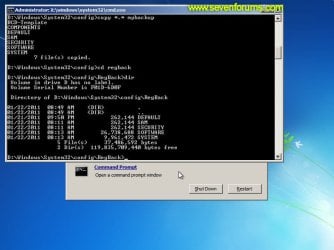
- Type copy *.* .. and press <ENTER> to copy the backup hive files to \Windows\System32\config.
- If you are prompted to overwrite existing files, press A to allow all file to be overwritten.
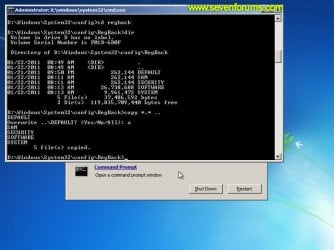
- If you are prompted to overwrite existing files, press A to allow all file to be overwritten.
- Type exit and press <ENTER> to close the command prompt.
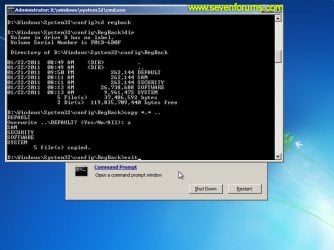
- Click the Restart button to reboot your computer. If all goes well, your system will boot normally.

This tutorial was made possible after learning how to manualy replace the Windows 7 Registry Hives after reading the Recovering Windows 7 Registry Hives/Files article on Microsoft Technet.
Attachments
Last edited by a moderator:


