Startup Repair Infinite Loop Recovery

How to Recover from an Infinitely Looping Startup Repair Loop without Reinstalling Windows

If you've ever experienced a Startup Repair that continously loops and fails to fix the problem of not being able to load windows, even in safe mode, then you'll know that usually the only way to recover from this when System Restore does not work is to do a clean install of Windows.

Until now.

This tutorial will show you how to use the System Recovery Options provided by Windows to recover your system to a working state so that you don't have to risk losing data by performing a clean install.

   Warning
The instructions presented withing this tutorial must be followed correctly, or you can damage your Windows 7 installation even further. This tutorial is designed to help recover from a bad registry that is causing the startup repair loop. You should note that there may still be some issues remaining that cannot be fixed by manually restoring the registry.


Recovering Your System
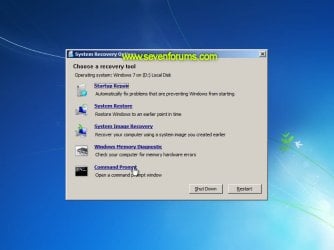
  1. Boot to the System Recovery Options screen.
    • If Windows automatically opens Startup Repair, and subsequently fails to fix a problem, you can skip ahead to step 4 below.
  2. In the System Recovery Options screen, click Startup Repair:
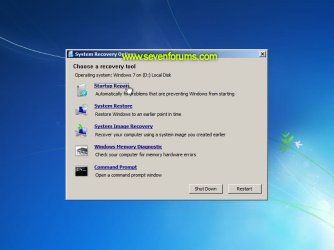
    Image05_startuprepair.jpg


  3. Windows will search for an attempt to repair startup problems:
    Image06_searching.jpg


  4. If startup problems could not be repaired, you will receive the message Windows cannot repair this computer automatically. Click View advanced options for system recovery and support:
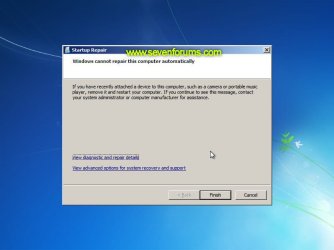
    Image07_cannotfix.jpg


  5. Click View advanced options for system recovery and support, which which bring you back to the main System Recovery Options screen.
  6. Click Command Prompt:
    Image08_clickcommand.jpg


  7. Command Prompt should open to X:, which is an internal ram disk use by System Repair:
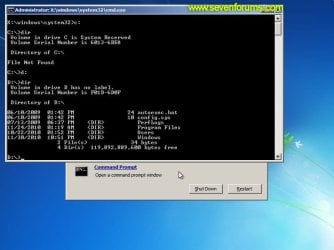
    Image10_changedrive.jpg


  8. Now you need to find your system drive. Depending on how your system is setup, this could be either C: or D:.
    • Type C: and press <ENTER>.
    • Verify that this is your system drive by typing DIR and pressing <ENTER>. If you see the Program Files, Users and Windows folders, then you have found your system drive, and can continue to step 9 below.
    • If the drive is not your system drive, repeat steps I and II above, changing the drive letter to D, E or some other letter until the system drive is located.
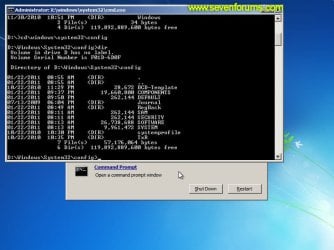
      Image11_chdir_config.jpg

  9. When you have located your Windows system drive, type CD \windows\system32\config and press <ENTER>:
  10. Type DIR and press <ENTER>, and verify that the following files and folders exist in the config folder:
    • RegBack (which is a folder)
    • DEFAULT
    • SAM
    • SECURITY
    • SOFTWARE
    • SYSTEM
      Image11_chdir_config.jpg

  11. Type MD mybackup and press <ENTER> to create a backup folder that you can use incase this procedure does not work as expected.
  12. Type copy *.* mybackup and press <ENTER>.
    • If you are prompted to overwrite existing files, press A to allow all backups to be overwritten.
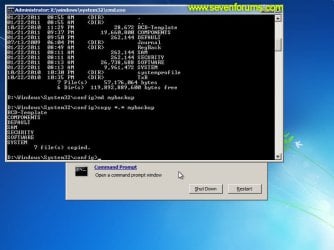
      Image12_mybackup.jpg

  13. Now you need to check if you can use the automatic Windows backups to restore your registry:
    • Type CD RegBack and press <ENTER> to go to the RegBack folder.
    • Type DIR and press <ENTER> to view the contents of the folder. All the following files must exist:
      • The DEFAULT, SAM and SECURITY files should each be about 262,000 bytes in size.
      • The SOFTWARE file should be about 26,000,000 bytes.
      • The SYSTEM file should be about 9,900,000 bytes.
      • The file sizes presented here are approximate estimations, and may vary depending on your system. If any one of them are 0 bytes, then you should stop what you're doing now and seek an alternative method of recovering your system, because Windows cannot function with a 0-byte size registry hive.
    • If the hive files listed in RegBack are ok, then proceed to step 14 of the tutorial.
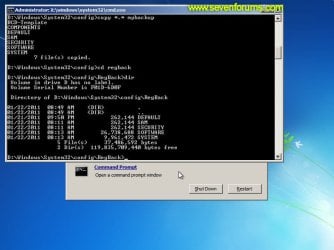
      Image13_checkregback.jpg


  14. Type copy *.* .. and press <ENTER> to copy the backup hive files to \Windows\System32\config.
    • If you are prompted to overwrite existing files, press A to allow all file to be overwritten.
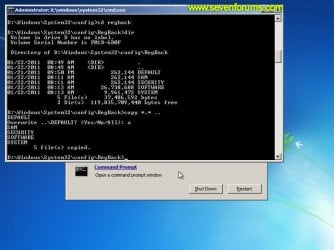
      Image14_copyregback.jpg

  15. Type exit and press <ENTER> to close the command prompt.
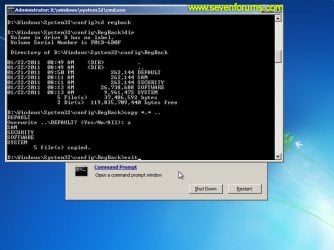
    Image15_exit.jpg


  16. Click the Restart button to reboot your computer. If all goes well, your system will boot normally.
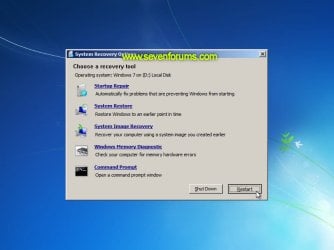
    Image16_restart.jpg
    Image17_working.jpg


Reference Information
This tutorial was made possible after learning how to manualy replace the Windows 7 Registry Hives after reading the Recovering Windows 7 Registry Hives/Files article on Microsoft Technet.


Attachments
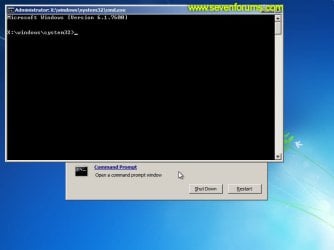
  • Image09_commandprompt.jpg
    Image09_commandprompt.jpg
    26.1 KB · Views: 373
Last edited by a moderator:

My Computer My Computer

At a glance

64-bit Windows 11 Pro for WorkstationsIntel i7-8700K OC'd to 5 GHz64 GB (4x16GB) G.SKILL TridentZ RGB DDR4 3600...ASUS ROG-STRIX-GTX1080TI-O11G-GAMING
Computer type
PC/Desktop
Computer Manufacturer/Model Number
Self built custom
OS
64-bit Windows 11 Pro for Workstations
CPU
Intel i7-8700K OC'd to 5 GHz
Motherboard
ASUS ROG Maximus XI Formula Z390
Memory
64 GB (4x16GB) G.SKILL TridentZ RGB DDR4 3600 MHz
Graphics Card(s)
ASUS ROG-STRIX-GTX1080TI-O11G-GAMING
Sound Card
Integrated
Monitor(s) Displays
2 x Samsung Odyssey G7 27"
Screen Resolution
2560x1440
Hard Drives
1TB Samsung 990 PRO M.2,
4TB Samsung 990 PRO PRO M.2,
TerraMaster F8 SSD Plus NAS
PSU
Seasonic Prime Titanium 850W
Case
Thermaltake Core P3
Cooling
Corsair Hydro H115i
Keyboard
Logitech wireless K800
Mouse
Logitech MX Master 4
Internet Speed
2 Gb/s Download and 100 Mb/s Upload
Antivirus
Malwarebyte Anti-Malware Premium
Browser
Google Chrome
Other Info
Logitech Z625 speaker system,
Logitech BRIO 4K Pro webcam,
HP Color LaserJet Pro MFP M477fdn,
APC SMART-UPS RT 1000 XL - SURT1000XLI,
Galaxy S23 Plus phone
Hi! Last week I got my family's computer working again with these instructions, but now it's happened again and it doesn't work :/ The first time, when I clicked normal startup it reached the logo part, but now when I click it it goes directly to startup repair, which obviously doesn't work. I also tried fixboot, fixmbr, rebuildbcd and chkdsk but nothing, and the two restore points end up in error... Any ideas?
 

My Computer My Computer

At a glance

Windows XP 32bit / Windows 7 32bit
Computer type
PC/Desktop
OS
Windows XP 32bit / Windows 7 32bit
Is your repair disc working? Mine gave me many errors so I created one to replace the defective one. But after many attempts and realizing that my files were lost (temporarily), I removed the Hard Drive and connected it to another PC, used multiple recovery programs to recover more than 50% of the lost files and restoring the Laptop to factory new, by using the DVDs I created the first time I configured the Laptop. If you have the DVDs to restore the system to Factory New and you have all your files safe and sound, just Nuke it with the DVD created for Factory new. Is this Windows 7 or 8?
 

My Computer My Computer

At a glance

Windows XP 32-bit
OS
Windows XP 32-bit
Hi, thanks for the response. It's Windows 7. I created a repair disk too last week since the options included wasn't working and I tried it the first time we had this problem, but again, it didn't work. I didn't check it this time so I'll do it now, though I don't have much hope it will work, but anyway. In this case, luckily the files don't seem to be damaged. I can see everything is there through the notepad and also through a windows xp portable I downloaded (which by the way doesn't let me do much)

I'll also add this: the last one to use that computer was my brother and he says that he saw something related to Microsoft Windows Defender (and maybe DirectX?, he doesn't remember..) Well the thing is that the last checkpoint was made last night automatically and it's named Windows Defender Checkpoint. So maybe something related to a virus or some kind of malware? I tried to run Malwarebytes Anti-malware through that WXP portable but it doesn't let me...)
 

My Computer My Computer

At a glance

Windows XP 32bit / Windows 7 32bit
Computer type
PC/Desktop
OS
Windows XP 32bit / Windows 7 32bit
Did you try to use the Windows 7 media instead of the repair disk? Booting from it will give the option of either installing windows or a repair. Choosing repair will send you to multiple options, like the simple repair start up problems and then on. Then you have the system restore option there too. But if you already tried all this, then I'm wasting your time.

There are two options I could try but one of them is too expensive. The cheapest one is to take out the HD, connect it to another PC (USB enclosure) and try the Disk Error Checking tool. Checkmark both Automatically Fix File System Errors and Scan and Recover bad sectors. The expensive one is to have another drive, same capacity or more, and try to clone the troublesome one. I did that once with a Windows XP system (Dell) that went on a loop when starting up (Windows XP Logo). Cloning the drive worked, I've no idea if the cloning process skipped the bad sectors but it worked. But don't waste money in buying another HD. I only suggest this option if you already have one, just in case. For cloning, I used the Acronis version that Western Digital let you download for free. I'm not sure if either the Source or the Target disk need to be Western Digital but it's just an idea (crazy one).

ADDENDUM

The cloning was pure luck because the original plan was to buy the HD to replace the one with the XP Logo Startup loop. Since it was a Dell, we had the Restoration CD to use with the new HD. The cloning was just an experiment I did to see if I got the same results (startup Loop) like with the old one. Surprisingly, the system booted normally so I didn't need to go through the tiresome re-installation process.

Again, if you happen to have an extra HD, same capacity (or more) as the "defective" one, try the experiment.
 
Last edited:

My Computer My Computer

At a glance

Windows XP 32-bit
OS
Windows XP 32-bit
Sorry, I just arrive home so I couldn't reply earlier. At the end my dad decided to take the cpu to a pc repairman this morning. Luckily we could do some backups of a few important personal files that were stored in the main partition (which I guess will be formatted) through the xp portable I had downloaded. Anyway, thanks skunky62 for taking time and try to help :)
 

My Computer My Computer

At a glance

Windows XP 32bit / Windows 7 32bit
Computer type
PC/Desktop
OS
Windows XP 32bit / Windows 7 32bit
This seems perfect for my predicament, all except for the fact that when I select Startup Repair from he booting menu, it goes straight to a black screen, F8 doesn't work either.
 

My Computer My Computer

At a glance

Windows 7 64bitNv55so5u6GBATI Radeon 6220G
Computer type
PC/Desktop
Computer Manufacturer/Model Number
Gateway
OS
Windows 7 64bit
CPU
Nv55so5u
Memory
6GB
Graphics Card(s)
ATI Radeon 6220G
Internet Speed
1 Mb/s
Antivirus
avast
Browser
chrome
Hello everyone!
This evening, my computer forcibly restarted, and after fussing with it, I was finally able to get to the command prompt. I followed all of the steps provided, yet I was unable to get the computer to boot up normally. In addition, I tried a System Restore which was "successful," though after it was finished, startup repair booted up for five seconds and then claimed that it couldn't do anything to solve the problem. Has anyone else experienced this sort of problem? If any of you have suggestions/tips, they would be much appreciated. Thanks for your time and effort. :) (I'm doing this on a Dell Inspiron N7010 with Windows 7 if that makes any difference.)
 

My Computer My Computer

At a glance

Windows 7
Computer type
Laptop
Computer Manufacturer/Model Number
Dell Inspiron N7010
OS
Windows 7
Antivirus
Norton 360
This seems perfect for my predicament, all except for the fact that when I select Startup Repair from he booting menu, it goes straight to a black screen, F8 doesn't work either.

If you can't get to System Restore, then re-install the OS again. If you previously created the DVDs to restore the system to factory new, don't waste your time. Try saving your data to another PC and Presto.
 

My Computer My Computer

At a glance

Windows XP 32-bit
OS
Windows XP 32-bit
Hello everyone!
This evening, my computer forcibly restarted, and after fussing with it, I was finally able to get to the command prompt. I followed all of the steps provided, yet I was unable to get the computer to boot up normally. In addition, I tried a System Restore which was "successful," though after it was finished, startup repair booted up for five seconds and then claimed that it couldn't do anything to solve the problem. Has anyone else experienced this sort of problem? If any of you have suggestions/tips, they would be much appreciated. Thanks for your time and effort. :) (I'm doing this on a Dell Inspiron N7010 with Windows 7 if that makes any difference.)

Almost. Did you try all the System Restore shown? Why not try an earlier one until you exhaust them all? If that doesn't work, I'm sure Dell gave you the system with a restoration DVD. Go for it, after saving the Data to another PC or drive. My hellish experience, you can see all my posts from late last year, with Dell Inspiron was ridiculous. That was the first model where you couldn't remove the HD so easily. You needed a Masters Degree in Computer Engineering to take out the stupid HD.
 

My Computer My Computer

At a glance

Windows XP 32-bit
OS
Windows XP 32-bit
Should I try disabling Norton 360 via command prompt first? I've heard that antivirus software sometimes messes with System Restore. I'll try all of the other restore points like you suggested. Thanks!
 

My Computer My Computer

At a glance

Windows 7
Computer type
Laptop
Computer Manufacturer/Model Number
Dell Inspiron N7010
OS
Windows 7
Antivirus
Norton 360
Should I try disabling Norton 360 via command prompt first? I've heard that antivirus software sometimes messes with System Restore. I'll try all of the other restore points like you suggested. Thanks!

I've no idea about Norton 360 because I don't trust Symantec. I used to trust Peter Norton but he sold his name more than a decade ago. Try other System Restore points until there are none.
 

My Computer My Computer

At a glance

Windows XP 32-bit
OS
Windows XP 32-bit
I tried going through all of the System Restore points, but still no luck. In addition, I tried re-installing Windows 7 using the disk I bought, but I had no luck with that, either. Furthermore, I don't think I was given a restoration DVD of any sort with the computer. Any idea as to what I should do next?
This is one of the reasons why I try to avoid updates as much as possible... -.-
 

My Computer My Computer

At a glance

Windows 7
Computer type
Laptop
Computer Manufacturer/Model Number
Dell Inspiron N7010
OS
Windows 7
Antivirus
Norton 360
I tried going through all of the System Restore points, but still no luck. In addition, I tried re-installing Windows 7 using the disk I bought, but I had no luck with that, either. Furthermore, I don't think I was given a restoration DVD of any sort with the computer. Any idea as to what I should do next?
This is one of the reasons why I try to avoid updates as much as possible... -.-

Download your Windows 7 version (Home Premium, Pro, etc.) from DigitalRiver (ISO files) and start anew. The Windows Lic. /Activation number for your system should be underneath it. Just download the Drivers for your System from Dell itself, by using Dell's Tag Number.

Microsoft (a possible link to DigitalRiver Win 7 Download)
 

My Computer My Computer

At a glance

Windows XP 32-bit
OS
Windows XP 32-bit
Well, I finally got the laptop to do a clean install of Windows. Now all that's left is to fix my internet connection. Thanks for all the help!
 

My Computer My Computer

At a glance

Windows 7
Computer type
Laptop
Computer Manufacturer/Model Number
Dell Inspiron N7010
OS
Windows 7
Antivirus
Norton 360
help

When I get to step 5 and I Click View advanced options for system recovery and support. It don't bring me to the main System Recovery Options screen. Instead some drop down menu to select a keyboard input method and then when i choose my language a menu opens after i click next and it ask me to choose a recovery tool and i get the options to shut down or restart. Can anyone help
 

My Computer My Computer

At a glance

Windows 7 home premium 32bit
Computer type
Laptop
Computer Manufacturer/Model Number
Acer Aspire 5515 KAW60
OS
Windows 7 home premium 32bit
Instead of going all the way through to step 5, just choose command prompt the first time. It's worth a try.
 

My Computer My Computer

At a glance

Windows 7 Pro- 32bit.Intel(R) Celeron(R) CPU 440 @ 2.00GHz, ~2.0GHz2038MB RAM DDR2Intel Corporation
Computer Manufacturer/Model Number
Gateway-Emachine, T-3656
OS
Windows 7 Pro- 32bit.
CPU
Intel(R) Celeron(R) CPU 440 @ 2.00GHz, ~2.0GHz
Motherboard
ELITEGROUP 945GCT-M3 3.1 V1.10 12/24/2007
Memory
2038MB RAM DDR2
Graphics Card(s)
Intel Corporation
Sound Card
HdAudio.sys 6.00.6002.18005
Monitor(s) Displays
Generic PnP... 17''
Screen Resolution
1440 x 900 (32bit) 75Hz
Hard Drives
2
Keyboard
Tevion "wireless" HID
Mouse
Tevion "wireless" HID
Internet Speed
Download.... 3.11 mb/s Upload.... 0.64 mb/s
Other Info
BIOS Phoenix- AwardBios v600PG / DirectX 11
It does not even let do that.
 

My Computer My Computer

At a glance

Windows 7 home premium 32bit
Computer type
Laptop
Computer Manufacturer/Model Number
Acer Aspire 5515 KAW60
OS
Windows 7 home premium 32bit
Hello Bradley, and welcome to Seven Forums.

You might see if you may be able to boot from a System Repair Disc created on another 32-bit W7 computer and do the Startup Repair tutorial with instead.

Hope this helps, :)
Shawn
 

My Computer My Computer

At a glance

64-bit Windows 11 Pro for WorkstationsIntel i7-8700K OC'd to 5 GHz64 GB (4x16GB) G.SKILL TridentZ RGB DDR4 3600...ASUS ROG-STRIX-GTX1080TI-O11G-GAMING
Computer type
PC/Desktop
Computer Manufacturer/Model Number
Self built custom
OS
64-bit Windows 11 Pro for Workstations
CPU
Intel i7-8700K OC'd to 5 GHz
Motherboard
ASUS ROG Maximus XI Formula Z390
Memory
64 GB (4x16GB) G.SKILL TridentZ RGB DDR4 3600 MHz
Graphics Card(s)
ASUS ROG-STRIX-GTX1080TI-O11G-GAMING
Sound Card
Integrated
Monitor(s) Displays
2 x Samsung Odyssey G7 27"
Screen Resolution
2560x1440
Hard Drives
1TB Samsung 990 PRO M.2,
4TB Samsung 990 PRO PRO M.2,
TerraMaster F8 SSD Plus NAS
PSU
Seasonic Prime Titanium 850W
Case
Thermaltake Core P3
Cooling
Corsair Hydro H115i
Keyboard
Logitech wireless K800
Mouse
Logitech MX Master 4
Internet Speed
2 Gb/s Download and 100 Mb/s Upload
Antivirus
Malwarebyte Anti-Malware Premium
Browser
Google Chrome
Other Info
Logitech Z625 speaker system,
Logitech BRIO 4K Pro webcam,
HP Color LaserJet Pro MFP M477fdn,
APC SMART-UPS RT 1000 XL - SURT1000XLI,
Galaxy S23 Plus phone
Brink, you are a hero beyond measure.

Today I created an account just to give you the greatest of thanks! For the last half decade i've been using a Mac as my main machine and have it setup to stop this kind of fuss down to a Tee.

I've been keeping up with all windows related things however as I use it at work and so do all of my tech friends. At some point I knew that i was going to build something mean to produce music on/game on etc. That happened this September and I'd been collecting software for it for the previous 12 months. Suffice to say it got built within a week and I poured literally a hundred hours into the software build, tweaking everything to my preferences and getting it setup perfectly to match the useability of my Mac.

Two weeks later, just as I was getting round to my first backup, it died inexplicably (I thought it was a beta version of Firefox that did it but have no way of confirming this). After a further two weeks of reading every night trying to fix it I got nowhere, none of my friends had any helpful suggestions and I just wanted to cry. Fast forward two months and my grands worth of rig has been sitting in the corner collecting dust because I couldn't face the rebuild.

Tonight I thought I would have one last google and this thread popped up, I followed your instructions to the letter thinking that it wouldn't work and there it was, the shiny LogIn screen I have so longed for. I nearly cried. I love you.

Hello Acronis True Image. Let's do this.
 

My Computer My Computer

At a glance

W7 Pro 64bit
Computer type
PC/Desktop
OS
W7 Pro 64bit
Back
Top