
How to Check / Repair the Windows System Files from a Command Prompt at Boot
This shows how to start the PC and open a command prompt at boot so the Windows system files can be checked and repaired if possible, if the PC will not start to Windows normally or in safe mode.
Note
For those that are dual/multi booting or if the Windows Recovery Environment (WinRE) does not 'see' the Windows Operating System needing repair, see Method Two below.
Let's get started!
In the BIOS set the boot order to boot first from the CD/DVD Drive, insert the Windows full version installation DVD or a created repair CD and restart the PC.
Method One
For Windows 7 and Vista full version installation media, after the "Press any key ... " black screen do steps #1 & #2 then skip down to step #5 below to continue.
For a Windows system repair disk start at step #3 below.
1) At the Select Language screen click next.
click any image to enlarge

2) At the next screen click Repair your Computer.

3) For a Windows created repair CD, after the "Press any key ... " black screen there will be a Loading Files screen.

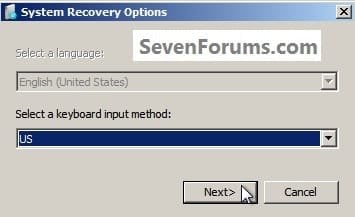
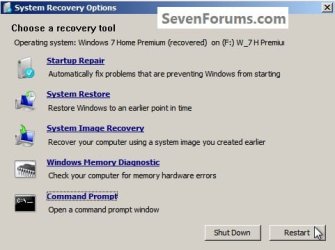
4) Then click Next for this System Recovery Options dialog box.
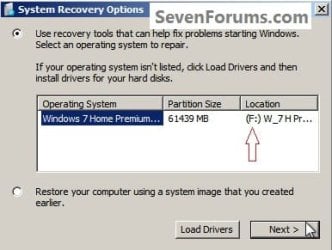
5) At this System Recovery Options dialog box, make sure there is a dot at "Use Recovery Tools" and be sure to make note of the Location drive letter as it probably will not be C: and the correct drive letter must be entered in the following steps; then click Next.
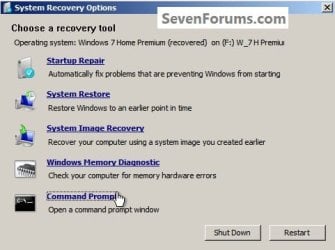
6) At this System Recovery Options dialog box click Command Prompt.
7) In the command window that opens type this command below and hit the <enter> key, be sure to use your drive letter, where mine is F: for this demonstration yours probably will not be the same.
Code:
[B]sfc /scannow /offbootdir=[COLOR=red]f[/COLOR]:\ /offwindir=[COLOR=red]f[/COLOR]:\windows[/B]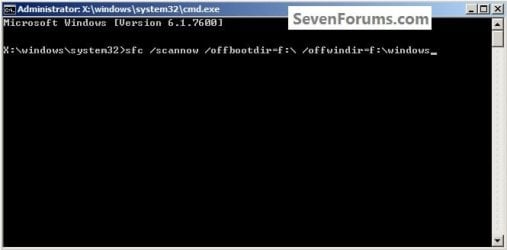
8) You will get a blinking curser while it checks and attempts to repair any issues it may find, it could take quite a bit of time to complete.
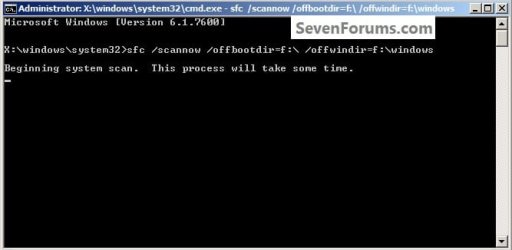
9) To close the command window after the scan type exit and hit the <enter> key.
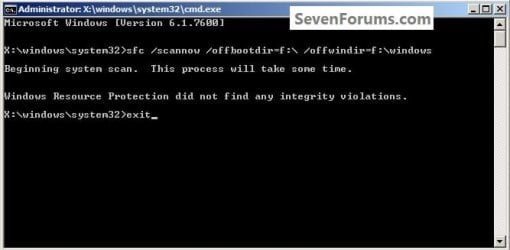
Though my demonstration / test found no errors to repair, yours may and if it does it may take you running this command a couple separate times to completely repair any issues it finds so don't give up after just one attempt.
For further important information on this process, see Option Two of this tutorial at the link below.
SFC /SCANNOW Command - System File Checker
10) To restart the PC when the command window closes, remove the Windows / repair disk from the ODD and click Restart in the System Recovery Options dialog box that's still open.
Method Two
It has been suggested by Brink to include this method for those dual/multi booting and for those that have issues with WinRE 'seeing' the Windows Operating System partition needing repair.
In the BIOS set the boot order to boot first from the CD/DVD Drive, insert the Windows full version installation DVD or a created repair CD and restart the PC so diskpart can be started, if need be, view this tutorial for those methods.
How to Boot to DISKPART at PC Startup
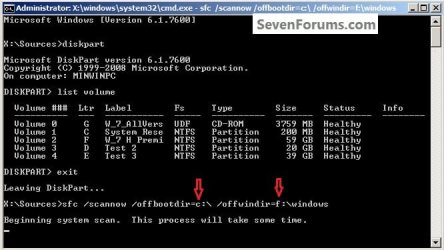
1) In the diskpart command window type list volume and hit the <enter> key.
2) After it lists the volumes type exit a single time and <enter>.
ckick to enlarge
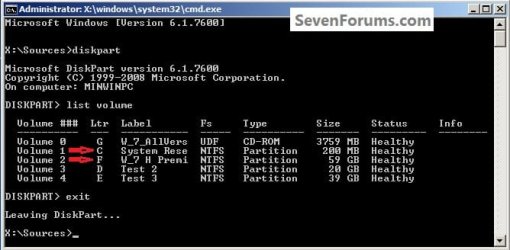
3) Now type the command below using your specific volume drive letters <enter>.
If you are dual/multi booting or have a System Reserved partition as I do and the system boot files are stored on a separate partition than the Operating System partition needing repair, in any case, the volume drive letter where the system boot files are stored goes in the first part.
offbootdir=c:
In the second part you would use the volume drive letter for the Windows OS partition you want to attempt the repair on.
offwindir=f:
Code:
[B]sfc /scannow /offbootdir=[COLOR=red]c[/COLOR]:\ /offwindir=[COLOR=red]f[/COLOR]:\windows[/B]4) You will get a blinking curser while it checks and attempts to repair any issues it may find, it could take quite a bit of time to complete.
5) Though my demonstration / test found no errors to repair, yours may and if it does it may take you running this command a couple separate times to completely repair any issues it finds so don't give up after just one attempt.
For further important information on this process, see Option Two of this tutorial at the link below.
SFC /SCANNOW Command - System File Checker
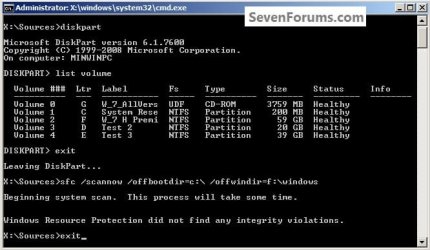
6) To close the command window after the scan type exit and hit the <enter> key.
Then remove the Windows disk from the ODD and restart the PC to start Windows.
Enjoy

Related Tutorials
- http://www.sevenforums.com/tutorials/69585-safe-mode.html?ltr=S
- http://www.sevenforums.com/tutorials/1538-sfc-scannow-command-system-file-checker.html?ltr=S
- http://www.sevenforums.com/tutorials/3413-repair-install.html?ltr=R
- http://www.sevenforums.com/tutorials/681-startup-repair.html?ltr=S
- http://www.sevenforums.com/tutorials/700-system-restore.html?ltr=S
- http://www.sevenforums.com/tutorials/93347-copy-paste-windows-recovery-console.html
- http://www.sevenforums.com/tutorials/433-disk-check.html
- http://www.sevenforums.com/tutorials/139576-startup-repair-infinite-loop-recovery.html
- http://www.sevenforums.com/tutorials/105541-startup-repair-run-3-separate-times.html?ltr=S
- http://www.sevenforums.com/tutorials/238737-user-account-reset-password-windows-7-a.html
Last edited by a moderator:


