
Allow or Prevent Remote Desktop Connection Clients to Automatically Log On to Host Computer
Information
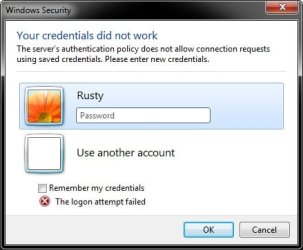
If you allow Remote Desktop Connections to your (host) computer, then this will show you how to allow or prevent all Remote Desktop Connection clients from being able to automatically log on (Remember my credentials) to your (host) Vista, Windows 7, or Windows 8 computer.
You must be logged in as an administrator to be able to do this tutorial.
You must be logged in as an administrator to be able to do this tutorial.
Note
- If this is set to be allowed on your (host) computer, then a RDC client will be able to be set to automatically log on (Remember my credentials) to your (host) computer.
- If this is set to be prevented on your (host) computer, then a RDC client will not be able to be set to automatically log on (Remember my credentials) to your (host) computer, and will always be prompted to enter their log on credentials before being allowed to log on to your (host) computer.
Warning
While all editions of Vista, Windows 7, and Windows 8 can be a remote desktop client...
- Only the Vista Business, Ultimate, and Enterprise editions can host a remote desktop connection.
- Only the Windows 7 Professional, Ultimate, and Enterprise editions can host a remote desktop connection.
- Only the Windows 8 Pro and Enterprise editions can host a remote desktop connection.
OPTION ONE
Using a REG File Download
1. To Allow Automatic Log On from RDC Clients
NOTE: This is the default setting.
A) Click on the Download button below to download the file below.
Allow_Automatic_Logon_from_RDC_Clients..reg
Download
B) Go to step 3.
2. To Prevent Automatic Log On from RDC Clients
A) Click on the Download button below to download the file below.
Prevent_Automatic_Logon_from_RDC_Clients..reg
Download
3. Save the .reg file to your desktop.
4. Right click on the downloaded .reg file and click on Merge.
6. Click on Run, Continue (UAC-Vista) or Yes (UAC-Windows 7), Yes, and OK when prompted.
7.When done, you can delete the downloaded .reg file if you like.
OPTION TWO
Through the Local Group Policy Editor
1. Open the Local Group Policy Editor.
2. In the left pane, click on the arrow to expand Computer Configuration, Administrative Templates, Windows Components, Remote Desktop Services, Remote Desktop Session Host, and on Security. (see screenshot below)
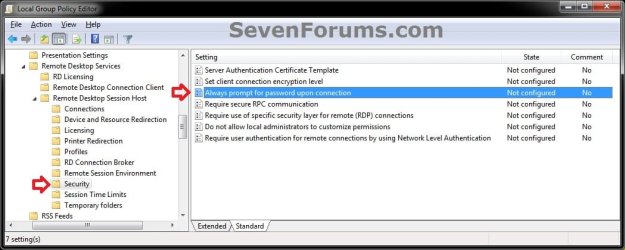
3. In the right pane of Security, right click on Always prompt for password upon connection and click on Edit. (see screenshot above)
4. To Allow Automatic Log On from RDC Clients
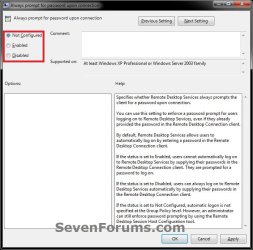
A) Select (dot) Not Configured or Disabled. (see screenshot below step 6)
NOTE: Not Configured is the default setting.
B) Go to step 6.
5. To Prevent Automatic Log On from RDC Clients
A) Select (dot) Enabled. (see screenshot below step 6)
6. Click on OK. (See screenshot below)
7. Close the Local Group Policy Editor. (see screenshot below step 2)
That's it,
Shawn
Related Tutorials
- How to Turn On or Off Automatic Log On for a Remote Desktop Connection
- How to Enable Windows to make a Remote Desktop Connection
- How to Set Time Limit for Active Remote Desktop Sessions
- How to Set Time Limit for Idle Remote Desktop Sessions
- How to Terminate Remote Desktop Session when Active or Idle Time Limits are Reached
- How to Create a Windows RemoteApp and Desktop Connections Shortcut
- How to Automatically Log On a User Account at Windows 7 Startup
- How to Create a "Remote Desktop Connection" Shortcut to a Specific Computer
- How to Reset and Clear Remote Desktop Connection History in Windows 7 and Windows 8
- How to Delete Credentials of a Remote Desktop Connection in Windows 7 and Windows 8
Attachments
Last edited:


