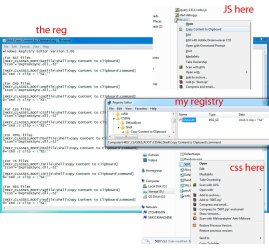
| Windows 7: Copy Content to Clipboard - Add to Context Menu Copy Content to Clipboard - Add to Context Menu How to Add "Copy Content to Clipboard" to Context Menu in Vista, Windows 7, and Windows 8
Published 06 Feb 2011
|  Published by | | |
 Featured Tutorial | | | How to Add "Copy Content to Clipboard" to Context Menu in Vista, Windows 7, and Windows 8  Information This tutorial will show you how to add or remove Copy to Clipboard from the right context menu of BAT, CMD, CSS, HTML, JS, LOG (txt), REG, RTF, TXT, and VBS files in Vista, Windows 7, and Windows 8.
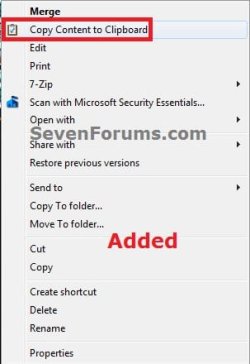
If added, this makes it a lot easier to copy the entire contents of a file with one of these file extensions to the clipboard, then paste the contents where you like.  Note This will not work for the RTF (WordPad) file extension context menus if you have Microsoft Office Word installed and set as the default program to open RTF files instead of WordPad. EXAMPLE: Context Menu with "Copy Content to Clipboard" Added or Removed 
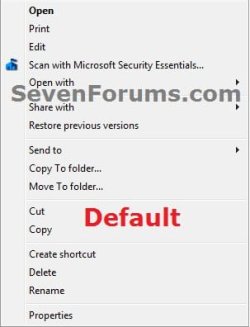
 OPTION ONE 
Add or Remove "Copy Content to Clipboard" using REG File
NOTE: This option will allow you to automatically add or remove Copy to Clipboard from all of the context menus of the BAT, CMD, CSS, HTML, JS, LOG (txt), REG, RTF, TXT, and VBS files at once.1. Do step 2 or 3 below for what you would like to do. 2. To Add "Copy Content to Clipboard" A) Click/tap on the download button below to download the file below, and go to step 4 below.Add_Copy_Content_to_Clipboard.reg
3. To Remove "Copy Content to Clipboard" A) Click/tap on the download button below to download the file below, and go to step 4 below.Remove_Copy_Content_to_Clipboard.reg
4. Save the .reg file to your Desktop. 5. Double click/tap on the downloaded .reg file to merge it. 6. Click/tap on Run, Continue (UAC-Vista) or Yes (UAC-Windows 7/8), Yes, and then OK when prompted. 7. When done, you can delete the downloaded .reg file if you like.
 OPTION TWO 
Add or Remove "Copy Content to Clipboard" in Registry Editor
NOTE: This option will allow you to manually pick and choose to add or remove Copy to Clipboard from either one, more, or all of the context menus of the BAT, CMD, CSS, HTML, JS, LOG (txt), REG, RTF, TXT, and VBS files.1. Press the Windows + R keys to open the Run dialog, type regedit, and press Enter. 2. If prompted by UAC, then click/tap on Continue (Vista) or Yes (Windows 7/8). 3. Do step 4 or 5 below for what you would like to do. 4. To Add "Copy Content to Clipboard" to the Context MenuA) In regedit, navigate to the location below for the file extension that you wish to add Copy Content to Clipboard to.- HKEY_CLASSES_ROOT\batfile\shell
- HKEY_CLASSES_ROOT\cmdfile\shell
- HKEY_CLASSES_ROOT\CSSfile\shell
- HKEY_CLASSES_ROOT\htmlfile\shell
- HKEY_CLASSES_ROOT\JSFile\shell
- HKEY_CLASSES_ROOT\regfile\shell
- HKEY_CLASSES_ROOT\rtffile\shell
- HKEY_CLASSES_ROOT\txtfile\shell
- HKEY_CLASSES_ROOT\VBSFile\shell
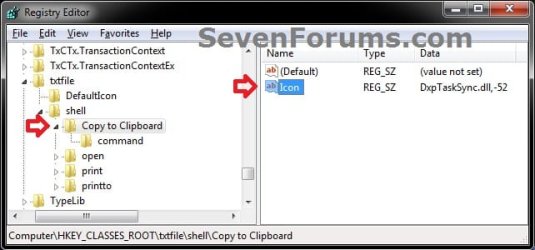
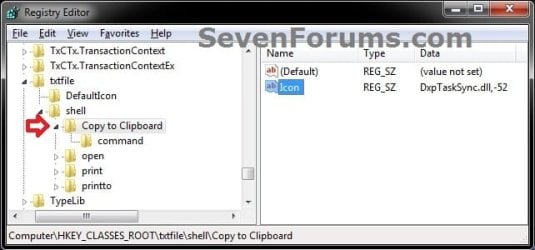
B) In the left pane of regedit, right click on shell, click/tap on New and Key, type Copy Content to Clipboard, and press Enter. (see screenshot below) C) In the right pane of Copy Content to Clipboard, right click on a empty space, click on New and String Value, type Icon, press Enter, and double click/tap on Icon to modify it. (see screenshot above)
D) In the Edit String box, copy and paste the commmand below, and click/tap on OK.DxpTaskSync.dll,-52 E) In the left pane of regedit, right click on Copy Content to Clipboard, click/tap on New and Key, type command, and press Enter. (see screenshot below) F) In the right pane of command, double click/tap on (Default) to modify it. (see screenshot above)
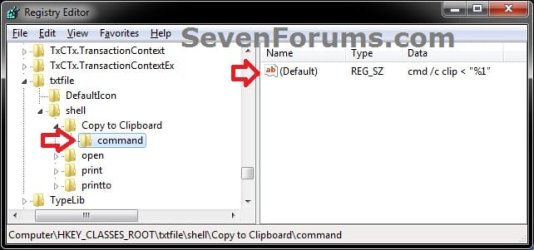
G) In the Edit String box, copy and paste the commmand below, and click/tap on OK. cmd /c clip < "%1" H) Repeat step 3 above for any other file extenstion that you wish to add Copy Content to Clipboard to it's context menu.
I) When finished, go to step 6 below. 5. To REMOVE "Copy Content to Clipboard" from the Context Menu
A) In regedit, navigate to the location below for the file extension that you wish to remove Copy Content to Clipboard from.- HKEY_CLASSES_ROOT\batfile\shell\Copy Content to Clipboard
- HKEY_CLASSES_ROOT\cmdfile\shell\Copy Content to Clipboard
- HKEY_CLASSES_ROOT\CSSfile\shell\Copy Content to Clipboard
- HKEY_CLASSES_ROOT\htmlfile\shell\Copy Content to Clipboard
- HKEY_CLASSES_ROOT\JSFile\shell\Copy Content to Clipboard
- HKEY_CLASSES_ROOT\regfile\shell\Copy Content to Clipboard
- HKEY_CLASSES_ROOT\rtffile\shell\Copy Content to Clipboard
- HKEY_CLASSES_ROOT\txtfile\shell\Copy Content to Clipboard
- HKEY_CLASSES_ROOT\VBSFile\shell\Copy Content to Clipboard
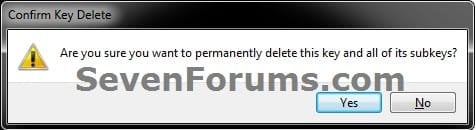
B) In the left pane of regedit, right click on Copy Content to Clipboard, and click/tap on Delete. (see screenshot below) C) Click/tap on Yes to approve deleting the key. (see screenshot below) D) Repeat step 4 above for any other file extenstion that you wish to remove Copy Content to Clipboard from it's context menu.
E) When finished, continue on to step 6. 6. Close Registry Editor. That's it,
Shawn | | | Need more help? Try searching our extensive help and support site.
Loading | |
06 Feb 2011
|
#1 | | |
It's very useful, thanks Shawn.
It'd be nice if you can add the manual way too..
Shawn, can you explain a thing, just for my knowledge? Code: ;For BAT files
[HKEY_CLASSES_ROOT\batfile\shell\Copy to Clipboard]
"Icon"="DxpTaskSync.dll,-52"
[HKEY_CLASSES_ROOT\batfile\shell\Copy to Clipboard\command]
@="cmd /c clip < \"%1\""
;For CMD files
[HKEY_CLASSES_ROOT\cmdfile\shell\Copy to Clipboard]
"Icon"="DxpTaskSync.dll,-52" Here, the registry entries part are same in all cases, so, how're the diff. extentions get sorted?
I mean do these parts ";For BAT files", ";For CMD files" differentiate b/w them?
Last edited by Brink; 06 Feb 2011 at 05:32 PM..
Reason: merged
| My System Specs |
| System Manufacturer/Model Number HCL OS Winbdows 7 ultimate x64 | Ubuntu 12.04 x64 LTS CPU Core 2 Duo e7400 @ 2.90GHz Motherboard Gigabyte G31M-ES2L Memory 3GB DDR2 Graphics Card Asus Nvidia GTX 560Ti 1GB Sound Card On-board Monitor(s) Displays HCL eZeeBee 18.5" LCD Screen Resolution 1366x768 @ 60Hz Keyboard Stock Mouse Stock PSU Corsair CX500 V2 500W Cooling Stock Hard Drives Western Digital 320GB Internet Speed 15-25kBps D/L | 10kBps U/L | Hey Don't laugh |
06 Feb 2011
|
#2 | | |
Hello Ezio,
I'm going to work on a manual part late tonight to be added to help better with this though.
The ;text...... parts are just comments to help tell what each section is for, and serve no other purpose. If you look at each [HKEY_CLASSES_ROOT\batfile...... part after that in each section, you will notice that this is where the difference is. | My System Specs | | Computer type PC/Desktop System Manufacturer/Model Number Self built custom OS 64-bit Windows 7 Ultimate SP1 & Windows 8 Enterprise CPU Intel i7-3930K 3.2 Ghz (O/C 4 Ghz) Motherboard ASRock X79 Extreme11 Memory 32 GB (8GBx4) G.SKILL DDR3 Quad PC3-19200 2400MHz Graphics Card Sapphire HD5870 Eyefinity 6 2GB Sound Card SB Recon 3Di Integrated Chip Monitor(s) Displays 3x 27" Asus VE278Q Screen Resolution 1920x1080 Keyboard Logitech Cordless Desktop MX 5500 Revolution Mouse Logitech Cordless Desktop MX 5500 Revolution PSU OCZ Series Gold OCZZ1000M 1000W Case Thermaltake Level 10 GT Snow Edition Cooling Corsair Hydro H100 Hard Drives 256GB OCZ Vector
160GB OCZ RevoDrive X2
2 x 1TB Samsung HDD HD154UI SATA Internet Speed 50 Mb/s Download and 2 Mb/s Upload Other Info Microsoft LifeCam Cinema
Lite-On iHBS212 12x BD Writer
Samsung CLX-3175FW Printer
Netgear WNDR3800 Router
Motorola SBG6580 Cable Modem
2x APC Back-UPS XS 1500 |
06 Feb 2011
|
#3 | | |
Thanks Shawn. It's clear now. | My System Specs | | System Manufacturer/Model Number HCL OS Winbdows 7 ultimate x64 | Ubuntu 12.04 x64 LTS CPU Core 2 Duo e7400 @ 2.90GHz Motherboard Gigabyte G31M-ES2L Memory 3GB DDR2 Graphics Card Asus Nvidia GTX 560Ti 1GB Sound Card On-board Monitor(s) Displays HCL eZeeBee 18.5" LCD Screen Resolution 1366x768 @ 60Hz Keyboard Stock Mouse Stock PSU Corsair CX500 V2 500W Cooling Stock Hard Drives Western Digital 320GB Internet Speed 15-25kBps D/L | 10kBps U/L | Hey Don't laugh |
07 Feb 2011
|
#4 | | |
You're welcome.
I've added the manual Option Two to the tutorial to help people to easily pick and choose what file extension they would like to have Copy to Clipboard added to or removed from. | My System Specs | | Computer type PC/Desktop System Manufacturer/Model Number Self built custom OS 64-bit Windows 7 Ultimate SP1 & Windows 8 Enterprise CPU Intel i7-3930K 3.2 Ghz (O/C 4 Ghz) Motherboard ASRock X79 Extreme11 Memory 32 GB (8GBx4) G.SKILL DDR3 Quad PC3-19200 2400MHz Graphics Card Sapphire HD5870 Eyefinity 6 2GB Sound Card SB Recon 3Di Integrated Chip Monitor(s) Displays 3x 27" Asus VE278Q Screen Resolution 1920x1080 Keyboard Logitech Cordless Desktop MX 5500 Revolution Mouse Logitech Cordless Desktop MX 5500 Revolution PSU OCZ Series Gold OCZZ1000M 1000W Case Thermaltake Level 10 GT Snow Edition Cooling Corsair Hydro H100 Hard Drives 256GB OCZ Vector
160GB OCZ RevoDrive X2
2 x 1TB Samsung HDD HD154UI SATA Internet Speed 50 Mb/s Download and 2 Mb/s Upload Other Info Microsoft LifeCam Cinema
Lite-On iHBS212 12x BD Writer
Samsung CLX-3175FW Printer
Netgear WNDR3800 Router
Motorola SBG6580 Cable Modem
2x APC Back-UPS XS 1500 |
07 Feb 2011
|
#5 | | |
Good stuff Shawn. Cant rep you..need to spread the love. | My System Specs | | System Manufacturer/Model Number Too many to describe... OS Windows 7 x64 pro/ Windows 7 x86 Pro/ XP SP3 x86 |
07 Feb 2011
|
#6 | | |
Very well, thanks again Shawn. | My System Specs | | System Manufacturer/Model Number HCL OS Winbdows 7 ultimate x64 | Ubuntu 12.04 x64 LTS CPU Core 2 Duo e7400 @ 2.90GHz Motherboard Gigabyte G31M-ES2L Memory 3GB DDR2 Graphics Card Asus Nvidia GTX 560Ti 1GB Sound Card On-board Monitor(s) Displays HCL eZeeBee 18.5" LCD Screen Resolution 1366x768 @ 60Hz Keyboard Stock Mouse Stock PSU Corsair CX500 V2 500W Cooling Stock Hard Drives Western Digital 320GB Internet Speed 15-25kBps D/L | 10kBps U/L | Hey Don't laugh |
07 Feb 2011
|
#7 | | |
You're most welcome guys. Thank you. | My System Specs | | Computer type PC/Desktop System Manufacturer/Model Number Self built custom OS 64-bit Windows 7 Ultimate SP1 & Windows 8 Enterprise CPU Intel i7-3930K 3.2 Ghz (O/C 4 Ghz) Motherboard ASRock X79 Extreme11 Memory 32 GB (8GBx4) G.SKILL DDR3 Quad PC3-19200 2400MHz Graphics Card Sapphire HD5870 Eyefinity 6 2GB Sound Card SB Recon 3Di Integrated Chip Monitor(s) Displays 3x 27" Asus VE278Q Screen Resolution 1920x1080 Keyboard Logitech Cordless Desktop MX 5500 Revolution Mouse Logitech Cordless Desktop MX 5500 Revolution PSU OCZ Series Gold OCZZ1000M 1000W Case Thermaltake Level 10 GT Snow Edition Cooling Corsair Hydro H100 Hard Drives 256GB OCZ Vector
160GB OCZ RevoDrive X2
2 x 1TB Samsung HDD HD154UI SATA Internet Speed 50 Mb/s Download and 2 Mb/s Upload Other Info Microsoft LifeCam Cinema
Lite-On iHBS212 12x BD Writer
Samsung CLX-3175FW Printer
Netgear WNDR3800 Router
Motorola SBG6580 Cable Modem
2x APC Back-UPS XS 1500 |
17 Jul 2011
|
#9 | | |
Hello l3ny, and welcome to Seven Forums.
Those file extensions have been added to the tutorial. | My System Specs | | Computer type PC/Desktop System Manufacturer/Model Number Self built custom OS 64-bit Windows 7 Ultimate SP1 & Windows 8 Enterprise CPU Intel i7-3930K 3.2 Ghz (O/C 4 Ghz) Motherboard ASRock X79 Extreme11 Memory 32 GB (8GBx4) G.SKILL DDR3 Quad PC3-19200 2400MHz Graphics Card Sapphire HD5870 Eyefinity 6 2GB Sound Card SB Recon 3Di Integrated Chip Monitor(s) Displays 3x 27" Asus VE278Q Screen Resolution 1920x1080 Keyboard Logitech Cordless Desktop MX 5500 Revolution Mouse Logitech Cordless Desktop MX 5500 Revolution PSU OCZ Series Gold OCZZ1000M 1000W Case Thermaltake Level 10 GT Snow Edition Cooling Corsair Hydro H100 Hard Drives 256GB OCZ Vector
160GB OCZ RevoDrive X2
2 x 1TB Samsung HDD HD154UI SATA Internet Speed 50 Mb/s Download and 2 Mb/s Upload Other Info Microsoft LifeCam Cinema
Lite-On iHBS212 12x BD Writer
Samsung CLX-3175FW Printer
Netgear WNDR3800 Router
Motorola SBG6580 Cable Modem
2x APC Back-UPS XS 1500 Copy Content to Clipboard - Add to Context Menu problems? All times are GMT -5. The time now is 09:01 AM. | |