
How to Slipstream Windows 7 SP1 and Updates to Create a Bootable USB, Installation DVD, or ISO File
Information
This will show you how to slipstream Windows 7 SP1 with your retail or student copy of Windows 7 without SP1 to create a slipstream Windows 7 SP1 installation "DVD", a slipstream Windows 7 SP1 bootable "ISO file", or a slipstream Windows 7 SP1 bootable installation "USB flash drive".
This will also show you how to integrate Windows Updates into your new or previously created slipstream Windows 7 SP1 to create a new updated slipstream Windows 7 SP1 installation "DVD", a slipstream Windows 7 SP1 bootable "ISO file", or a slipstream Windows 7 SP1 bootable installation "USB flash drive".
This will also show you how to integrate Windows Updates into your new or previously created slipstream Windows 7 SP1 to create a new updated slipstream Windows 7 SP1 installation "DVD", a slipstream Windows 7 SP1 bootable "ISO file", or a slipstream Windows 7 SP1 bootable installation "USB flash drive".
Warning
- You can only do this tutorial while logged in as an administrator.
- You can only use a retail copy or student copy of a Windows 7 installation DVD, bootable USB flash drive, or ISO file to create a slipstream Windows 7 SP1 with.
- You can only use a previously created slipstream Windows 7 SP1 installation DVD, bootable USB flash drive, or ISO file using this tutorial to integrate new Windows Updates to create a new updated slipstream Windows 7 SP1 installation DVD, bootable USB flash drive, or ISO file with.
- You can only create a 64-bit slipstreamed Windows 7 SP1 DVD or ISO if your current Windows 7 installation is also 64-bit.
- You can create a 32-bit slipstreamed Windows 7 SP1 DVD or ISO if your current Windows 7 installation is 32-bit or 64-bit.
- When you install Windows 7 SP1 using the slipstreamed Windows 7 SP1 DVD/ISO/USB created in this tutorial, you will not be able to uninstall SP1.
Tip
- You cannot use a slipstream Windows 7 installation disc to do a repair install with on a currently installed Windows 7 SP1.
- You cannot use a slipstream Windows 7 installation disc to do a repair install with on a currently installed slipstream Windows 7 SP1.
- You can use a Windows 7 with SP1 installation disc (ex: Technet, MSDN, or retail) to do a repair install with on a current slipstream Windows 7 SP1 installation.
Note
This tutorial is designed to be followed like a flow chart to help make it easier to use and select the options (ex: DVD or ISO) you want.
Here's How: 1. If you have not already, then you will need download and install the free 32-bit (x86) or 64-bit (x64)
Note

Warning
At the rt7lite.com site, you will need to scroll down a bit past the RC 1.7.0 build to see the Beta 2.6.0 build download links.
This tutorial will not work using the RC 1.7.0 build.
This tutorial will not work using the RC 1.7.0 build.
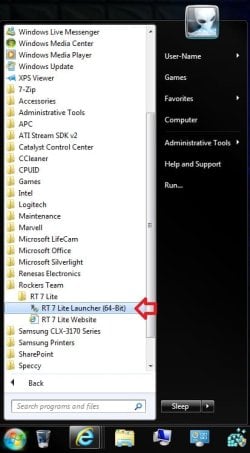
2. Click on the RT Seven Lite shortcut on your desktop or in the Start Menu to run the program. (see screenshot below)
3. Do either step 4 or 5 for what you have to use to integrate the Windows 7 SP1 and/or Windows Updates into.
4. To Select and Use a Windows 7 Installation DVD or Bootable USB A) Insert your retail or previously slipstreamed Windows 7 installation DVD into the DVD drive and close it, OR plug in your Windows 7 bootable USB flash drive. If a AutoPlay pop-up opens, close it.
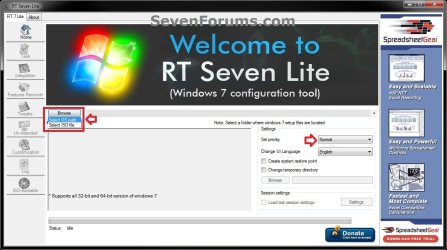
B) In RT Seven Lite, click on the Browse button, and select the Select OS path option. (see screenshot below)
NOTE: If you do not have much else running, then you may wish to change the Set priority setting to High first to help speed the slipstreaming process up some.
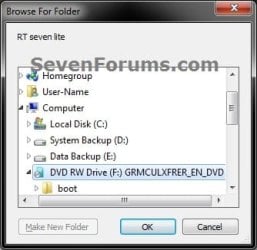
C) Navigate to and select your DVD drive or bootable USB flash drive with Windows 7 on it from steps 4A, and click on OK. (see screeshow below)
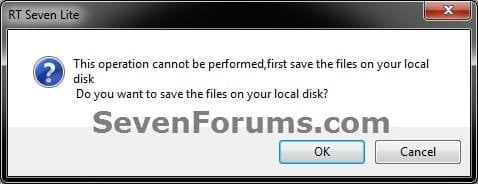
D) Click on OK. (see screenshot below)
E) Select your Desktop, and click on the Make New Folder button. (see screenshot below)
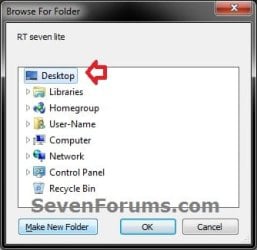
F) Select the New folder on the desktop, and click on OK. (see screenshot below)
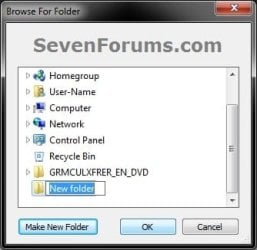
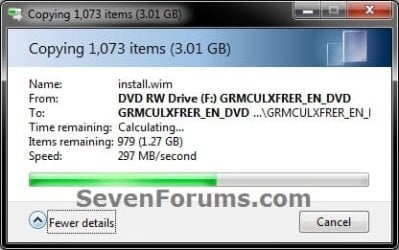
G) The contents of the Windows 7 installation DVD from steps 4A and 4C will now be copied into the New folder (step 4F) on the desktop. (see screenshot below)
NOTE: This may take a few minutes to complete.
H) Go to step 6.
5. To Select and Use a Windows 7 ISO File
Note
You could use a Windows 7 ISO file that you already created from say RT Seven Lite, or a Windows 7 w/SP1 U ISO downloaded from: Microsoft: Windows 7 Direct Download Links
NOTE: If you do not have much else running, then you may wish to change the Set priority setting to High first to help speed the slipstreaming process up some.

B) Click on the Select a ISO button. (see screenshot below)
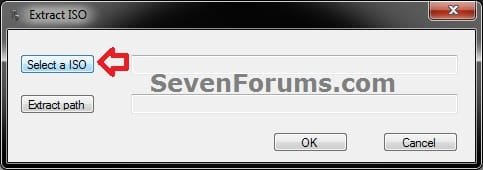
C) Navigate to and select the Windows 7 ISO file, and click on Open. (see screenshot below)
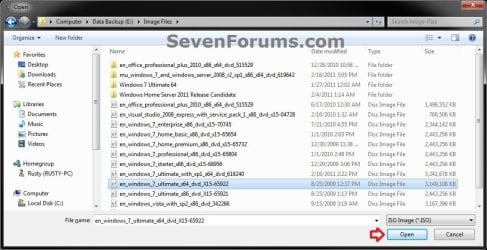
D) Select the Extract path button. (see screenshot below)

E) Select your Desktop, and click on the Make New Folder button. (see screenshot below)

F) Select the New folder on the desktop, and click on OK. (see screenshot below)
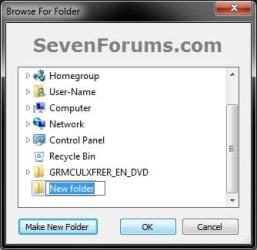
G) Click on OK. (see screenshot below)
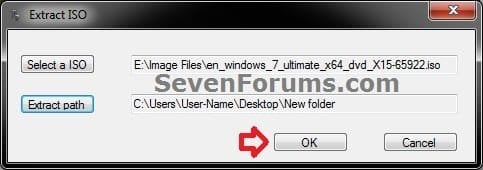
H) The contents of the Windows 7 ISO file from step 5C will now be extracted and copied into the New folder (step 5F) on the desktop. (see screenshot below)
NOTE: This may take only a few minutes to complete.
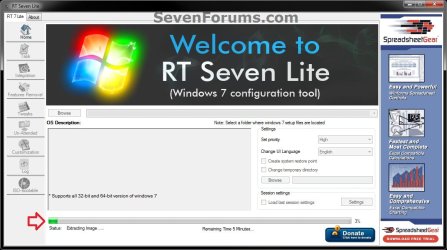
I) Continue on to step 6.
6. Do either step 7 or 8 below for what you want to do.
7. To Only Integrate New Windows Updates
NOTE: You would only select this option if used a previously created slipstream Windows 7 SP1 installation DVD, bootable USB flash drive, or ISO file using this tutorial in step 4 or 5 above, and only want to update it by integrating new Windows Updates. A) When finished, select (dot) the Windows 7 edition that you want to create a updated SP1 slipstream version of, and click on OK. (see screenshot below)
NOTE: When this window below opens it likes to hide behind another opened active window, so you may need to check behind them when the screenshot above (step 5H) shows it's "Status" as Loading Image.... and does not appear to be doing anything.
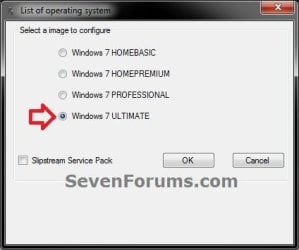
B) Go to step 9.
8. To Slipstream SP1 and to be able to Integrate Windows Updates
NOTE: You would select this option if you used a retail copy or student copy of a Windows 7 installation DVD, bootable USB flash drive, or ISO file that did not have SP1 slipstreamed in it in step 4 or 5 above. A) If you have not already, then you will need to download the same 32-bit (x86) or 64-bit (x64) Windows 7 SP1 EXE installation file for your same 32-bit or 64-bit Windows 7 installation DVD or ISO file at the Microsoft link below, and save it to your Desktop. Download details: Windows 7 and Windows Server 2008 R2 Service Pack 1 (KB976932)
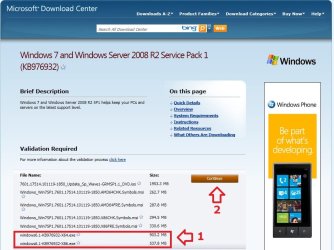
B) Right click on the downloaded windows6.1-KB976932-X64.exe or windows6.1-KB976932-X86.exe file, click on Properties, click on the General tab, and click on Unblock.
NOTE: If you do not have a Unblock button under the General tab, then the SP1 exe file is already unblocked and you can continue on to step 8C.
C) When RT Seven Lite is finished from step 4G or 5H, select (dot) only the one Windows 7 edition that you want to create a slipstream SP1 version of, check the Slipstream Service Pack box, and click on OK. (see screenshot below)
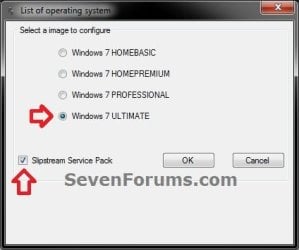
D) Click on the Browse button. (see screenshot below)
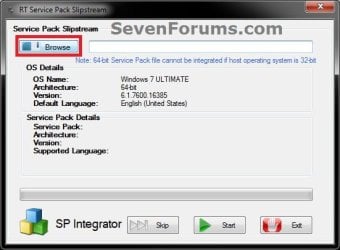
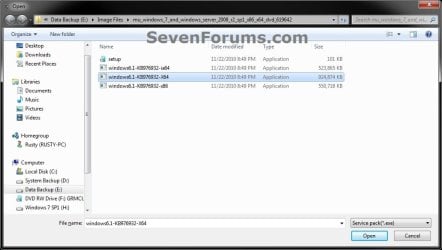
E) Navigate to and select the Windows 7 SP1 EXE installation file on your desktop from step 1, and click on Open. (see screenshot below)
F) Click on the Start button. (see screenshot below)
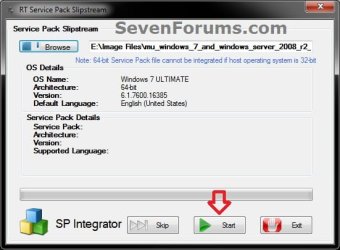
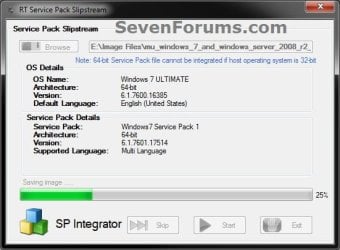
G) RT Seven Lite will now start preparing, integrating, and saving the SP1 (step 9) with the DVD (step 4) or ISO file (step 5). (see screenshots below)
NOTE: This will take a good while to complete depending on how fast your system is and what you have the priority level set as in step 4B.


H) When finished, click on the Proceed button. (see screenshot below)

I) RT Seven Lite will now start start loading the image. (see screenshot below)
NOTE: This will take a few minutes to complete.
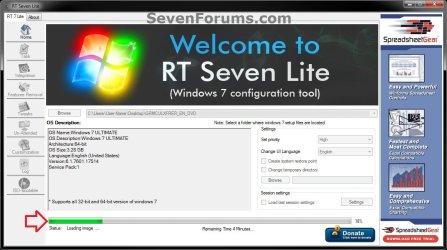
J) Continue on to step 9.
9. When finished, click on the Task tab in the left pane. (see screenshot below)

10. Do either step 11 or 12 below for what you want to do.
11. To Only Slipstream SP1
NOTE: You would do this step if you did step 8 above and do not want to integrate any Windows Updates into the Slipstream Windows 7 SP1 installation DVD, bootable USB flash drive, or ISO file. A) In the Task tab, check the ISO Bootable box option, then click on the ISO-Bootable tab in the left pane. (see screenshot below)
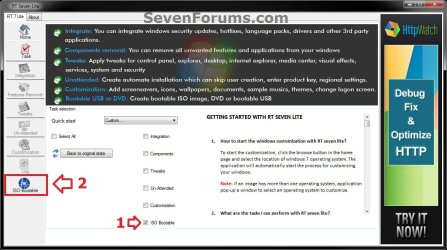
B) Go to step 12F.
12. To Integrate Windows Updates and still be able to Slipstream SP1 (if not already)
NOTE: You would do this step if you did step 7 above and want to integrate Windows Updates into this new or previously created Slipstream Windows 7 SP1 installation DVD, bootable USB flash drive, or ISO file. A) If you have not already, then you will need to download the standalone MSU installation files for each Windows Update that you want to integrate into the slipstream, and save them to your Desktop.
B) In the Task tab in RT Seven Lite, check the Integration box and ISO Bootable box options, then click on the Integration tab in the left pane. (see screenshot below)
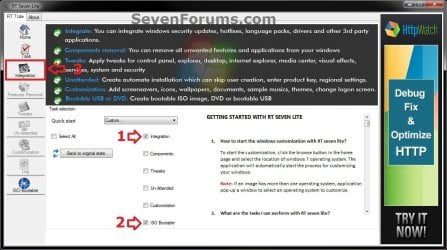
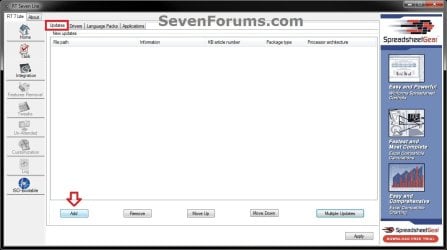
C) Under the Updates tab, click on the Add button. (see screenshot below)
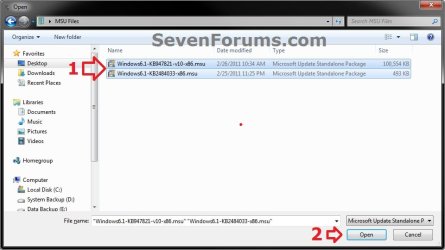
D) Navigate to and select all of the Windows Update MSU files that you want to integrate, and click on Open. (see screenshot below)
NOTE: You can press and hold the CTRL key to select more than one random MSU file.
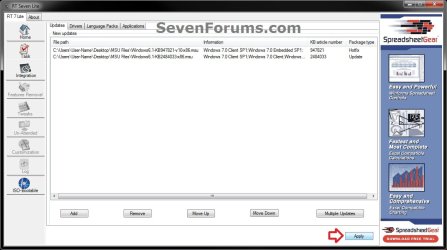
E) When finished adding MSU files, click on Apply. (see screenshot below)
F) Do either step 12G or 12H for what type of Slipstream Windows 7 SP1 you want.
G) To Create a Single Windows 7 SP1 Edition Slipstream
NOTE: This will create a Slipstream Windows 7 SP1 with only the one Windows 7 edition that you selected in step 7A or 8C.
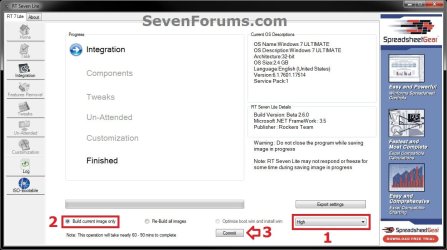
- Select High priority level, select (dot) Build current image only, and click on Commit. (see screenshot below)
- Go to step 12I
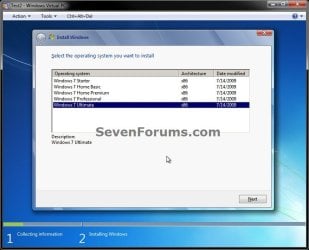
NOTE: This will create a Slipstream Windows 7 SP1 with all Windows 7 editions that will allow you to select which one to install during installation. (see screenshot below)
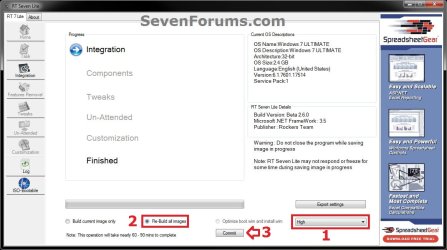
- Select High priority level, select (dot) Re-build all images, and click on Commit. (see screenshot below)
- Continue on to step 12I
NOTE: This may take from a few minutes or longer depending on how many Windows Update MSU files you added.

J) When finished, click on the ISO-Bootable tab in the left pane. (see screenshot below)

K) Continue on to step 13.
13. Do either step 14, 15, or 16 for what you would like to have your Slipstreamed Windows 7 SP1 as.
14. To Burn a Slipstream Windows 7 SP1 Installation DVD A) Insert a blank DVD (ex: DVD-R) into the DVD drive and close it. If a AutoPlay pop-up opens, close it.
B) In RT Seven Lite, select the Direct Burn drop down menu option under Mode, select the drive letter used from step 14A under Device, then click on the Direct Burn button towards the bottom right. (see screenshot below)

C) RT Seven Lite will now start creating the image. (see screenshot below)
NOTE: This will take a few minutes to complete.
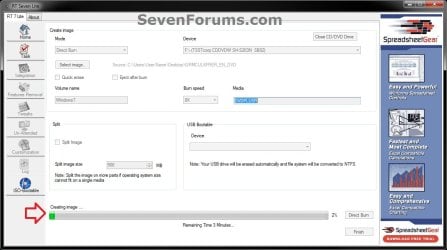
D) When finished, click on OK. If a AutoPlay pop-up opens, close it. (see screenshots below)
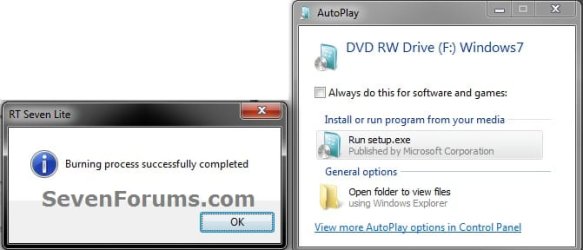
E) You now have a slipstream Windows 7 SP1 installation DVD.
F) Go to step 17.
15. To Create a Slipstream Windows 7 SP1 ISO File A) In RT Seven Lite, select the Create Image drop down menu option under Mode, then click on the Make ISO button towards the bottom right. (see screenshot below)

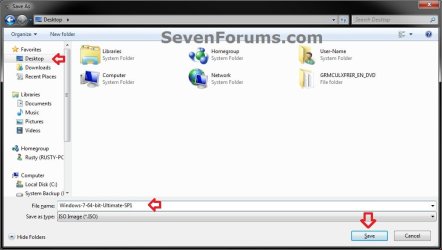
B) Navigate to and select your Desktop, type in a name that you want for the ISO file, then click on the Save button. (see screenshot below)
C) When finished, click on OK. (see screenshot below)

D) You now have a slipstream Windows 7 SP1 bootable ISO file.
Note
- You could also use this ISO file to burn and create a Slipstream Windows 7 SP1 installation DVD with.
- You could also use this ISO file to create a Slipstream Windows 7 SP1 bootable installation USB flash drive with. For how, see part 2 here: Windows 7 USB/DVD Download Tool
- You could also test or use this ISO file in a virtual machine if you like.
E) Go to step 17.
16. To Create a Slipstream Windows 7 SP1 Bootable Installation USB Flash Drive A) If you have not already, plug in your USB flash drive.
NOTE: You will need to have at least 4.5 GB free on the USB flash drive.
B) In RT Seven Lite, select the USB Bootable drop down menu option under Mode. (see screenshot below)
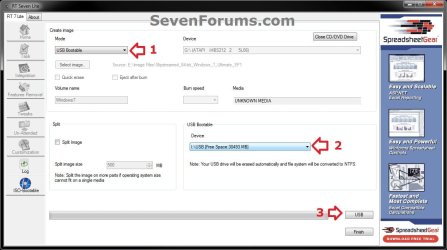
C) Select your USB flash drive from the drop down menu under USB Bootable. (see screenshot above)
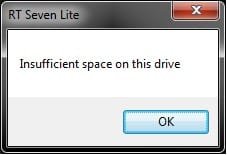
NOTE: If there is not enough free space on the selected USB flash drive, you will get a notice telling you so. You will then need to select a larger USB flash drive. (see screenshot below)
D) Click on the USB button towards the bottom right. (see screenshot below step 16B)
E) Click on OK to format the USB flash drive. (see screenshot below)
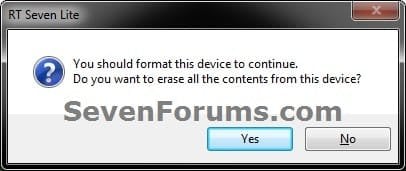
F) RT Seven Lite will now start formating the USB flash drive and copying the files to it. (see screenshot below)
NOTE: This will take a few minutes to complete.

G) When it's finished, click on OK. (see screenshot below)
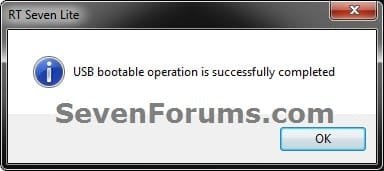
H) You now have a slipstream Windows 7 SP1 bootable installation USB flash drive.
I) Continue on to step 17.
17. Close RT Seven Lite.
18. Click on Yes to confirm closing RT Seven Lite. (see screenshot below)
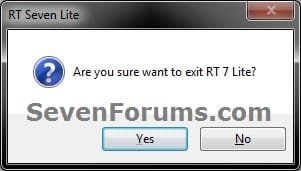
19. RT Seven Lite will now clean up it's temp files before closing. (see screenshot below)
:warn:WARNING: Do not stop or interrupt RT Seven Lite from cleaning it's temp files to avoid getting this error here the next time you try and run RT Seven Lite.

20. You can now delete the New folder from step 4E or 5E and it's contents on the desktop if you like.
Tip
You can keep your newly created slipstream Windows 7 SP1 installation DVD, bootable USB flash drive, or ISO file updated by doing this tutorial again with steps 7 and 12 to integrate any new Windows Updates released afterwards into it.
When you install Windows 7 SP1 using the slipstream Windows 7 SP1 DVD/ISO/USB created in this tutorial, you will be able to use the Windows 7 SP1 Disk Cleanup Tool (OPTION THREE at link) to delete the SP1 backup files.
When you install Windows 7 SP1 using the slipstream Windows 7 SP1 DVD/ISO/USB created in this tutorial, you will be able to use the Windows 7 SP1 Disk Cleanup Tool (OPTION THREE at link) to delete the SP1 backup files.
That's it,
Shawn
Related Tutorials
- How Use the Windows 7 SP1 Disk Cleanup Tool to Recover Lost Disk Space
- How to Uninstall Windows 7 Service Pack 1 (SP1) Beta, RC, and RTM
- How to Create a Windows 7 Installation USB Key
- How to Create a Windows 7 Universal Installation Disc
- How to Create a Windows PE Disk
- How to Create a Windows 7 System Repair Disc
- How to Burn a "ISO" or "IMG" Disc Image file to a CD/DVD in Windows 7 and Windows 8
- How to make Windows Boot Manager Boot an ISO from your Hard Drive
- How to Create a Virtual Machine in Windows Virtual PC
- How to Do a Upgrade Installation with Windows 7
- How to Do a Clean Installation with Windows 7
- How to Do a Custom Installation of Windows 7
- How to Download the Standalone MSU Installer File of a Windows Update
- Windows 7 Service Pack 1 FAQs and helpful links
- How to Extract an ISO File to the Desktop
- How to Slipstream Office 2010 with Service Pack 1 (SP1)
Attachments


Last edited:


